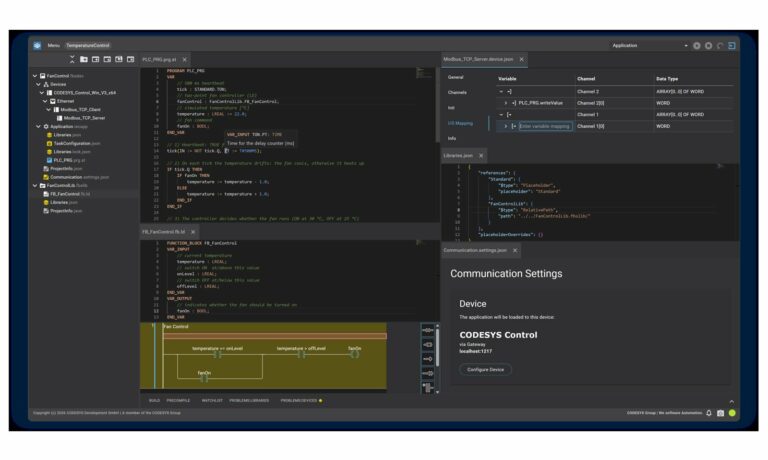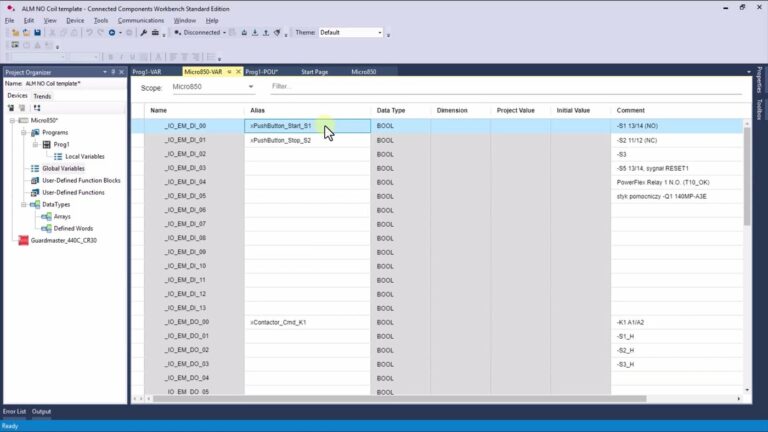
FactoryTalk Design Workbench is Rockwell Automation's new free programming environment for Micro800 controllers, and since its launch in October 2025 it has forced a decision on everyone who has been living in Connected Components Workbench. The question sounds simple: switch, or stay? The honest answer is that your hardware decides for you more often than your preferences do. Here is the full comparison, plus four concrete scenarios that tell you which tool belongs on your laptop.

Allen-Bradley hardware used in our materials (Micro800 controllers, HMI panels and accessories) is supplied by our technology partner Elmark Automatyka, an authorized Rockwell Automation distributor.
Connected Components Workbench: where it hurts today
Connected Components Workbench was the only way into the Micro800 family for more than a decade. The free Standard edition covered simple applications, while the paid Developer edition added simulation and stronger code protection. The trouble is that the tool aged in several places at once.
- Install footprint. The installer is roughly 6 GB, and a full install can take the better part of an hour.
- Performance. Opening a project, copying rungs, uploading and downloading a program, all of it drags noticeably once the application grows.
- Unfamiliar interface. CCW is built on the Visual Studio shell, so it looks and behaves nothing like Studio 5000 Logix Designer. An engineer moving from CompactLogix to Micro850 starts by learning a new window layout instead of writing logic.
- Weight of scope. The software covers controllers, panels and drives in one package, so every change has to drag that whole footprint along.
FactoryTalk Design Workbench: what actually changed
Rockwell did not patch CCW. It wrote a new tool from scratch and released it on 28 October 2025. FactoryTalk Design Workbench is completely free, with no Standard and Developer split, so every feature that exists in the product is available to you on day one.
- Installer under 1 GB instead of six, which is a real difference when you are setting up a service laptop in the field.
- Up to 70% faster according to the vendor, for opening projects, copy and paste operations, and program transfer to the controller.
- Interface aligned with Studio 5000 Logix Designer, the same project tree layout, the same editor and variable table organisation.
- Online editing with Run Mode Change (RMC), so you can modify logic without stopping the machine.
- Multi-device support in a single project, which is convenient on machines with several controllers.
- Three programming languages: Ladder Diagram (LD), Structured Text (ST) and Function Block Diagram (FBD).
System requirements are modest: an Intel Core i5 class processor, 8 GB of RAM, 20 GB of free disk space, Windows 10 or 11.
FactoryTalk Design Workbench vs Connected Components Workbench: the table
| Criterion | Connected Components Workbench | FactoryTalk Design Workbench |
|---|---|---|
| Licensing | free Standard, paid Developer | completely free, no editions |
| Installer size | about 6 GB | under 1 GB |
| Performance | slower project operations | up to 70% faster per vendor |
| Interface | Visual Studio shell, its own logic | aligned with Studio 5000 Logix Designer |
| Controllers | full Micro800 family, LC series included | Micro810 plus Lx0E models (Micro820, Micro850, Micro870) |
| HMI panels | full PanelView 800 editor | none, and none planned |
| Drives | PowerFlex parameter configuration | Class 1 connectivity to PowerFlex 520 and Kinetix 5100 |
| Simulation | available in Developer edition | not in version 1, announced for version 2 |
| Online editing | limited | Run Mode Change |
| Languages | LD, ST, FBD | LD, ST, FBD |
Supported hardware is the first decision point
This is the section that settles the argument far more often than performance or window layout.
FactoryTalk Design Workbench supports Micro810 and controllers with an "E" in the catalog number only, meaning Micro820, Micro850 and Micro870 in their Lx0E variants. The E stands for Ethernet. Older LC series controllers, including the very common 2080-LC50, are out of scope and stay in CCW.
It is worth remembering that Rockwell discontinued the 2080-LC30 at the end of 2023 and the 2080-LC50 in July 2023, naming the 2080-L50E models as the replacement. In other words, anything you buy today already lands on the list FTDW supports, while CCW becomes the maintenance tool for the installed base. If you are starting a new application, check the controller catalog number first and choose the software second. For more on the controller itself see Allen-Bradley Micro850 2080-L50E: Build and Capabilities Step by Step, and for the wider family see Allen-Bradley Controllers: CompactLogix, ControlLogix, Micro800.
HMI: PanelView 800 stays in CCW
FactoryTalk Design Workbench has no HMI application editor, and it will not get one in future releases. The reason is straightforward: PanelView 800 is being phased out. The panel moved to Active Mature status on 31 January 2026, shipments are planned through May 2028, and the migration path leads to OptixPanel Compact with FactoryTalk Optix.
The practical takeaway for a machine builder: if there is a PanelView 800 in the cabinet, CCW stays on your disk no matter where you write the controller logic. If you are still choosing a panel, there is little point in starting a new project on PanelView 800.
PowerFlex drives: two very different levels of support
This one is easy to get wrong, because both tools "support" PowerFlex, just not in the same sense.
FactoryTalk Design Workbench provides Class 1 connectivity to PowerFlex 520 series drives and Kinetix 5100 servo drives, meaning cyclic data exchange over EtherNet/IP. What it does not provide is full drive parameter configuration from inside the project, the way the CCW wizards do it. To parameterise a PowerFlex 525 you still need Connected Components Workbench, or the keypad on the drive itself.
What version 1 is still missing
Version 1.01 is deliberately narrow in scope. Several features that CCW has had for years are simply not there yet:
- variable trending charts,
- a program simulator that runs without a physical controller,
- the variable watch list (spy list),
- intellectual property protection for your program,
- configuration of devices beyond the supported controllers and drives.
Rockwell has announced version 2 for the fourth quarter of 2026, with application simulation at the top of the list, and has committed to annual releases. Until then, treat FTDW as an environment for writing and commissioning logic rather than as a drop-in replacement for the whole CCW package.
Migrating existing projects
FactoryTalk Design Workbench imports Micro800 projects from Connected Components Workbench versions 22 and 23, with minimal conversion risk according to the vendor. In practice, a few rules keep the migration boring, which is exactly what you want:
- Upgrade the project inside CCW to version 22 or 23 before you import anything.
- Keep a copy of the source project, because the import is a one way operation.
- After the import, compare the variable tables and the plug-in and expansion module configuration, which is where discrepancies usually show up.
- Leave the HMI application in CCW, only the controller program moves across.
- Verify the logic online on a real controller rather than by reading the editor, because version 1 has no simulator.
Which one to use: four scenarios
- New machine on a Micro850 2080-L50E with no HMI. Use FactoryTalk Design Workbench. You will be up and running faster, and the Studio 5000 style interface shortens the learning curve for the team.
- Maintaining an older base of 2080-LC30 or 2080-LC50 controllers. Stay with CCW, the new tool does not see those controllers at all.
- Lx0E controller with a PanelView 800 panel. Run both tools side by side: logic in FTDW, panel application in CCW.
- Training and learning. Learn FTDW, because that is where the development effort goes, but keep the CCW basics in your toolkit, since plenty of installed machines were programmed there. Our walkthrough of PLC system variables and the first scan bit in CCW is a good place to start.
How we handled it on our own training stand
When we built our Micro850 training stand we picked the 2080-L50E-48QBB precisely because it sits on the list FactoryTalk Design Workbench supports. Around it there is a PowerFlex 525 drive and a 440C-CR30 safety relay, a set that mirrors a typical small machine. We deliberately left out the PanelView 800, given that the product is being phased out. The build is described in The ControlByte PLC Trainer: a Hands-On Allen-Bradley Micro800 Training Stand.
Frequently asked questions
Is FactoryTalk Design Workbench free?
Yes, entirely, and there are no editions. There is no equivalent of the paid Developer edition known from Connected Components Workbench.
Will FactoryTalk Design Workbench replace Connected Components Workbench?
Not in version 1. CCW is still required for LC series controllers, PanelView 800 applications, PowerFlex parameter configuration and simulation. Rockwell has not announced an end of life date for CCW.
Which controllers does FactoryTalk Design Workbench support?
Micro810 plus the Ethernet models: Micro820, Micro850 and Micro870 in their Lx0E variants. Future releases are expected to widen that list.
Can I import a project from CCW?
Yes, for Micro800 projects from CCW versions 22 and 23. Older projects have to be upgraded to one of those versions inside CCW first.
Can I program a PanelView 800 in FactoryTalk Design Workbench?
No, and the feature is not planned. The panel is being phased out, so PanelView 800 applications are built in CCW, and new designs should consider OptixPanel Compact instead.
Can both environments be installed at the same time?
Yes, the installations are independent, and in many plants they will run side by side for years.
Wrap-up
FactoryTalk Design Workbench wins wherever speed of work and consistency with Studio 5000 matter: a lighter installer, faster operations, a familiar interface, online editing with RMC, and no licence cost at all. Connected Components Workbench wins on coverage, because it still handles older controllers, PanelView 800 panels, drive parameterisation and simulation. The decision comes down to your controller catalog number and whether the project includes an HMI panel. New "E" hardware without a panel is an easy call in favour of FTDW, and everything else means running both tools at least until version 2 lands at the end of 2026.
Full specifications and installation files are on the vendor's FactoryTalk Design Workbench product page.