In Siemens S7-1200 and S7-1500 PLCs, counters play a crucial role. They enable counting of events, pulses, and operations in control programs, making them essential for product counting, cycle tracking, batching, and position monitoring.
This article describes the three main types of counters used in TIA Portal: CTU (Count Up), CTD (Count Down), and CTUD (Count Up/Down).
All examples refer to S7-1200 and S7-1500 PLCs, although the counter logic remains identical for both families.
General Structure and Parameters of Counters
Counters in TIA Portal are implemented as IEC_COUNTER structures, which are stored inside data blocks (DBs).
Each counter instance creates its own DB, allowing counters to operate independently.

The CTU, CTD, and CTUD instructions share a common set of parameters. The data type of PV and CV is selected when the instruction is inserted - most commonly Int, but DInt, UInt, UDInt, SInt, USInt, LInt, or ULInt can be used depending on the expected count range.
- CU - Count Up input (Bool). A rising edge (0→1) at CU increments the current value CV by 1. Available in CTU and CTUD.
- CD - Count Down input (Bool). A rising edge (0→1) at CD decrements CV by 1. Available in CTD and CTUD.
- R - Reset input (Bool). A signal of 1 resets CV to 0 and clears the output Q. Available in CTU and CTUD. R has the highest priority - while R = 1, counting is blocked.
- LD - Load input (Bool). A signal of 1 loads the preset value PV into CV. Available in CTD and CTUD. Used to preload the counter to a starting value before a countdown.
- PV - Preset Value. Defines the target value the counter compares CV against. For CTU, Q switches to 1 when CV ≥ PV. For CTD, PV is the starting value loaded by LD.
- Q - Logical output (Bool), used in CTU and CTD. Indicates whether the counting target has been reached. Can be used in further logic or for visualization purposes.
- QU - Up counter status (Bool), available only in CTUD. QU = 1 when CV ≥ PV.
- QD - Down counter status (Bool), available only in CTUD. QD = 1 when CV ≤ 0.
- CV - Current Value. Shows the actual count. Can be read in program logic, archived, or displayed on HMI.
⚙️ Each IEC_COUNTER structure should be assigned to only one counter instruction to avoid unwanted interactions between CU, CD, R, and LD signals.
When programming in LAD, counter instructions should be placed at the end of the network, and it is recommended to use tag outputs (Q, QU, QD, CV) instead of directly accessing DB variables. Remember that CU and CD react to rising edges only - if you need to count a continuous level, combine the counter with an edge detector (see our guide on R_TRIG and F_TRIG edge detection).
How the CTU Counter in TIA Portal Works - Count Up
Principle of Operation
CTU is the most commonly used counter in PLC programming. The current value CV is incremented by 1 on every rising edge of the input signal CU (transition from 0 to 1).
CV keeps increasing with each rising edge until it reaches the upper limit of its data type (for Int, this is 32 767). Once CV ≥ PV, output Q switches to 1. Q remains at 1 as long as CV is greater than or equal to PV, regardless of whether CU keeps pulsing.
If R is set to 1, CV is immediately reset to 0 and Q goes low. While R = 1, the counter ignores rising edges on CU - reset has absolute priority.


Typical Applications
Count-up counting is useful when you need to track the number of events or completed operations, for example:
- Counting products on a conveyor line
- Counting machine cycles completed
- Tracking operations until scheduled maintenance (e.g. every 10 000 cycles)
- Counting rejected parts or alarms over a shift
- Triggering an action after a defined number of events (bundling, packaging)
How the CTD Counter in TIA Portal Works - Count Down
Principle of Operation
The CTD counter works opposite to CTU. Before counting starts, the preset value PV is loaded into CV using input LD - a signal of 1 at LD copies PV into CV in a single scan.
After loading, each rising edge at input CD decrements CV by 1. When CV reaches 0 or goes below, output Q switches to 1. Q stays at 1 as long as CV ≤ 0.
Unlike CTU, the CTD counter has no reset input. To restart a countdown, simply pulse LD = 1 again - this reloads PV into CV and clears Q.


Typical Applications
The CTD counter is used when a process has to run for a defined number of steps and then signal completion, such as:
- Counting down the remaining parts in a production batch
- Decrementing a ticket or token pool
- Countdown to an alarm or maintenance notification
- Step-by-step machine sequences where each step decrements the remaining count
- Dispensing a preset number of items and stopping automatically
How the CTUD Counter in TIA Portal Works - Count Up/Down
Principle of Operation
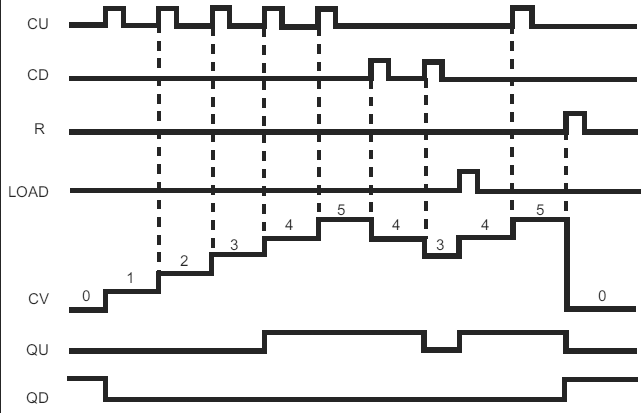
The CTUD counter combines the behavior of CTU and CTD in a single instruction. CV is incremented on a rising edge at CU, decremented on a rising edge at CD, reset to 0 when R = 1, and loaded with PV when LD = 1.
CTUD exposes two independent status outputs:
- QU = 1 when CV ≥ PV (up limit reached)
- QD = 1 when CV ≤ 0 (down limit reached)
Priority between inputs is fixed: R has the highest priority, followed by LD, then the count inputs. If both CU and CD get a rising edge in the same scan, CV remains unchanged.

Typical Applications
CTUD counters are ideal wherever you need bidirectional counting - tracking a quantity that can both grow and shrink - for example:
- Inventory or buffer tracking (parts in, parts out)
- Position counting on linear and rotary axes
- Parking lot or warehouse occupancy monitoring
- Counting items between two stations in a production line
- People counting at entry/exit points
Typical Problems and Best Practices
When implementing counters in TIA Portal, a few practical issues come up often:
- Missing edges - CU and CD count only rising edges. If the driving signal is noisy or bouncy, use a debounce filter or an edge detector (R_TRIG) before the counter input.
- Overflow on Int counters - the default
Intrange is −32 768…32 767. For high-speed or long-running counters, switch PV/CV toDIntorUDInt. - Counter not resetting - check if R is truly transitioning to 1. Reset has priority, but if R stays at 0 due to logic errors, the counter will keep counting.
- Shared DB between instances - never point two counter calls to the same instance DB. Each counter needs its own IEC_COUNTER instance.
- Retentivity after restart - by default, CV is not retained after a power cycle. If you need the count to survive restarts (e.g. total operating cycles), mark the DB variables as retentive in the DB properties.
Summary
Counters in Siemens PLCs are essential tools for event-based logic.
Understanding the behavior of CTU, CTD, and CTUD allows you to build reliable product counting, batching, position tracking, and inventory monitoring in TIA Portal. Combined with timers (see our guide on Timers in TIA Portal) and edge detectors, counters form the core of almost every industrial sequence.
FAQ
What is the difference between CTU, CTD, and CTUD in TIA Portal?
CTU counts up on each rising edge of CU. CTD counts down from a preset value loaded via LD, on each rising edge of CD. CTUD combines both - it can count up, count down, reset, and load PV in a single instruction, with two outputs QU and QD.
Do counters in TIA Portal count levels or edges?
Counters in TIA Portal react to rising edges only at CU and CD inputs. A steady 1 at the input will not increment or decrement the counter - only a 0→1 transition does.
What is the IEC_COUNTER data block?
IEC_COUNTER is the instance structure that stores a counter's internal state (CV, Q, QU, QD, status bits). Every CTU, CTD, or CTUD call requires its own IEC_COUNTER instance DB so that counters do not interfere with each other.
What data types can I use for PV and CV?
TIA Portal supports Int, DInt, UInt, UDInt, SInt, USInt, LInt, and ULInt for PV and CV. Choose the type based on the expected count range - Int is fine for typical applications, DInt or UDInt for high-speed or long-running counters.
How do I reset a CTD counter without a reset input?
CTD has no R input. To "reset" it, pulse LD = 1, which reloads PV into CV and drives Q back to 0. This effectively starts a new countdown from the preset value.
If you want to learn more about PLC programming and counters in TIA Portal, check out our Premium Siemens S7-1200/1500 Programming course with certificate and teacher's support.
Author