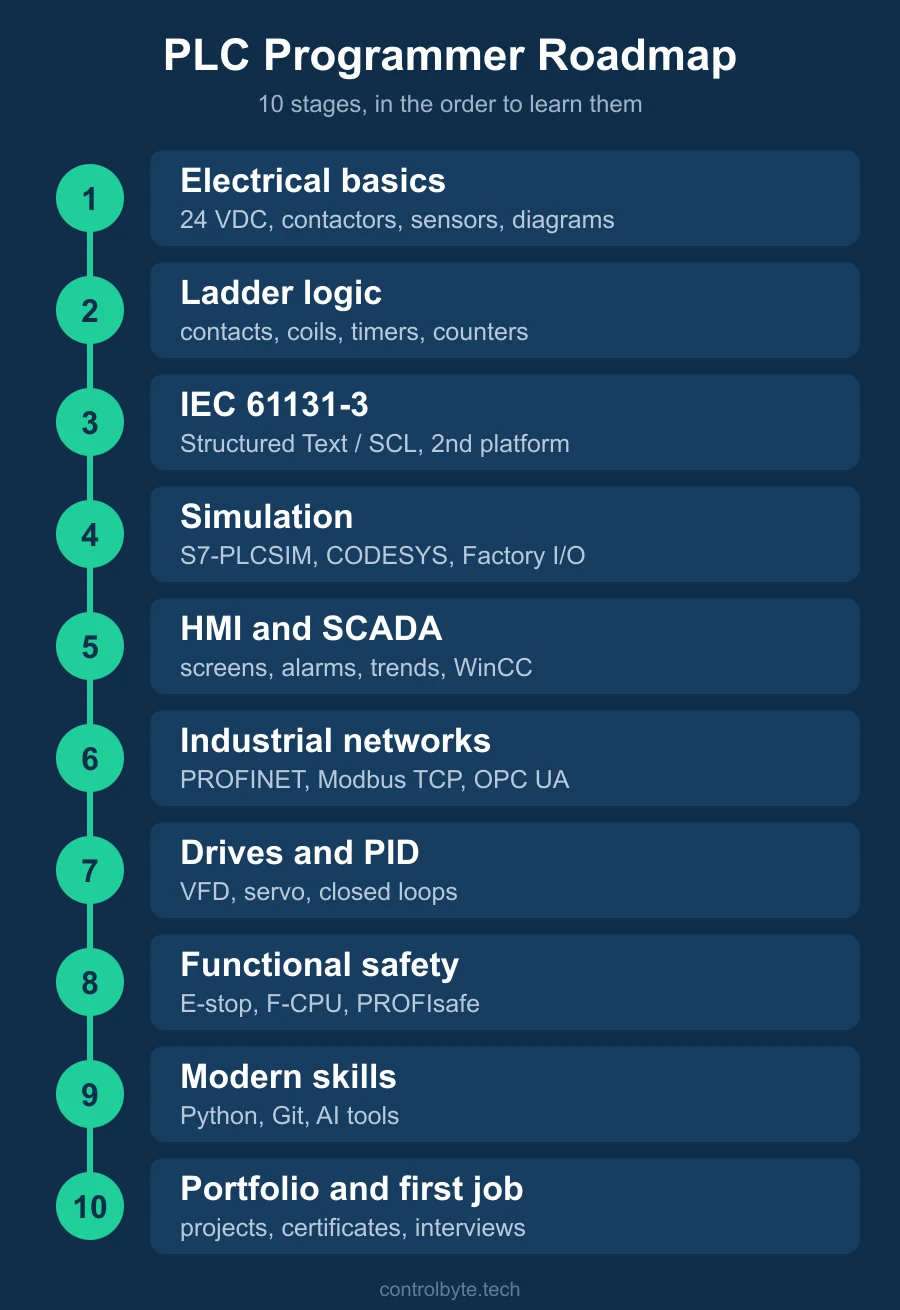
Most people who want to get into PLC programming do not fail for lack of effort. They fail because they learn things in the wrong order: a bit of ladder logic, a YouTube video about SCADA, a forum thread about which brand is best, and no clear next step. This PLC programmer roadmap puts the skills in the order we use when we train automation engineers, from the first 24 VDC circuit to the first job offer.
It is a plc learning roadmap, not a promise of a shortcut. Each stage ends with something you can actually do, so you always know whether you are ready to move on.
Stage 1: Electrical basics and field devices
Every PLC sits in a control system made of wires, contactors and sensors. Before you write a single rung you should be able to read an electrical diagram and follow a signal from the field device to the input card and from the output card to the actuator.
What to learn at this stage:
- 24 VDC control circuits, fuses, terminals and the difference between a control circuit and a power circuit
- contactors, relays and the classic seal-in (start/stop) circuit, which you will later rebuild in software as a latch
- digital sensors: pushbuttons, limit switches, inductive and photoelectric sensors, PNP versus NPN wiring
- analog signals: 4-20 mA and 0-10 V, and what instrumentation such as pressure or temperature transmitters sends to the PLC
People who come from an electrician background already have a head start here, and that is a real advantage on a commissioning site. If you come from software, do not skip this part. Our free guide on how to read an electrical wiring diagram and the Industrial Automation Basics and Electrical Diagrams course cover this stage.
You are ready to move on when you can look at a schematic and explain which input goes high when an operator presses a button, and which contactor pulls in when the PLC switches an output.
Stage 2: Ladder logic, the first PLC programming language
Ladder logic (LAD) is still the language most maintenance teams read first, because it looks like the relay diagrams from stage 1. Start here, on one platform, and learn the core building blocks:
- normally open and normally closed contacts, coils, set and reset
- the scan cycle of the CPU: read inputs, execute the program, write outputs
- timer and counter instructions (TON, TOF, CTU) and edge detection
- comparisons, moves and simple math on analog values
- permissives and interlocks: the conditions that must be true before a motor or valve may run
A good first project is a conveyor with a start/stop station, a photoelectric sensor that counts parts and a timer that stops the belt when nothing arrives. It touches every concept above.
Which brand should you pick? For most beginners in Europe the answer is Siemens TIA Portal with an S7-1200, because it is common in industry and you can test programs in the S7-PLCSIM simulator before you own any hardware. Our free Siemens S7-1200 ladder logic course is a gentle starting point, and the premium Siemens S7-1200 and S7-1500 course in LAD/FBD takes you all the way to complete machine programs.
Stage 3: IEC 61131-3 and a second platform
IEC 61131-3 is the standard that defines the main PLC languages: Ladder Diagram, Function Block Diagram, Structured Text, Sequential Function Chart and Instruction List (now deprecated). Once ladder logic feels natural, learn Structured Text. In Siemens it is called SCL. Text is better for loops, arrays, recipes, state machines and anything with math, and it is the language most new code in larger projects is written in.
- Siemens: SCL programming for S7-1200 and S7-1500
- CODESYS: a free IEC 61131-3 programming software used by Beckhoff, Schneider, WAGO and many others. Try the free CODESYS mini-course, then the Structured Text course in CODESYS
- Rockwell Automation (Allen-Bradley): Logix controllers in Studio 5000, older Allen-Bradley MicroLogix 1100 units in RSLogix 500, and Micro800 controllers in Connected Components Workbench. Our Allen-Bradley Micro800 course starts on Connected Components Workbench
The good news: concepts transfer. Every PLC has inputs, outputs, timers, counters and a scan cycle. Your second platform will take a fraction of the time your first one did. Learn one brand well, then learn the differences.
Stage 4: Simulation and your own practice projects
You do not need to buy hardware to make progress. Simulation software lets you test logic against a virtual machine:
- S7-PLCSIM for TIA Portal and the built-in simulation in CODESYS for the logic itself
- Factory I/O for 3D factory automation scenes (conveyors, sorters, palletizers) connected to a real or simulated PLC
Build three or four small projects and keep them: a traffic light, a tank fill with a level sensor, a sorting conveyor, a pump station with alarms. These become your portfolio later. Write each one as if somebody else had to troubleshoot it at 3 a.m.: clear tag names, comments and a short description of the sequence.
Stage 5: HMI and SCADA
Operators do not see your code, they see the screen. HMI programming means designing screens that show the state of the machine, accept commands and display alarms in a way that helps people react. Learn:
- tags, screens, buttons and status indicators
- alarm handling and alarm classes
- trends for analog values
- user management and recipes
In the Siemens world this means WinCC inside TIA Portal, from Basic panels up to WinCC Unified. The difference between HMI and SCADA is mostly scale: an HMI controls one machine, SCADA supervises a whole plant or a pipeline over many controllers. A DCS goes one step further and is typical for process industries, where the control system and the operator layer come from one vendor. The HMI and SCADA course in TIA Portal and WinCC covers this stage.
Stage 6: Industrial networks
Modern machines are networks of devices. A PLC programmer should be able to add a drive or remote I/O to a project, assign addresses and diagnose a lost connection. The protocols you will meet most often:
- PROFINET: the standard in Siemens installations
- EtherNet/IP and CIP: the Rockwell side
- Modbus TCP and Modbus RTU: simple, old and still everywhere, especially for meters and third-party devices
- OPC UA: for data exchange with SCADA, MES and IT systems
Our Modbus, PROFINET and OPC UA communication training walks through each of them on real hardware.
Stage 7: Drives, motion and PID control
Most machines move something. Learn how a VFD (frequency inverter) is controlled from the PLC: start, stop, speed setpoint, status word and fault reset over the network. Then move on to servo drives and positioning, which you will need for packaging, robotics cells and anything with precise motion. Add PID control to this stage: a closed loop that keeps temperature, pressure or level at a setpoint is a classic interview topic.
The servo drives and VFD motion control course covers SINAMICS drives with an S7-1200 and S7-1500.
Stage 8: Functional safety
Safety is the stage that separates a junior from someone a company trusts on site. Learn how emergency stops, light curtains and safety doors are handled, what a safety PLC (an F-CPU in Siemens) does differently from a standard CPU, how PROFIsafe carries safety signals over PROFINET, and why safety programs are validated and documented. You will not design safety systems alone in your first year, but you must understand them. See Safety Programming for Siemens PLCs.
Stage 9: Modern skills that set you apart
Not required for a first job, but increasingly valued:
- Python for data, testing and small tools around automation: Python for automation engineers
- version control (Git) for PLC projects
- using AI assistants to review, document and generate PLC code, with your own judgement on top: PLC programming course with AI
Stage 10: Portfolio, certificates and the first job
Employers hiring a PLC programmer want proof that you can deliver, not just a list of courses. Put together:
- two or three projects with code, HMI screens and a short write-up of the sequence and alarms
- screenshots or a short video of the project running in simulation or on hardware
- course certificates, which show structured learning and help you pass the first HR filter
Typical entry points on this career path are a junior PLC programmer at a system integrator, a maintenance or service technician who troubleshoots machines, or a commissioning engineer who travels to sites to commission new lines. Integrators are often the fastest school, because you see many machines and many brands in a short time. Read more in how to get a job as a PLC programmer without experience.
How long does the roadmap take?
It depends on your background and on how many hours a week you can put in. Someone with electrical experience moves through stages 1 and 2 much faster than someone coming from IT, while a software developer usually finds Structured Text easy and wiring hard. Treat the stages as checkpoints, not deadlines. If you prefer a guided schedule with mentors and fixed milestones instead of self-study, the PLC Bootcamp follows this same order, and we compared the options honestly in PLC bootcamp vs self-study vs university.
Common mistakes on the way
- Jumping between brands before you are fluent in one
- Learning only ladder logic and never touching Structured Text
- Skipping electrical basics and then getting lost on the first commissioning job
- Watching videos without building anything yourself
- Ignoring HMI and alarms, which is where operators judge your work
FAQ
What should a beginner learn first on the PLC programmer roadmap?
Start with electrical basics: 24 VDC circuits, contactors, sensors and how to read a wiring diagram. Then learn ladder logic on one platform, usually Siemens TIA Portal with an S7-1200. Everything later in the roadmap builds on these two stages.
Siemens, Allen-Bradley or CODESYS: which should I learn first?
Pick the platform that is most common where you want to work. In Europe that is usually Siemens, in North America Rockwell Automation (Allen-Bradley). CODESYS is a good free option because one environment covers many brands. The concepts transfer, so your second platform is much faster to learn.

Allen-Bradley hardware used in our materials (Micro800 controllers, HMI panels and accessories) is supplied by our technology partner Elmark Automatyka, an authorized Rockwell Automation distributor.
Do I need to buy a PLC to learn PLC programming?
No. Simulation software such as S7-PLCSIM, the CODESYS simulator and Factory I/O is enough for the first stages. Real hardware helps later, when you learn wiring, networks and drives.
Do I need a degree to become a PLC programmer?
Not always. Many PLC programmers come from electrician or technician roles. Employers mostly look for practical skills: a portfolio of projects, the ability to troubleshoot and a basic understanding of safety. A degree in automation or electrical engineering helps, but it is not the only way in.
Is ladder logic enough to get a job?
It is enough to start in maintenance, but most programming roles also expect Structured Text (SCL in Siemens), HMI work and basic industrial networking such as PROFINET or Modbus TCP.