In PLC programming, understanding how to use enumerations (ENUM) and the distinction between local and global variables is crucial for writing efficient and structured code. This section explores the use of enumerations in CODESYS, how to declare them, and their advantages in programming projects.
Enumerations in CODESYS
An enumeration (ENUM) is a user-defined data type that consists of a set of named constants. Enumerations improve code readability, make the program more maintainable, and reduce the likelihood of errors caused by using arbitrary numbers. Instead of using standard integer values that might be confusing, enumerations provide a human-readable way to represent predefined states or options.
Enumerations are especially useful in PLC programming when dealing with state machines, control sequences, or configuration settings, where only a limited set of possible values should be used. By defining an enumeration, we ensure that variables take on only valid values, reducing the risk of unexpected behavior in the program.
Declaring an Enumeration in CODESYS
To define an enumeration, use the following syntax:
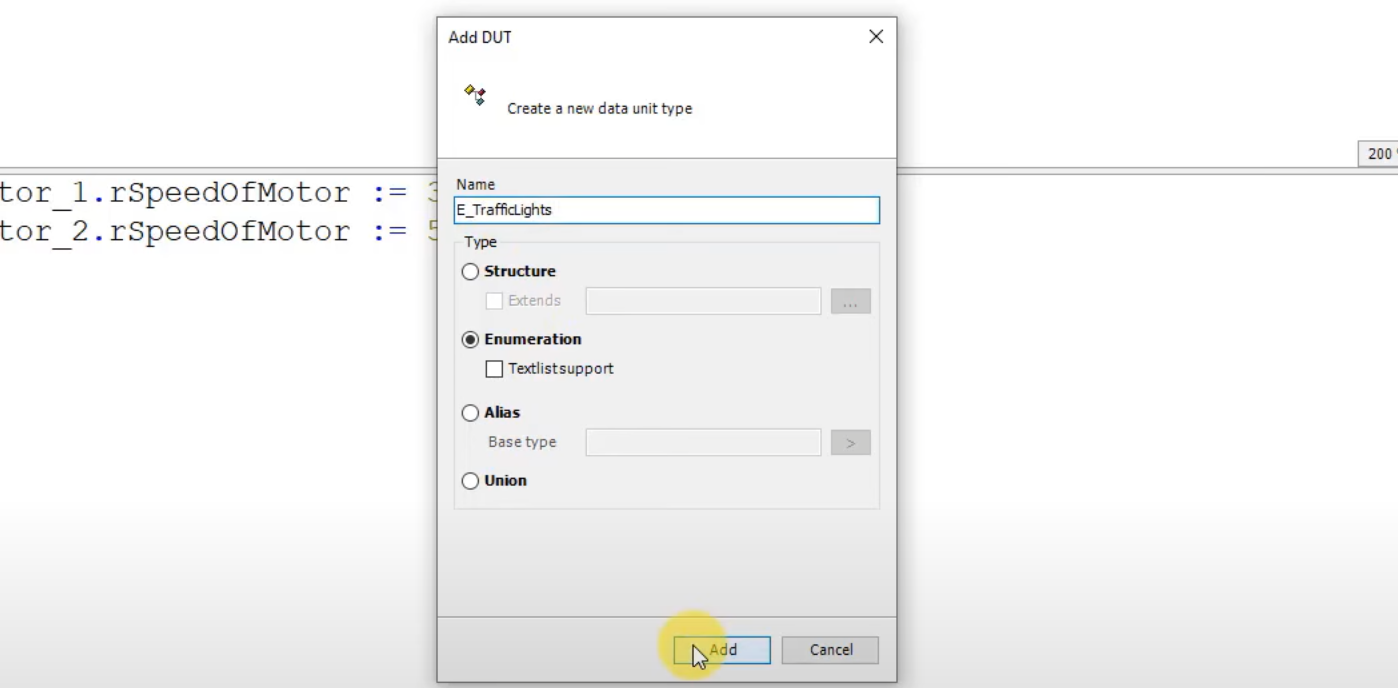
TYPE E_TrafficLights:
   (Yellow := 0, Green := 1, Red := 2);
END_TYPE
Here, we define an enumeration named E_TrafficLights, which includes three states: Yellow, Green, and Red. Each state is assigned a numeric value for internal representation. These values serve as constant references within the program and help ensure consistency when referring to specific conditions.
Declaring and Using an Enumeration Variable
Once the enumeration is created, we can declare a variable using this type:
VAR
   eTrafficLights : E_TrafficLights;
   iColor : INT;
END_VAR
This allows us to store and manipulate enumeration values while keeping the code readable and structured.
Assigning and Using Enumeration Values in Programs
We can assign values to an enumeration variable as follows:
iColor := eTrafficLights;This stores the numeric equivalent of eTrafficLights in the integer variable iColor. This is particularly useful when working with hardware interfaces or functions that expect numerical values.
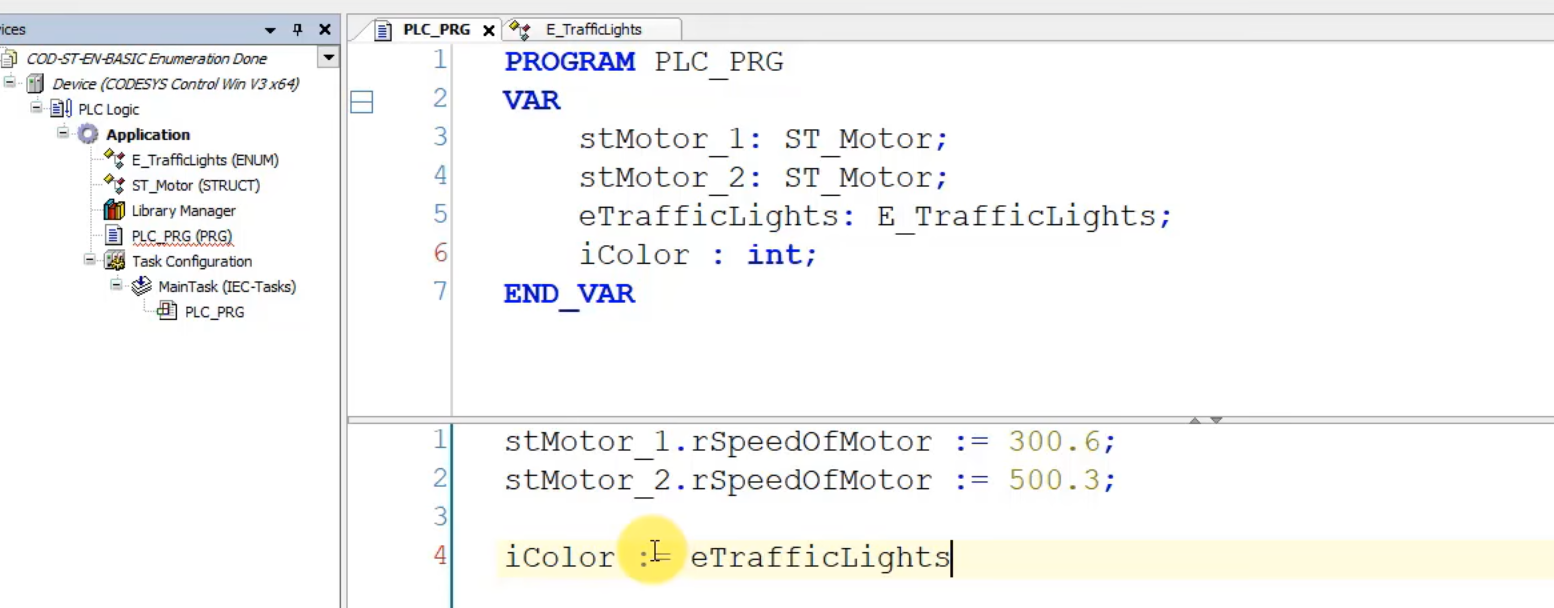
Using Enumeration in a PLC Program
Enumerations are useful in state management and structured programming. Below is an example of how enumerations help manage traffic light states:
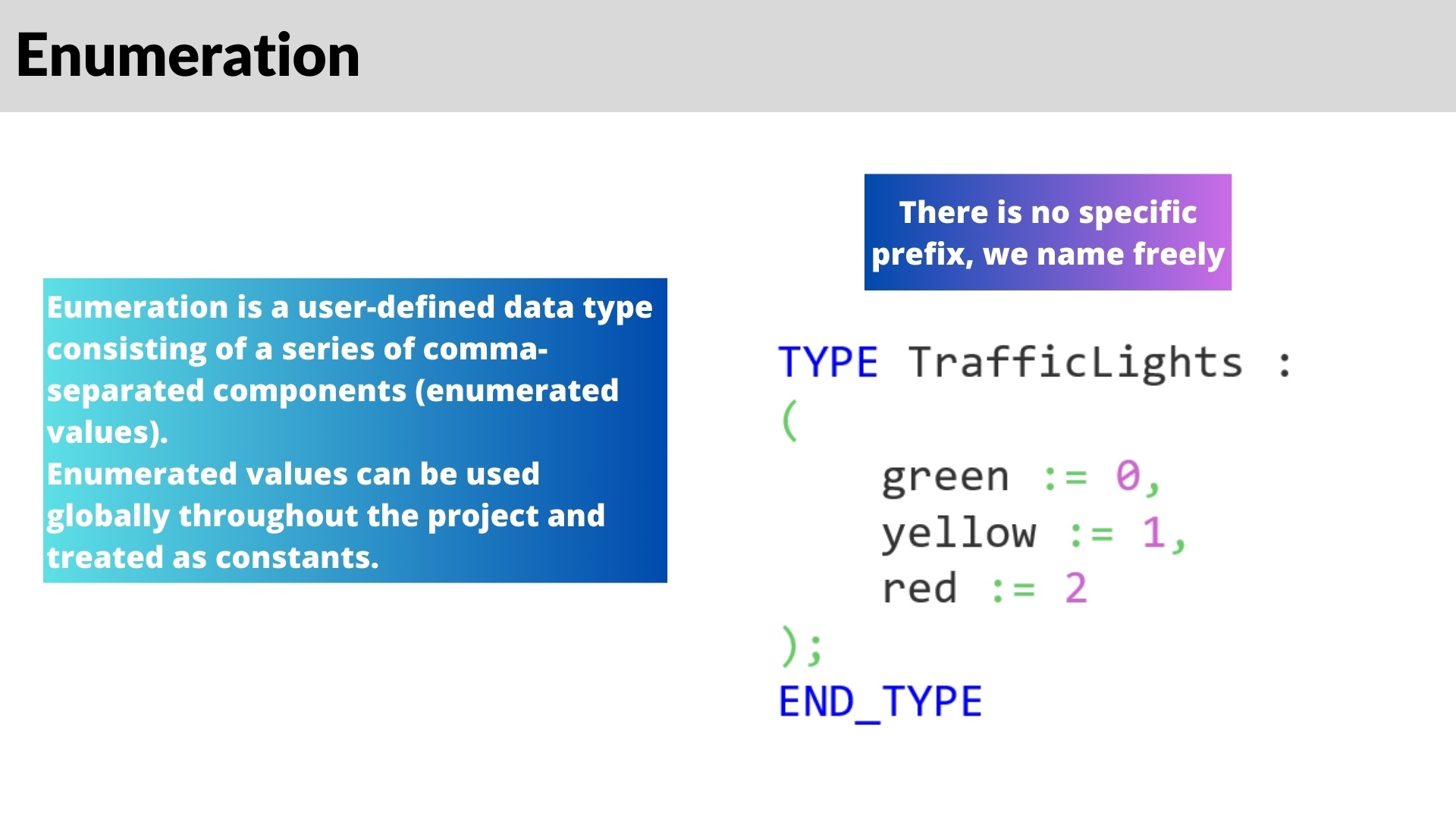
Using enumerations in this way ensures that all possible values are predefined and handled in a controlled manner. This eliminates the need to compare raw integer values, making the program easier to debug and maintain.
Assigning Enumeration Values from a Drop-Down List
CODESYS provides a useful feature that allows selection of enumeration values from a drop-down list in the interface. This helps developers choose from valid options without manually entering values, reducing errors.
For example, when assigning a new value to an enumeration variable in the CODESYS editor, a drop-down list appears, displaying the available options (Yellow, Green, Red). This feature speeds up programming and prevents accidental assignments of invalid values.
Real-World Applications of Enumerations
Enumerations are widely used in industrial automation, particularly in the following scenarios:
- Machine State Control: Representing states such as Idle, Running, Error, and Maintenance.
- Mode Selection: Configuring devices to run in different modes, such as Manual, Automatic, or Semi-Automatic.
- Alarm and Fault Handling: Defining error codes and alarm levels, e.g., LowAlarm, HighAlarm, CriticalAlarm.
- Traffic Light Control: Managing the states of traffic signals, as shown in our previous example.
By using enumerations instead of raw numbers, the readability and reliability of the code are greatly improved, making the system easier to maintain and scale.
Advantages of Using Enumerations
- Improved Readability: Instead of using arbitrary numbers, names are assigned to specific values, making the program easier to understand.
- Error Prevention: Prevents the use of invalid values, ensuring that only predefined states are used.
- Simplified Debugging: Makes it easier to identify what each value represents, reducing confusion.
- Consistency Across Projects: Ensures uniform naming conventions for constants, making the project more structured.
- Faster Development: Reduces the need for excessive comments and documentation, as the enumeration names describe their function directly.
Understanding Local and Global Variables in CODESYS
In PLC programming, understanding the distinction between local and global variables is crucial for creating structured, efficient, and maintainable code. This section will explore their differences, best practices, and a practical assignment to reinforce the concepts.
What Are Local Variables?
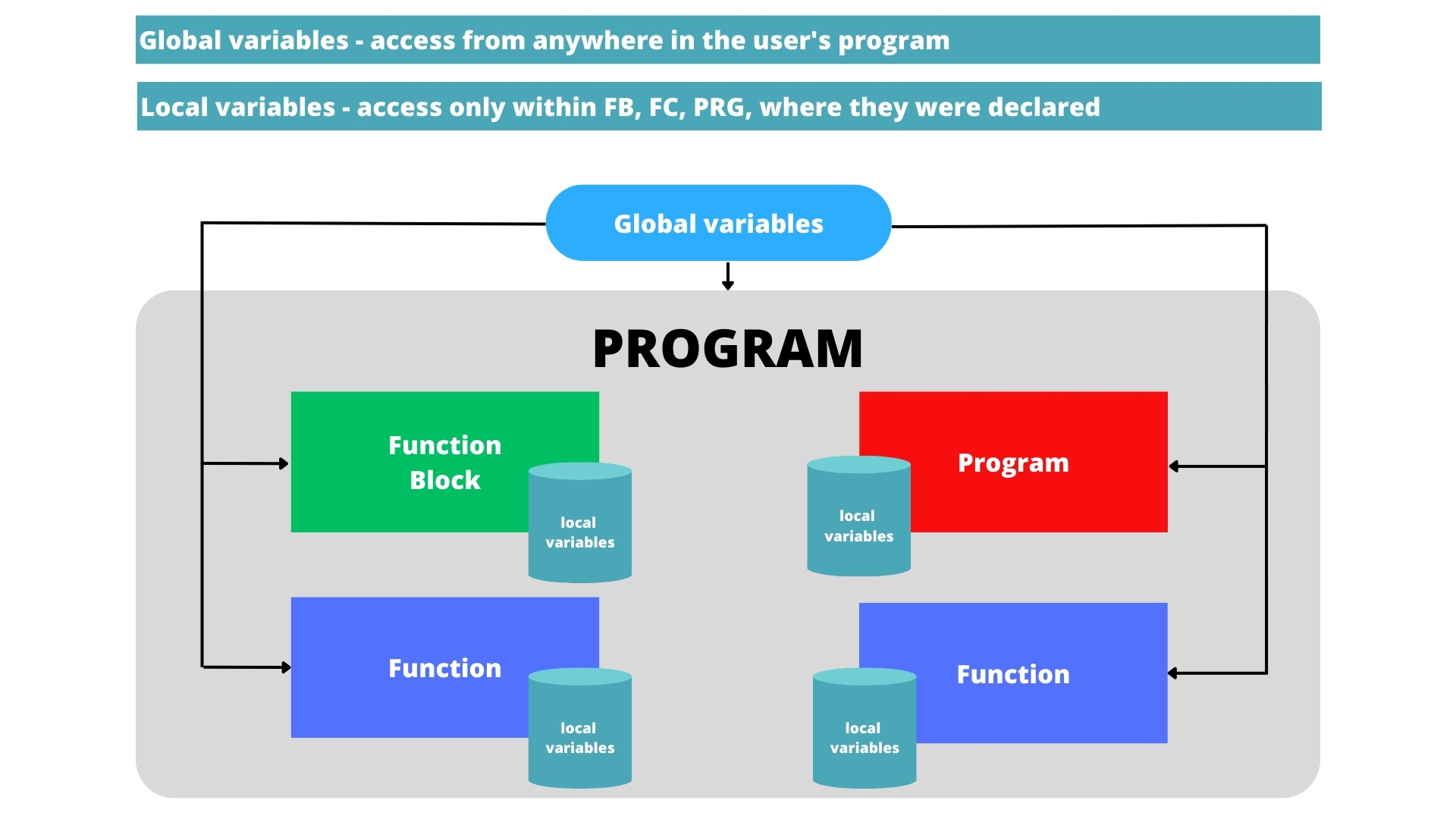
Local variables are declared within a specific program organization unit (POU), such as a function block, function, or program. These variables are only accessible within that unit and cannot be referenced elsewhere.
Example of Local Variable Declaration
PROGRAM Test_PRG
VAR
   iLocalVar : INT;
END_VAR
Here, I_LocalVar is a local integer variable that can only be accessed within the Test_PRG program.
What Are Global Variables?
Global variables, on the other hand, can be accessed from any part of the project. They are typically declared in a Global Variable List (GVL) and used for data exchange between different POUs.
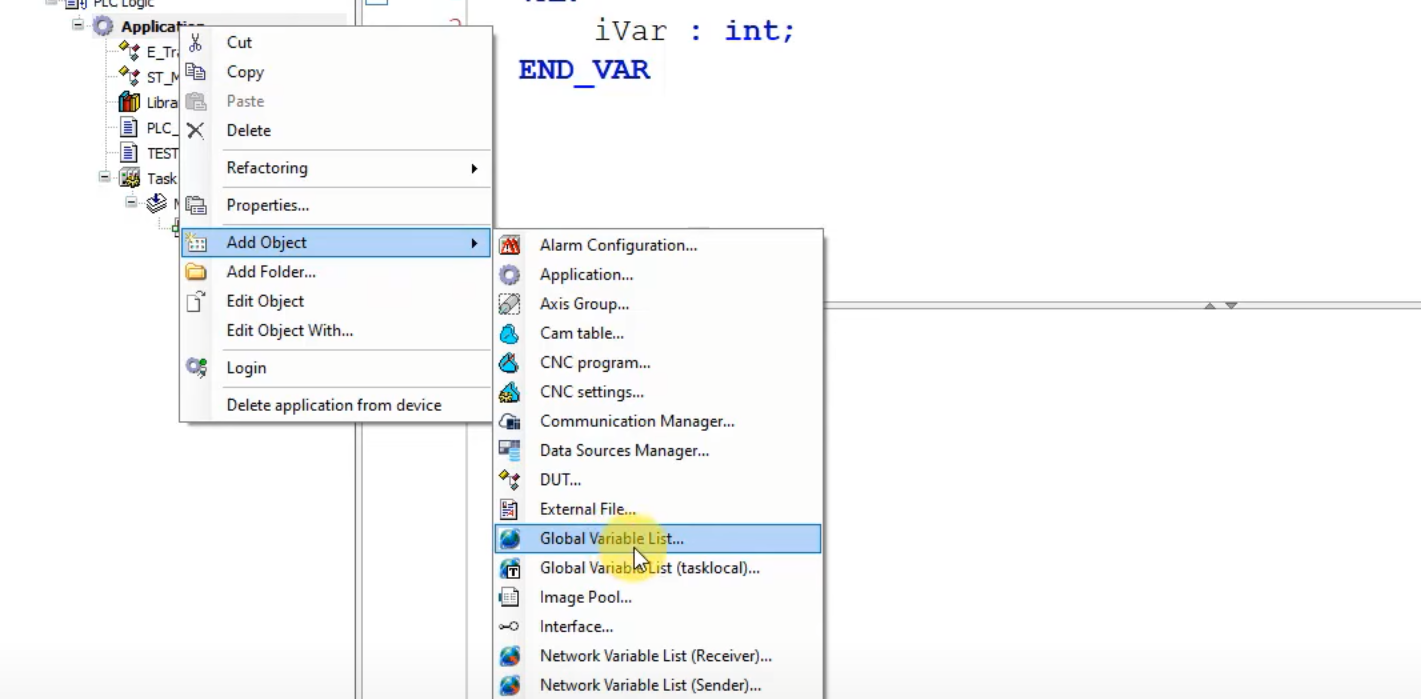
Example of Global Variable Declaration
VAR_GLOBAL
   iGlobalVar : INT;
   xLamp : BOOL;
END_VAR
Global variables provide convenient data sharing but must be used carefully to avoid unintended modifications and dependencies.
When to Use Local vs. Global Variables
Best Practices for Using Local Variables
- Encapsulation: Keep variables within their relevant program blocks to prevent unintended modifications.
- Readability: Easier to track variable usage and prevent conflicts.
- Memory Efficiency: Local variables are only active when their function or program is executed, minimizing memory usage.
When to Use Global Variables
- Data Exchange Between POUs: When different programs need to share data, global variables help facilitate communication.
- Configuration Parameters: Global variables are useful for storing settings or parameters that need to persist throughout the program execution.
- I/O Mapping: Often used to define variables linked to physical inputs and outputs.
Practical Assignment: Working with Variables
To reinforce the concepts of local and global variables, follow the instructions below and complete the programming challenge.
Step 1: Declare Variables
Create a new CODESYS project and declare the following variables:
Local Variables
VAR
   iDate : INT;
   wDate : WORD;
   uiYear : UINT;
   sDay : STRING;
   rTemperature : REAL;
END_VAR
Each variable represents a different data type:
- iDate: Stores the day and month as an integer.
- wDate: Stores the date in binary format.
- uiYear: Stores the year in octal format.
- sDay: Stores the day of the week as a string.
- rTemperature: Stores the temperature as a floating-point number.
Step 2: Assign Values to Variables
Use today’s date and assign values in different numeric formats:
// Date: 13/09/2024, Wednesday
iDate := 1309; // 13th of September
wDate := 2#101000101; // Binary representation
uiYear := 8#2023; // Octal notation
sDay := 'Wednesday'; // String variable
rTemperature := 24.6; // Actual outside temperature
This exercise helps reinforce data representation in different numeric systems.
Step 3: Working with Arrays
Next, declare an array with three elements to store the date components: Day, Month, Year
Now assign values to the array:
aArray[0] := 13; // Day
aArray[1] := 9;  // Month
aArray[2] := 2023; // Year
Step 4: Perform Mathematical Operations on Arrays
Using these date values, perform a simple calculation:
iResult := aArray[0] + aArray[2] - aArray[1];This sums the day and year and subtracts the month, showcasing basic arithmetic operations using arrays.
Step 5: Testing the Program in CODESYS
- Compile the program and simulate the execution.
- Ensure that all variables are correctly initialized and displayed.
- Modify the values and observe how changes affect the calculations.
Standard Data Types in CODESYS
Enumerations are built on top of the standard data types in CODESYS. Every variable you declare in the declaration part of a POU needs a data type, and the data type determines how much memory the variable uses, which values it can hold and which operators and string functions you can apply to it. CODESYS 3.5 follows the IEC 61131-3 standard, so the elementary data types below work the same way in most IEC-based PLCs:
| Data type | Size / meaning | Range or example |
|---|---|---|
| BOOL | 1 bit logic (stored in 1 byte) | TRUE / FALSE |
| BYTE, WORD, DWORD, LWORD | 8, 16, 32, 64 bit strings | bit patterns, status words |
| SINT / USINT | 8 bit integer | -128 to 127 / 0 to 255 |
| INT / UINT | 16 bit integer | -32768 to 32767 / 0 to 65535 |
| DINT / UDINT | 32 bit integer | about -2.1 to 2.1 billion / 0 to 4.29 billion |
| LINT / ULINT | 64 bit integer | very large counters and totals |
| REAL | 32 bit floating point | about 7 significant digits |
| LREAL | 64 bit floating point | about 15 significant digits |
| TIME / LTIME | duration (32 bit ms / 64 bit ns) | T#5S, LTIME#100US |
| DATE, TOD, DT | date, time of day, date and time | D#2026-10-29, DT#2026-10-29-08:00:00 |
| STRING / WSTRING | text (single byte / Unicode) | 80 characters by default, STRING(n) for other lengths |
Choosing the right data type
- Counters and positions - use DINT or UDINT instead of INT when a value can exceed 32767. An INT counter that overflows wraps around to a negative number and can stop a machine in a strange state.
- Analog values - raw values from an analog card usually arrive as INT; scale them to REAL or LREAL engineering units (bar, degrees C, mm) in one function block.
- Time or REAL? - store delays and timeouts as TIME, not as a REAL number of seconds. Timers like TON expect a TIME value, and the code is easier to read.
- Bit-oriented data - status words from drives or fieldbus devices are WORD or DWORD, because you are interested in individual bits, not in arithmetic.
A clear variable name helps as much as the right type. Many teams add a type prefix (x for BOOL, i for INT, di for DINT, r for REAL, e for enumerations), as described in our PLC variable naming convention.
User-Defined Data Types in CODESYS
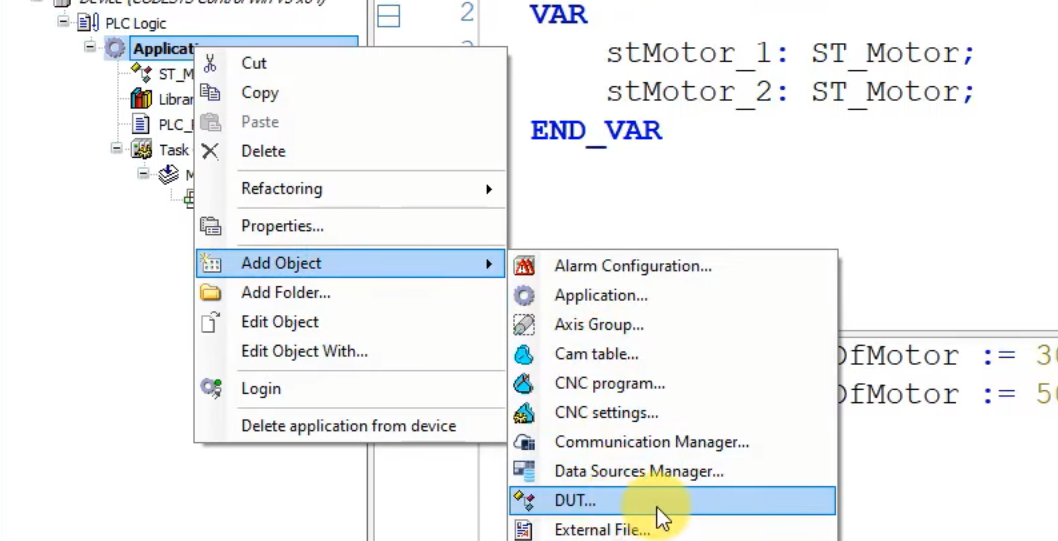
When the elementary types are not enough, CODESYS lets you create user-defined data types as DUT objects (Add Object - DUT):
- Enumeration (ENUM) - a list of named states, as shown in this post.
- Structure (STRUCT) - groups different data types into one record, for example all data of one motor.
- Alias - a new name for an existing type, such as `TYPE T_Temperature : REAL; END_TYPE`.
- Union - several variables that share the same memory area.
- Arrays - declared directly in the variable, for example `ARRAY[1..10] OF REAL`.
Structures and arrays are explained in detail in Part #6: arrays and structures in CODESYS.
A note on strict enumerations
Newer versions of CODESYS often add the pragmas `{attribute 'qualified_only'}` and `{attribute 'strict'}` to a new enumeration DUT. With qualified_only you must write `E_TrafficLights.Green` instead of `Green`. With strict, an assignment such as `iColor := eTrafficLights;` is rejected by the compiler, and you need an explicit conversion, for example `iColor := TO_INT(eTrafficLights);`. Strict enumerations are safer, because only valid values can be written to the variable.
Data Types in CODESYS - FAQ
What are the data types in CODESYS?
CODESYS supports the IEC 61131-3 elementary data types: BOOL, bit strings (BYTE, WORD, DWORD, LWORD), signed and unsigned integers (SINT, INT, DINT, LINT, USINT, UINT, UDINT, ULINT), floating point (REAL, LREAL), time and date types and text (STRING, WSTRING). On top of that you can create user-defined data types: enumerations, structures, aliases and unions.
What is the data type of DT in CODESYS?
DT (DATE_AND_TIME) stores a date and a time of day in one value, for example `DT#2026-10-29-08:00:00`. Internally CODESYS keeps it as the number of seconds since 1 January 1970. For nanosecond resolution, newer compiler versions also offer LDT (LDATE_AND_TIME).
What is the difference between WORD and INT in CODESYS?
Both use 16 bits, but INT is a signed integer for arithmetic (-32768 to 32767), while WORD is a bit string meant for bit patterns, masks and status words. Use INT (or DINT) for numbers and WORD when you need to look at individual bits. Conversion functions such as INT_TO_WORD or TO_WORD switch between them.
How do I learn CODESYS programming step by step?
Go through this CODESYS series in order, from installation and variables to operators and program flow. If you want guided exercises with feedback, try our Structured Text programming in CODESYS course.
Summary
In PLC programming, understanding enumerations (ENUM) and the distinction between local and global variables is essential for writing efficient and structured code. Enumerations in CODESYS enhance code readability, minimize errors, and facilitate state management in automation systems. They are particularly useful in applications such as machine state control, mode selection, and alarm handling.
Additionally, the proper use of local and global variables impacts code structure and security. Local variables improve encapsulation and memory efficiency, while global variables enable seamless data exchange between different program units. The article also provides practical exercises on variable declarations, assignments, arrays, and mathematical operations.
By mastering these concepts in CODESYS, developers can create more organized, scalable, and reliable automation programs, ensuring better system maintainability and performance.