In PLC programming, working with more complex data structures is essential for handling numerical computations, collections of data, and structured information. Efficient use of these structures improves program readability, optimizes memory usage, and simplifies data management. This section explores floating-point numbers (REAL), arrays (ARRAYS), and structures (STRUCTURE) in CODESYS, demonstrating their significance and practical usage.
Floating-Point Numbers (REAL) in CODESYS
Floating-point numbers are used to store decimal values, which are necessary for representing physical quantities such as temperature, pressure, or flow rates. Many real-world measurements require precision beyond whole numbers, making floating-point data types indispensable in industrial automation.
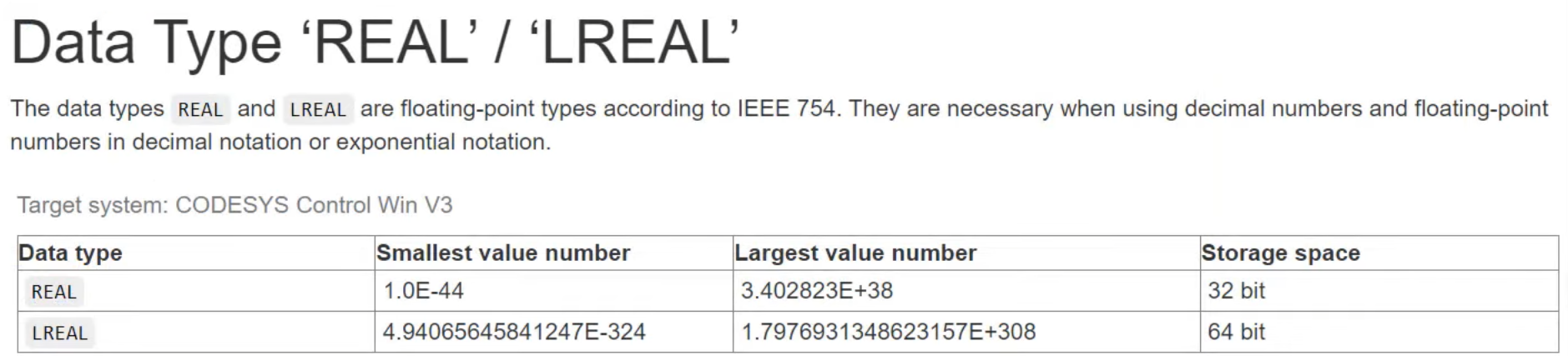
In CODESYS, floating-point numbers are categorized into two main types:
- REAL: Occupies 32 bits, offering moderate precision and range.
- LREAL (long real): Occupies 64 bits, providing an extended range and higher precision.
Advantages of Floating-Point Numbers
- Allow precise representation of decimal values.
- Essential for analog sensor readings and complex calculations.
- Enable fractional arithmetic in control systems, avoiding integer rounding errors.
To explore these data types further, you can access the CODESYS online help under Data Types -> REAL / LREAL.
Declaring a Floating-Point Variable in CODESYS
- Open CODESYS and navigate to PLC_PRG.
- Declare a floating-point variable as follows: rResult : REAL := 1.345678;
- Click Enter to confirm the declaration.
- Log in to the PLC simulator and start execution.
- Observe the approximation of the displayed value.
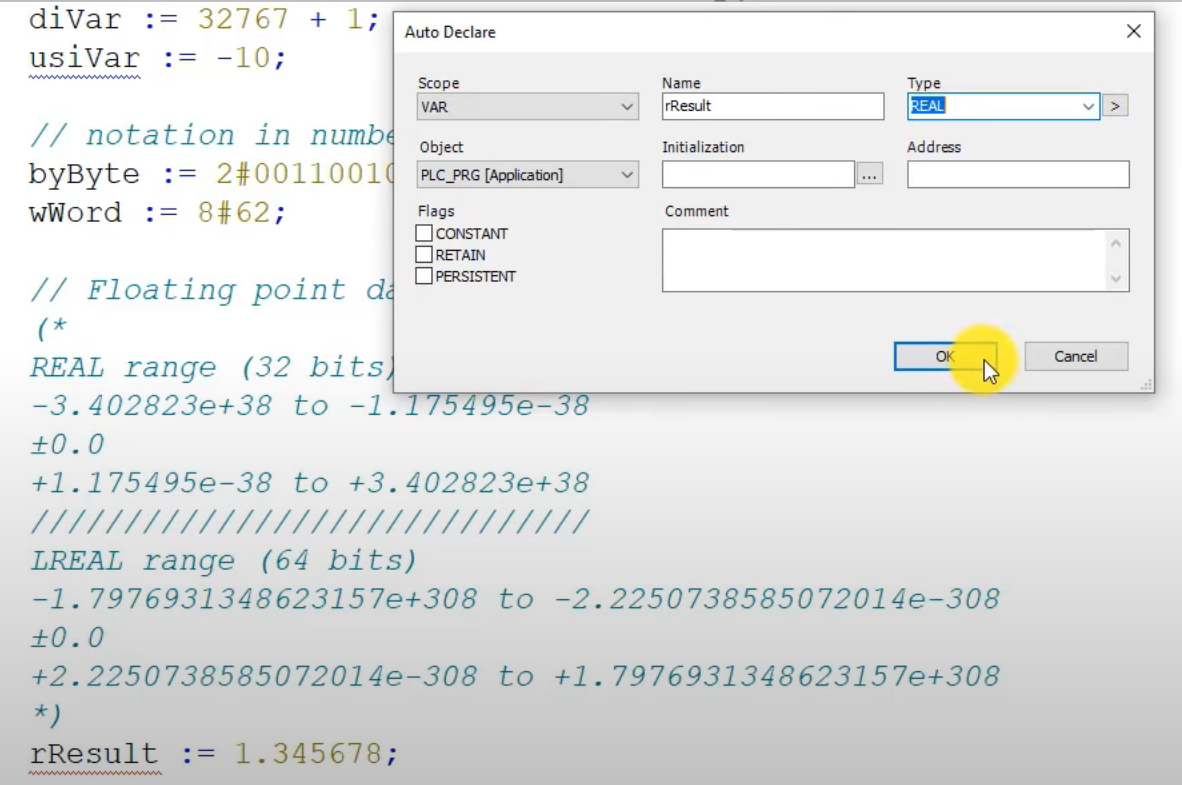

Since floating-point variables are stored in binary, some decimal values cannot be represented precisely. When hovering over the value, CODESYS displays the full stored value, providing a clearer picture of the internal representation.
Application: Floating-point numbers are frequently used in automation projects requiring precise numerical calculations, such as PID control algorithms, temperature monitoring, and pressure regulation.
Arrays in CODESYS
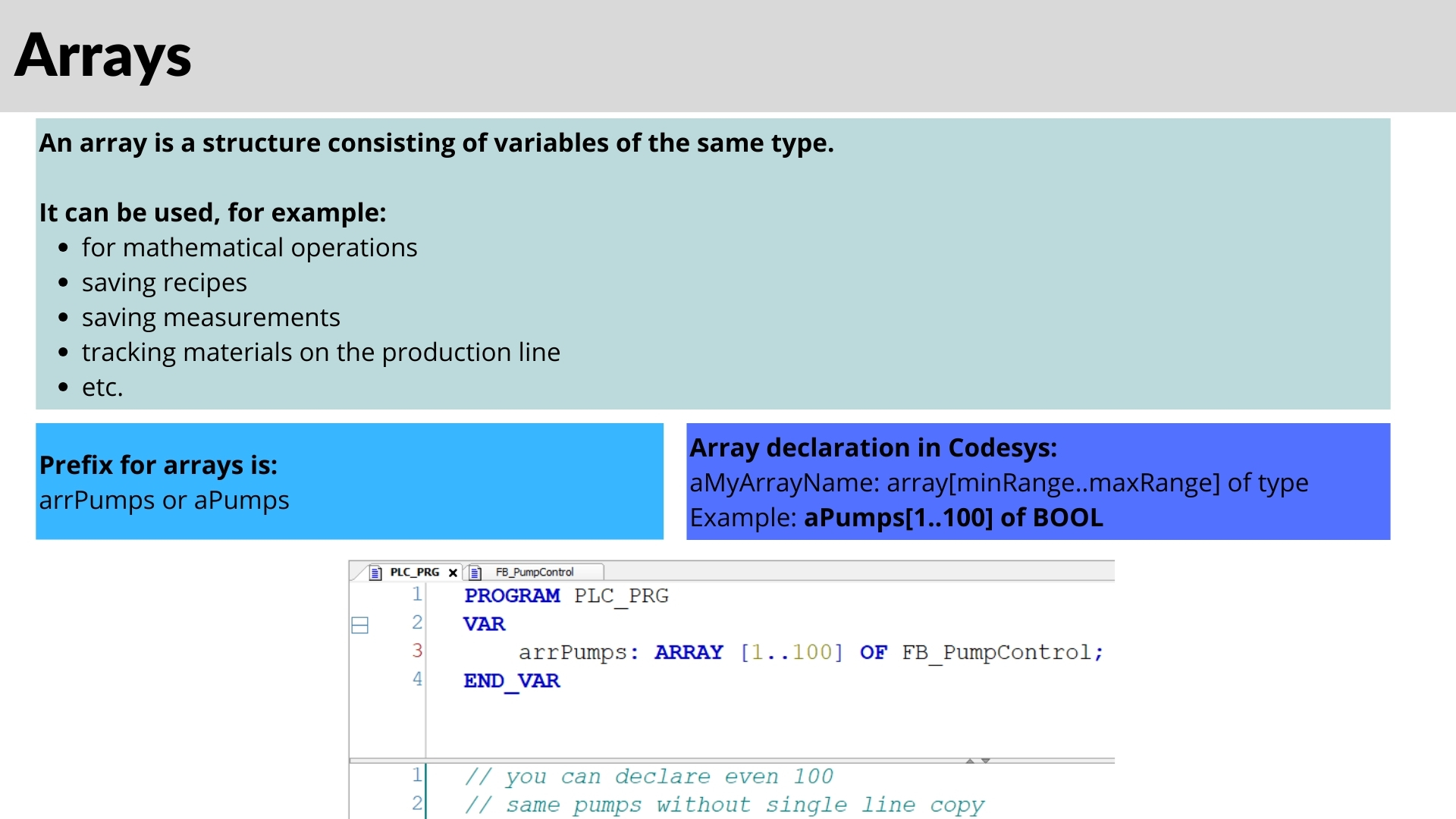
An array is a structured collection of multiple elements of the same data type, allowing efficient organization and manipulation of related values. Arrays in CODESYS provide a structured way to store multiple values without the need to declare separate variables for each.
Benefits of Using Arrays
- Reduce the number of declared variables.
- Enable easy indexing and iteration through multiple values.
- Improve data structure organization in control applications.
Declaring an Array in CODESYS
- Open CODESYS and go to PLC_PRG.
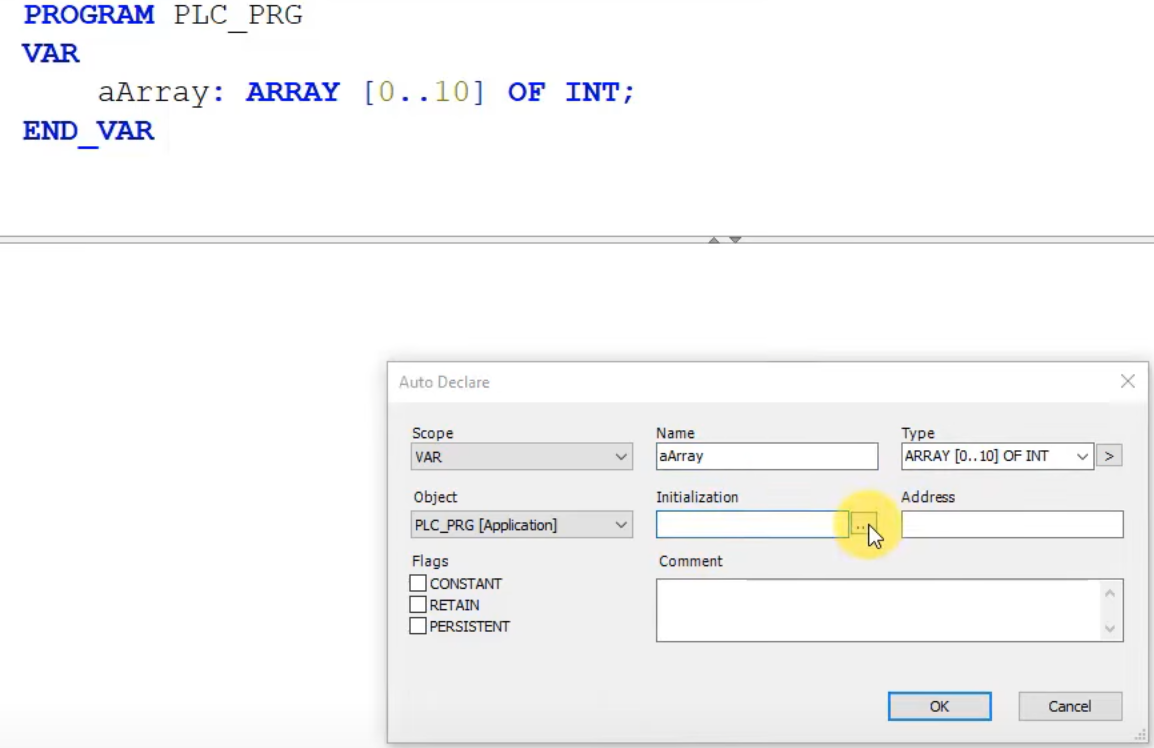
- Use the following syntax to declare an array: ARR_Data : ARRAY[0..10] OF INT;
- This statement creates an integer array with 11 elements (from index 0 to 10).
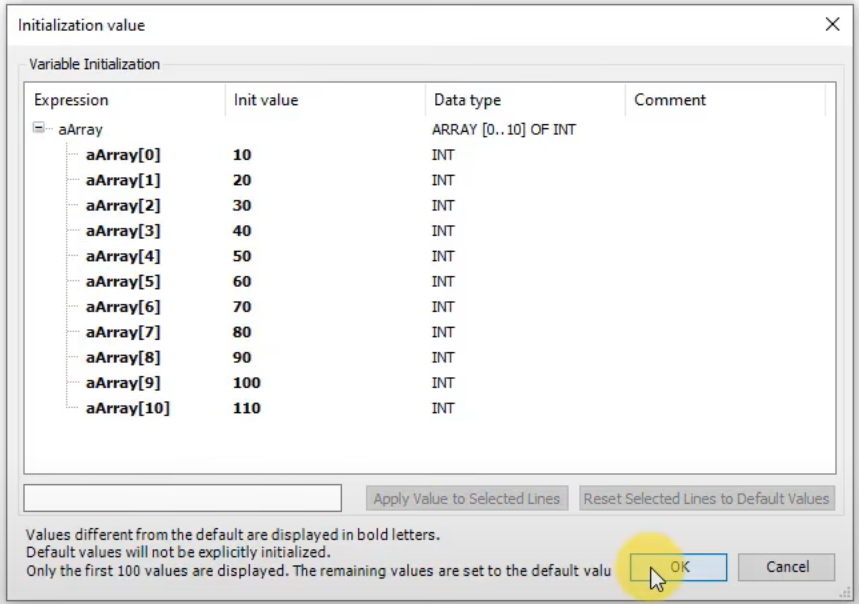
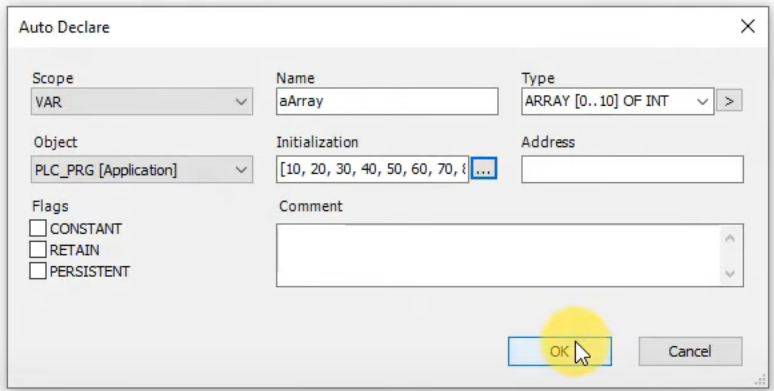
- To initialize an array with values, use the Auto Declare feature:
- Open Edit → Auto Declare.
- Enter the array name and set the initialization values.
- Click OK to confirm.
Accessing Array Elements
To retrieve or modify an array element:
iVar := aArray[3];This assigns the value stored at index 3 of aArray to the integer variable iVar.

Testing an Array in CODESYS
- Log in to the PLC simulator.
- Check the Simulation option.
- Run the program and observe the values.
- Modify specific array elements and verify changes in the runtime environment.
Arrays are particularly useful for sensor data storage, buffer implementations, iterative computations, and batch processing in PLC applications.
Declaring and Using Structures in a Program
Structures in CODESYS allow developers to define a custom data type that groups multiple related variables together. This makes the code more readable, scalable, and efficient when working on large automation projects.
Defining a Custom Structure
To define a new structure type, follow these steps:
TYPE ST_Motor:
   STRUCT
      rSpeed: REAL;
      rCurrent: REAL;
      rVoltage: REAL;
      iTemperature: INT;
      xThermalSensor: BOOL;
   END_STRUCT;
END_TYPE
This structure represents a motor, storing its speed, current, and operational state.
Declaring Structured Variables
After defining the structure, we can declare variables of this type:
PROGRAM PLC_PRG
VAR
   stMotor_1 : ST_Motor;
   stMotor_2 : ST_Motor;
END_VAR
Each motor now has its own independent variables for speed, current, and operational status.
Assigning Values to Structure Members
To assign values to the members of the structure:
stMotor_1.rSpeed := 300.6;
stMotor_2.rSpeed := 500.3;
This method ensures clear and organized data management in PLC applications.

Using Structures in Large Projects
Structures are especially useful in large-scale automation projects where multiple instances of similar components exist. For example, instead of creating separate variables for each motor, you can use arrays of structures. This simplifies managing multiple motors, making the program modular and scalable.
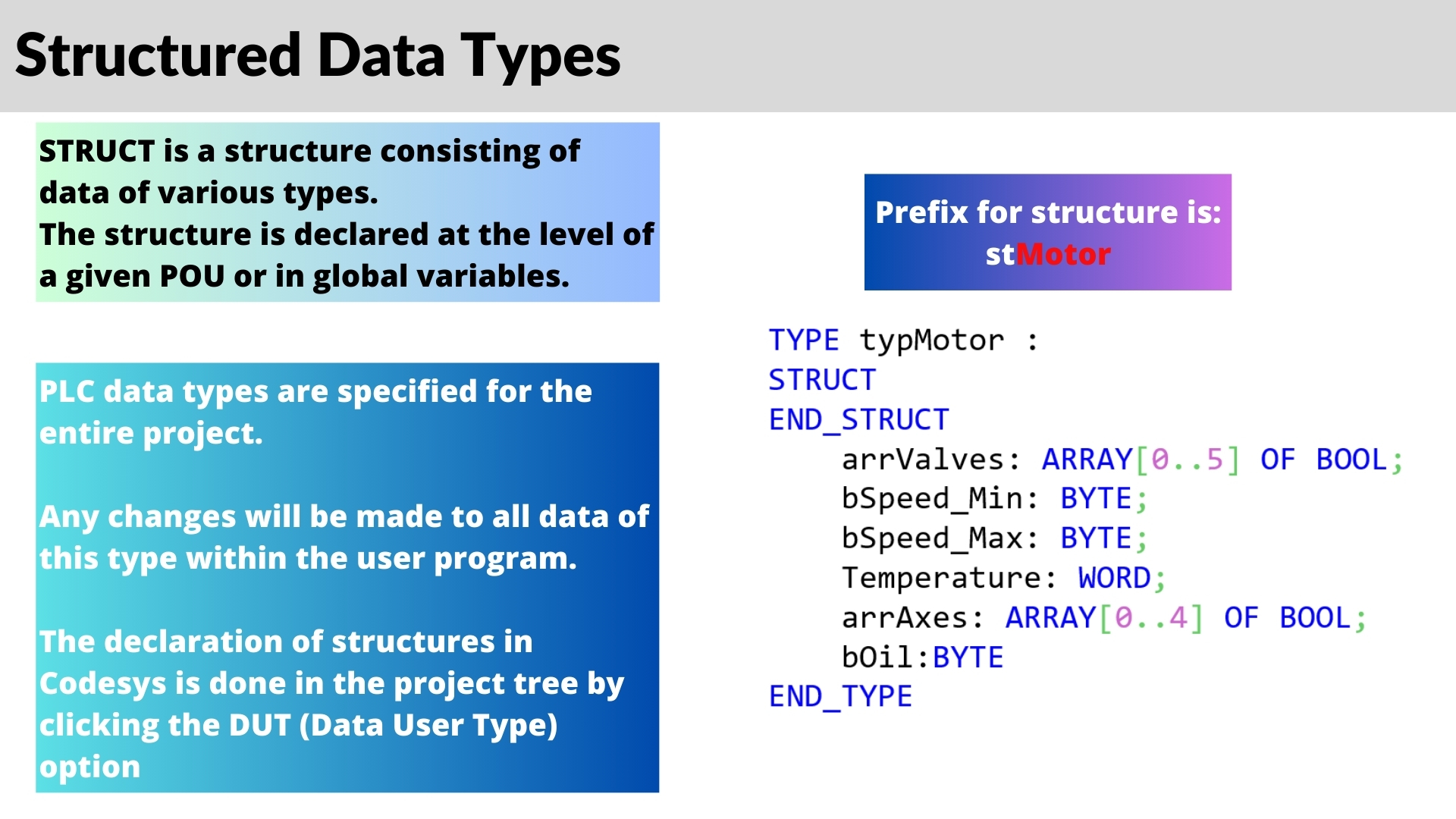
Difference Between Structures and Local Variables
- Structures are defined globally and apply to the entire project.
- Local variables exist only within the function or program where they are declared.
- Structures use a capitalized ST prefix in the declaration, while variable instances follow lowercase notation.
Best Practices for Using Structures in CODESYS
1. Use Structures for Grouping Related Data
- Structures improve modularity by grouping similar variables together.
- Reduces the number of individual variable declarations.
- Enhances code readability and maintainability.
2. Use Arrays of Structures for Large-Scale Applications
- Arrays of structures simplify handling multiple similar components (e.g., motors, sensors).
- Allows easy iteration over multiple objects with loops.
3. Define Structures Globally for Reusability
- Helps maintain consistency across the entire project.
- Reduces redundancy and enhances reusability.
4. Follow a Consistent Naming Convention
Ensure meaningful and intuitive names for better readability.
Use st as a prefix for structures (e.g., stMotor).
How to Create a Structure (DUT) in CODESYS
In the CODESYS Development System a structure is a Data Unit Type (DUT). To add one, right-click the Application in the device tree, select Add Object - DUT, enter a name such as ST_Motor and choose the type Structure. CODESYS creates an empty template, and you only specify the members between STRUCT and END_STRUCT:
TYPE ST_Motor :
STRUCT
    rSpeed         : REAL;
    rCurrent       : REAL;
    rVoltage       : REAL;
    iTemperature   : INT;
    xThermalSensor : BOOL;
END_STRUCT
END_TYPE
Once the DUT is saved, ST_Motor can be used like any built-in data type in every program, function and function block of the application. You can also give the members default values directly in the DUT, for example rVoltage : REAL := 400.0;, so every new instance starts with the same settings.
Arrays of Structures in Structured Text
The real power of CODESYS structures shows up when you combine them with arrays and loops in Structured Text (ST). The program below scans four motors, adds up their current and sets one alarm bit if any motor is overheating:
PROGRAM PLC_PRG
VAR
    aMotors      : ARRAY[1..4] OF ST_Motor;
    i            : INT;
    xAnyOverheat : BOOL;
    rTotalCurrent: REAL;
END_VAR

xAnyOverheat  := FALSE;
rTotalCurrent := 0.0;

FOR i := 1 TO 4 DO
    rTotalCurrent := rTotalCurrent + aMotors[i].rCurrent;
    IF aMotors[i].xThermalSensor OR aMotors[i].iTemperature > 90 THEN
        xAnyOverheat := TRUE;
    END_IF
END_FOR
You access a member of an array element with the index first and the member name second: aMotors[2].rSpeed. You cannot address structure members by an index number, so if you need to loop over values, put them in an array (either an array of structures or an array inside the structure). A single structured variable can also be initialized in the declaration:
VAR
    stPump : ST_Motor := (rSpeed := 1450.0, iTemperature := 20);
END_VAR
Nested Structures and Inheritance with EXTENDS
A structure member can itself be a structure or an array, which lets you build data models that look like the real machine, for example a station structure that contains a conveyor structure and an array of motors. CODESYS V3 also allows a structure to extend another one. The new type contains all members of the base structure plus its own:
TYPE ST_ServoMotor EXTENDS ST_Motor :
STRUCT
    rPosition : REAL;
    xHomed    : BOOL;
END_STRUCT
END_TYPE
Keep nesting shallow (two or three levels are usually enough), otherwise access paths like stLine.stStation[3].aMotors[2].rSpeed become hard to read and to view in the online monitor.
Structure vs. UNION in CODESYS
A UNION is declared like a structure, but all its members share the same memory address. Writing one member changes the others, because they are just different views of the same bytes. This is why, in online mode, all members of a union show the same address:
TYPE U_Value :
UNION
    diValue : DINT;
    rValue  : REAL;
    awWords : ARRAY[0..1] OF WORD;
END_UNION
END_TYPE
Unions are useful for low-level tasks such as splitting a 32-bit value into two words for Modbus communication. For normal process data, use a structure, where every member has its own memory and changing one member never affects another.
CODESYS Structures - FAQ
How do you declare a structure in CODESYS?
Add a DUT of type Structure (Add Object - DUT), list the members between STRUCT and END_STRUCT, and then declare variables of the new type in the VAR section, for example stMotor_1 : ST_Motor;.
Can I use structures in Structured Text and ladder logic?
Yes. Structures are data types, so they work in all IEC 61131-3 languages. In Structured Text you access members with a dot (stMotor_1.rSpeed), and in Ladder Diagram or FBD you can assign the same member to a contact, coil or block input.
What is the difference between an array and a structure?
An array stores many elements of the same data type, accessed by an index. A structure groups members of different data types, accessed by name. Combining both, as in ARRAY[1..4] OF ST_Motor, is the typical way to handle several identical machine components.
Summary
This article explores the use of REAL numbers, arrays and structures in CODESYS, demonstrating how to declare, initialize, and effectively use them in PLC programming. You learned how to create a DUT, loop over an array of structures in Structured Text, extend a structure and when a UNION is the better choice. If you need a refresher on basic data types and the declaration part, go back to Part #5: variables in CODESYS. The next step is Part #7: enumerations and local vs. global variables. To practice these data types on a virtual PLC, see our Structured Text programming course in CODESYS.