In PLC programming, especially in CODESYS, understanding how data is stored and organized in the controller's memory is crucial. Proper variable management allows optimal utilization of hardware resources and ensures the correct operation of the control program. In this article, we will discuss basic memory units, variable types, and constants used in PLC applications.
Memory Units in CODESYS
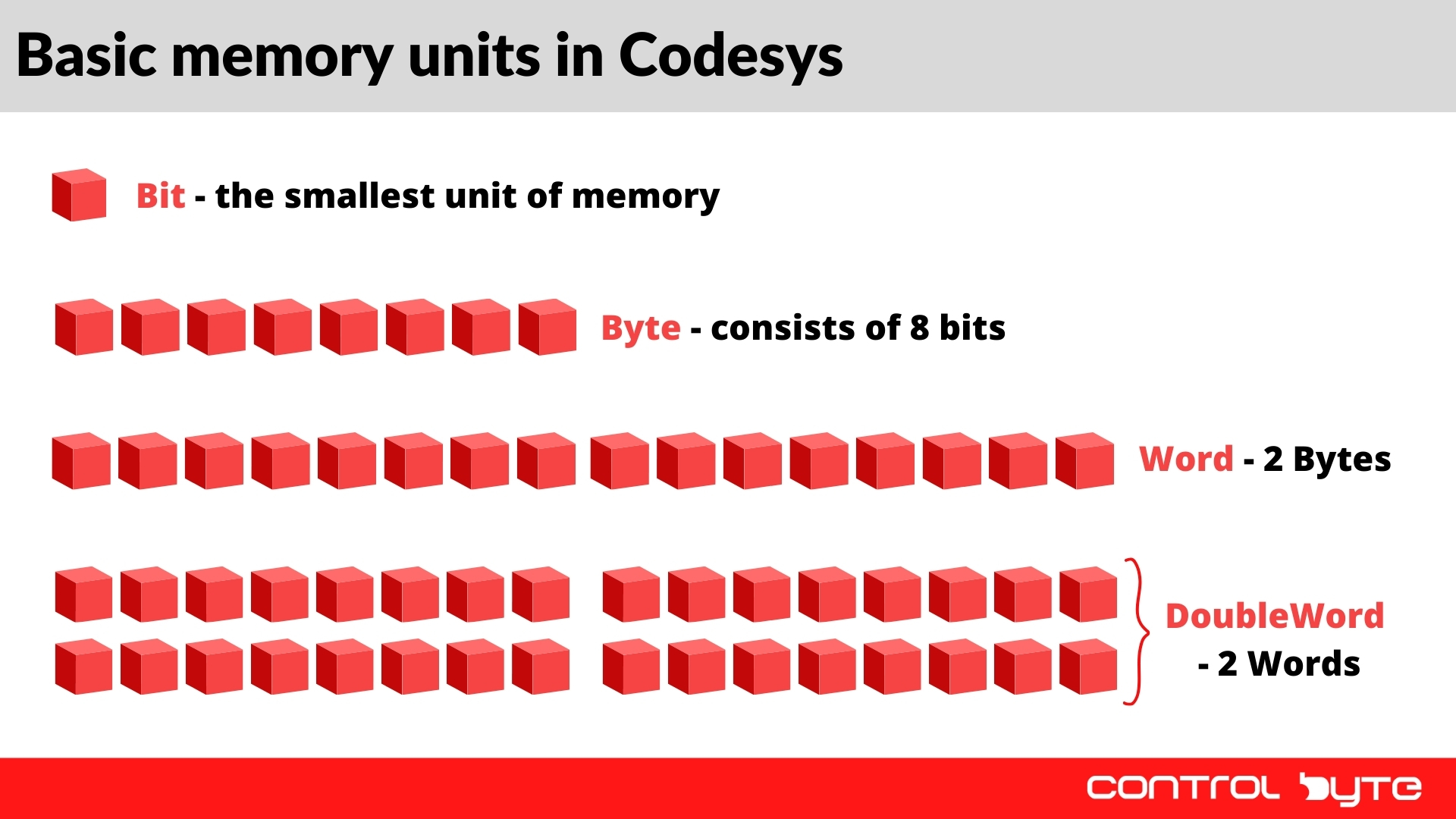
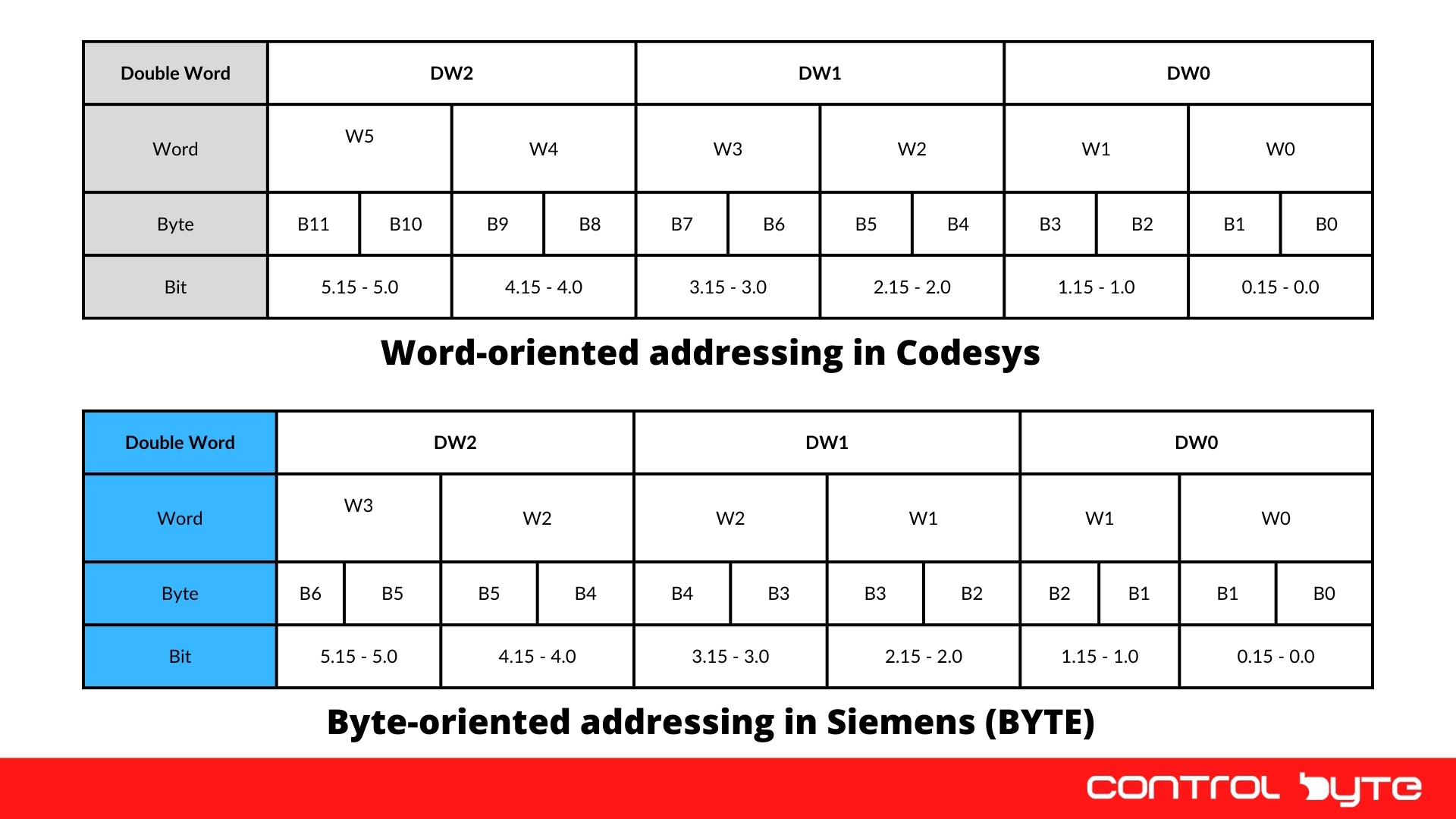
CODESYS operates on memory divided into units of different sizes:
- Bit - the smallest memory unit that can store a logical value of 1 (TRUE) or 0 (FALSE). It is used for storing simple digital signals, such as switch states.
- Byte - consists of 8 bits, with each bit capable of storing an individual logical value. It is used for storing small numerical values or ASCII characters.
- Word - consists of 16 bits (2 bytes). It is commonly used in PLCs to store integer values and memory addresses.
- Double Word (DWORD) - consists of 32 bits (4 bytes, or two words). It is used for storing larger values and 32-bit bit patterns. A 32-bit REAL (floating-point) value has the same size, but it is a separate data type.
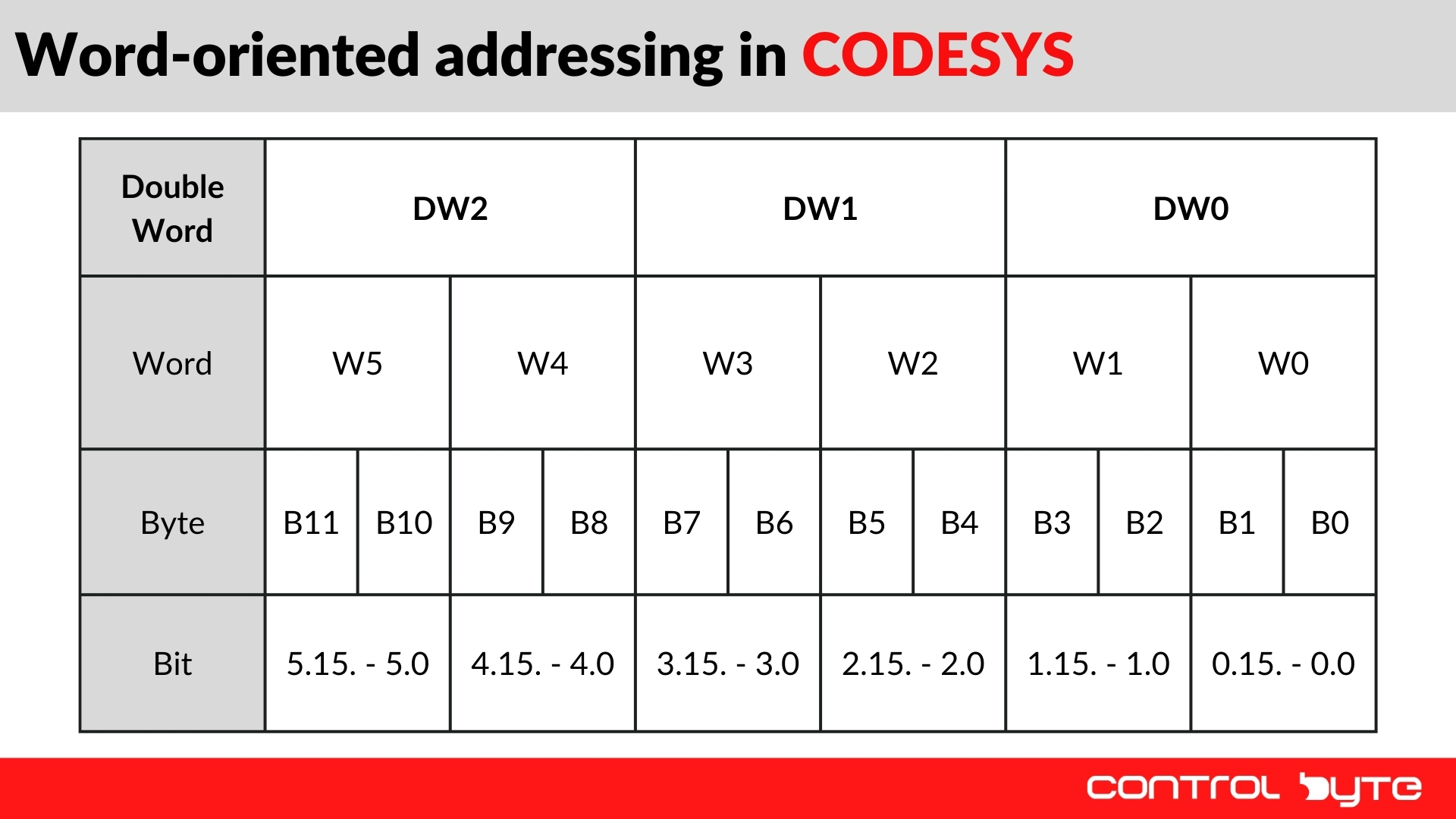
Memory in CODESYS is addressed in bytes, and bytes are grouped into 16-bit words. For more advanced operations, double words (DWORD) are used, allowing the storage of larger numerical values and more complex data structures.
Tip
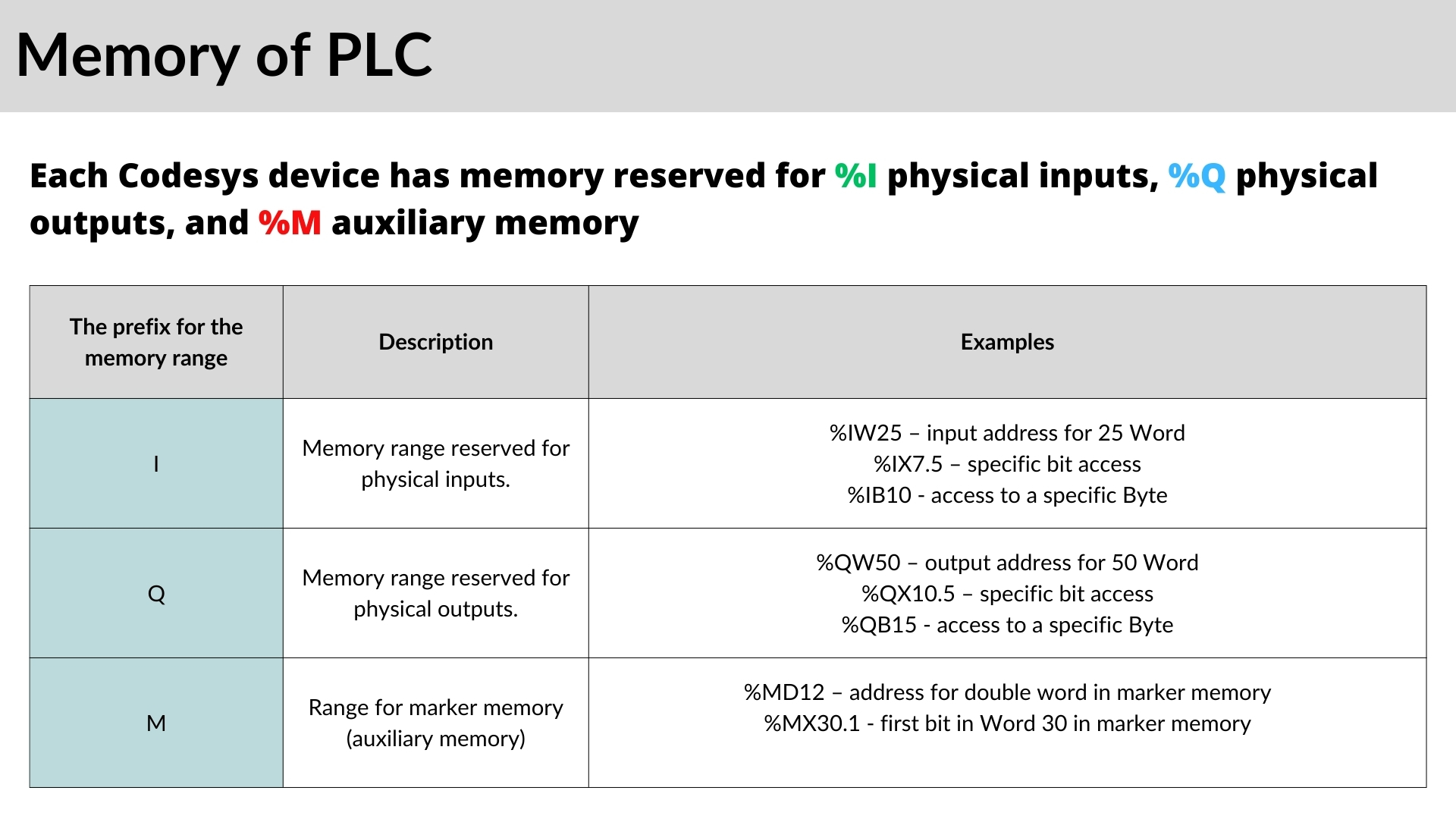
To efficiently manage memory, it is important to understand its structure and different addressing methods. This helps avoid wasted memory and optimizes resource management in PLC projects. Additionally, in more advanced applications, managing variable addressing effectively prevents overwriting critical data. In CODESYS, memory addresses for variables can be precisely defined, which is crucial when working with physical hardware.
For example, allocating memory for variables thoughtfully can optimize controller performance. Using appropriately typed variables minimizes memory usage and improves the efficiency of the control application.
Variables and Constants in CODESYS
Definition of a Variable
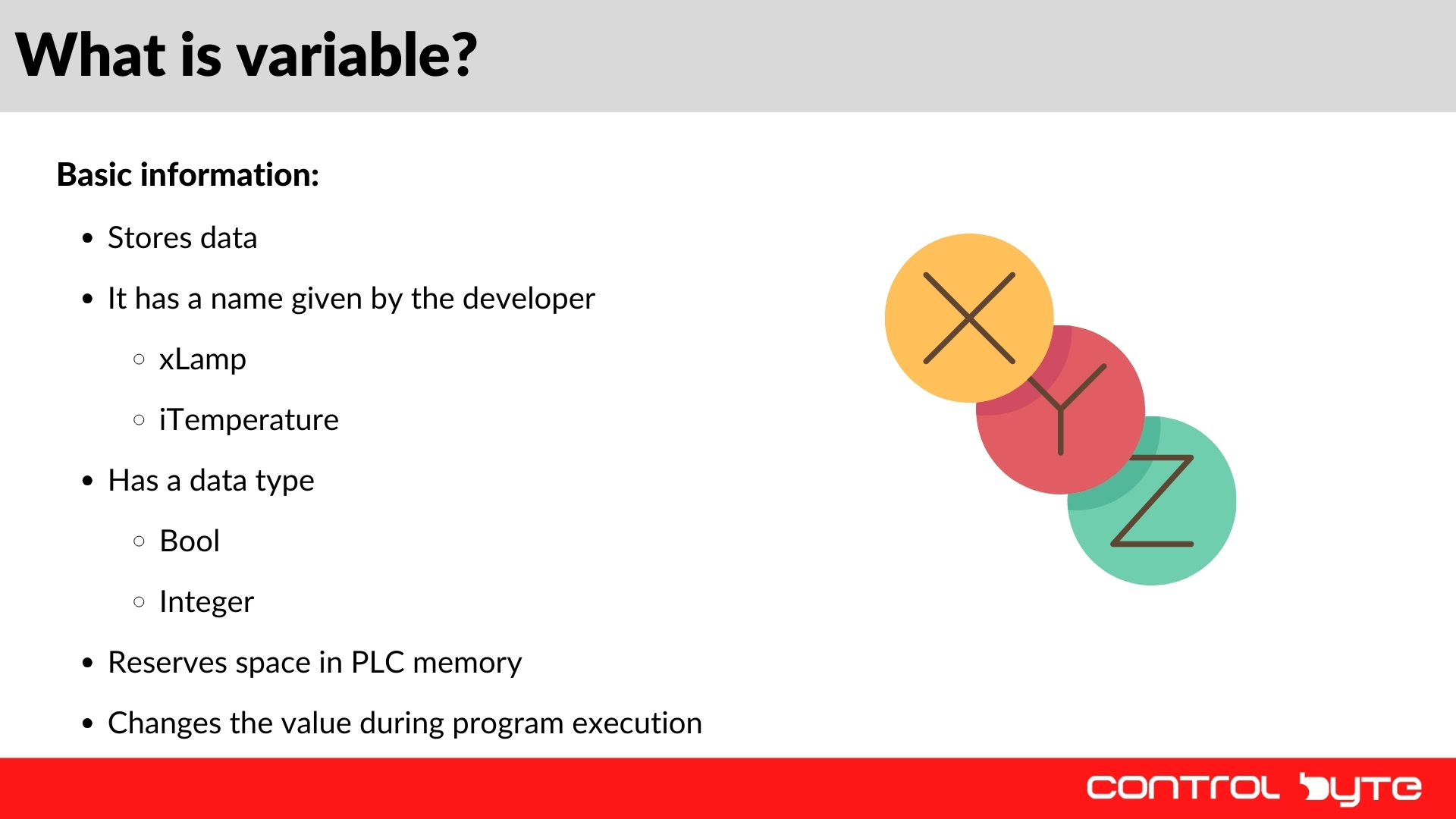
In simple terms, a variable is a memory location in the PLC where data is stored. Each variable has the following attributes:
- Data Type - e.g., Boolean, Integer, Real.
- Name - assigned by the programmer, such as xLamp (Boolean) or iTemperature (Integer).
- Memory Address - a unique location where the variable is stored in the PLC memory.
Variables can change values during program execution, making them a fundamental element of process control in PLCs. They allow the storage of calculation results, sensor states, and other essential data required for control applications.
In CODESYS, variables can be declared in different ways depending on their purpose and context. These include local variables (available only within a specific program), global variables (accessible throughout the entire project), and system variables used for communication with external devices.
Constants
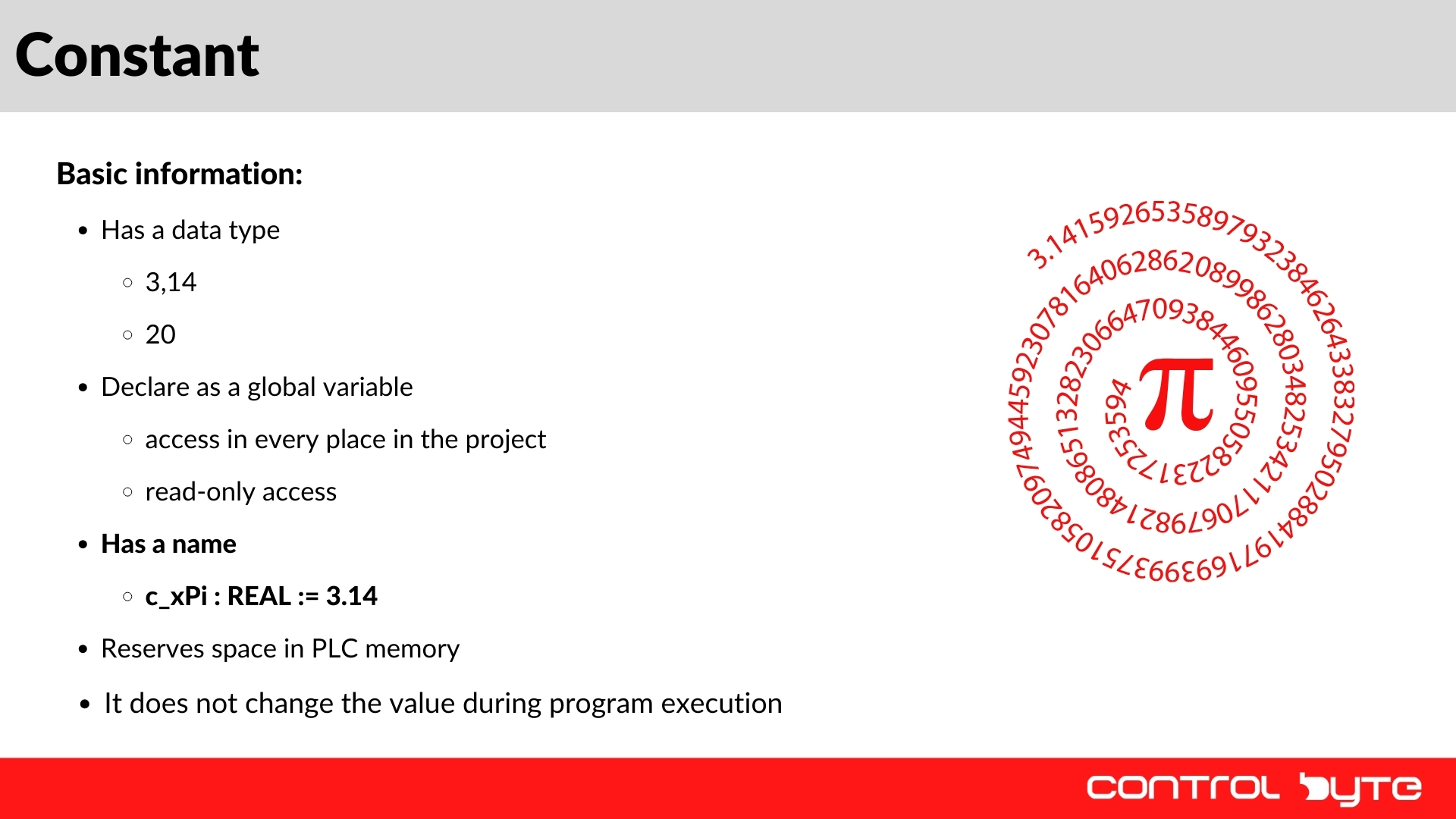
Constants are values that do not change during program execution. Like variables, they have a data type and a symbolic name. An example of a constant is the number Pi = 3.14, which remains unchanged. Constants are often used to store configuration parameters or reference values that should not be modified by the user.
Declaring constants in the code simplifies project management and enhances readability. Instead of hardcoding values multiple times, constants can be referenced by name, making modifications easier.
Declaring a Boolean Variable in CODESYS
Step 1: Creating a New Project
- Open CODESYS and create a new project.
- Navigate to PLC_PRG.
Step 2: Adding a Variable
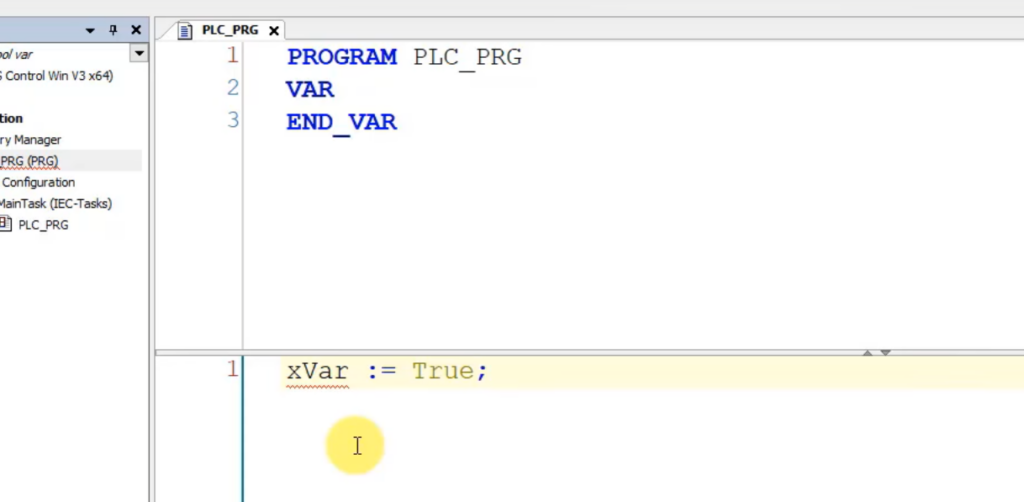
- In the first line, type the variable name using Hungarian notation: xVar := True;
- x denotes a Boolean type.
- Var is the variable name.
- := is the assignment operator in Structured Text (ST).
- TRUE is the initial value.
- Every line in Structured Text must end with a semicolon (;).
Step 3: Adding a Comment
Adding comments improves code readability:

Step 4: Using the "Auto Declare" Feature
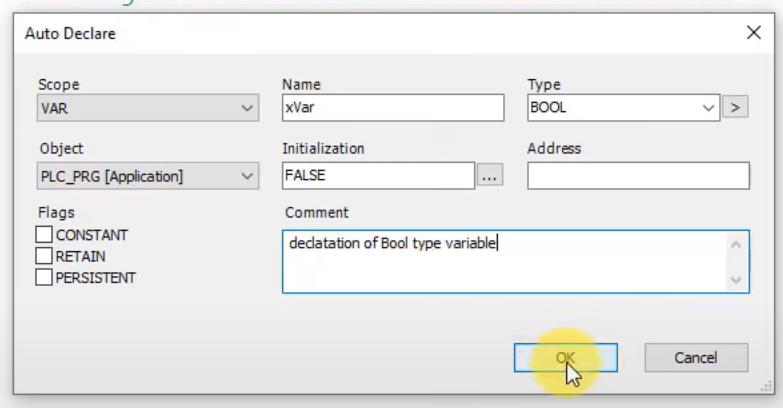
- Press Enter - the "Auto Declare" window appears.
- Fill in the fields:
- Name: xVar
- Data Type: BOOL
- Scope: Local Variable
- Initialization: FALSE
- Click OK to add the variable to the program.
Integer data type
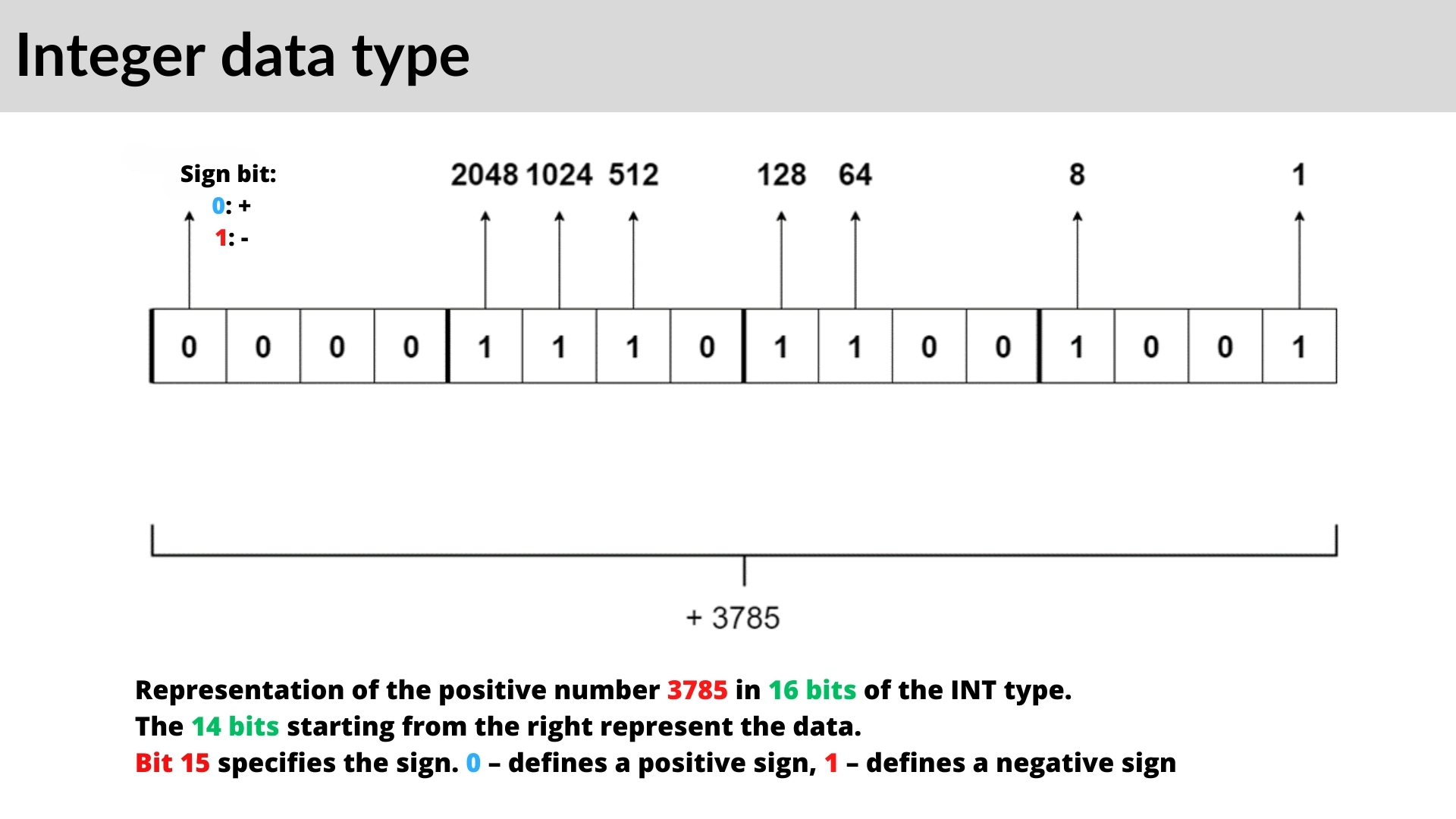
Understanding integer data types in CODESYS is crucial for effective PLC programming. CODESYS provides different types of integers that vary based on their range and whether they include signed or unsigned values. These integer types are essential for handling numerical operations efficiently and avoiding errors related to data overflow.
Types of Integer Data Types in CODESYS
CODESYS supports the following integer data types:
- Signed Integer (INT) - A standard integer that includes negative values. The lower limit is -32,768, and the upper limit is 32,767, occupying 16 bits of memory.
- Short Integer (SINT) - A smaller signed integer with a range from -128 to 127, using only 8 bits of memory.
- Double Integer (DINT) - A larger integer with a range of -2,147,483,648 to 2,147,483,647, occupying 32 bits of memory.
- Unsigned Short Integer (USINT) - This integer does not allow negative values, with a range of 0 to 255, using 8 bits.
- Unsigned Integer (UINT) - A 16-bit unsigned integer with a range of 0 to 65,535.
- Unsigned Double Integer (UDINT) - A 32-bit unsigned integer, ranging from 0 to 4,294,967,295.
To find more details about integer types in CODESYS, you can refer to CODESYS Help under Reference -> Programming -> Data Types -> Integer Data Types.
Memory Allocation and Limits
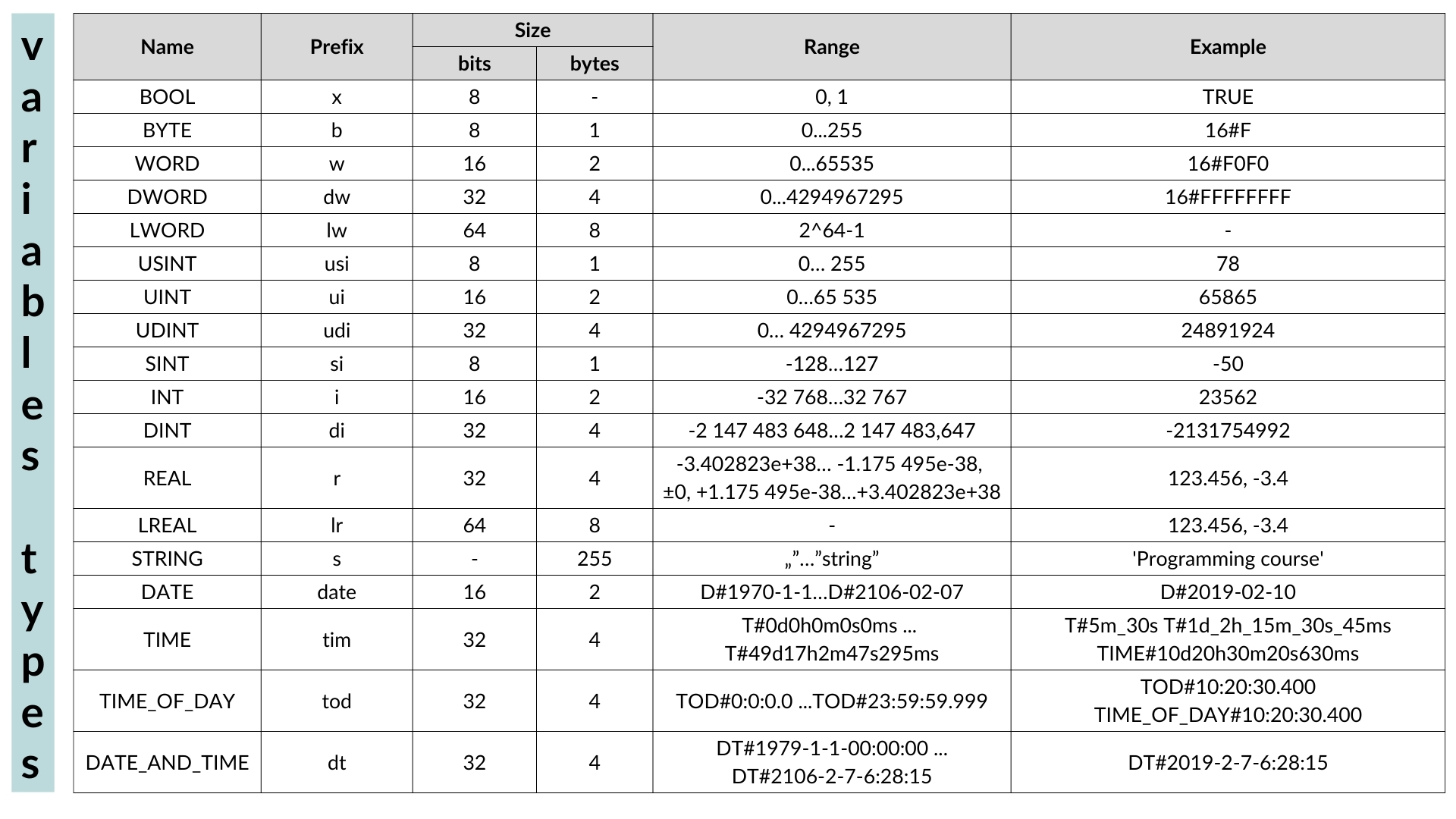
Each integer data type has a different memory size and range. For example:
- Signed Integer (INT): Uses 16 bits and ranges from -32,768 to 32,767.
- Unsigned Integer (UINT): Uses 16 bits but only allows values from 0 to 65,535.
- Signed Byte (SINT): Uses 8 bits and has a range of -128 to 127.
- Unsigned Byte (USINT): Uses 8 bits with a range of 0 to 255.
This means that choosing the appropriate integer type is critical to avoiding data overflow and optimizing memory usage in your PLC programs.
Declaring Integer Variables in CODESYS
Step 1: Opening a Project
- Open CODESYS and create a new project.
- Navigate to PLC_PRG.
Step 2: Declaring Integer Variables
To declare an integer variable, follow these steps:
- Find the prefix for integer variables in the reference table.
- Use the Hungarian notation to name the variable, for example: iVar := 5000;
- i represents an integer variable.
- Var is the chosen name.
- Use := to assign a value, followed by a semicolon (;).
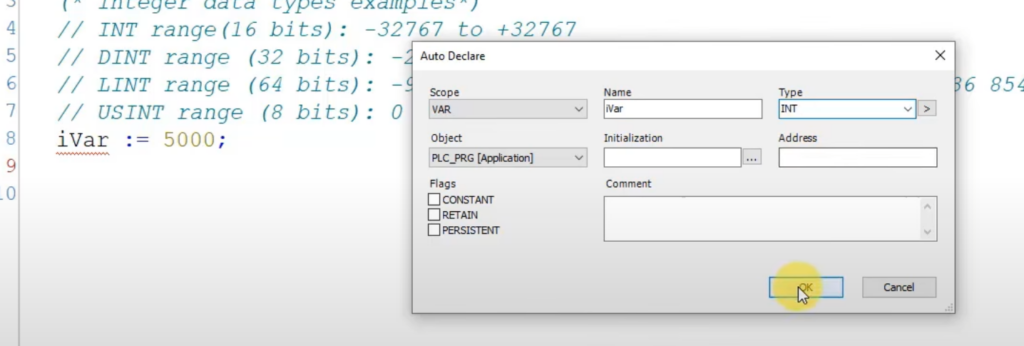
- Press Enter to open the Auto Declare window.
Step 3: Setting the Data Type
- In the Auto Declare window, set the data type to INT.
- The variable’s memory location and scope (local/global) will be determined automatically.
- Click OK to confirm the declaration.
xVar := TRUE; // writing True value to boolean variable

(* Integer data types examples*)

// INT range(16 bits): -32768 to +32767

// DINT range (32 bits): -2 147 483 648 to +2 147 483 647

// LINT range (64 bits): -9 223 372 036 854 775 808 to +9 223 372 036 854 775 807
// USINT range (8 bits): 0 to 255

iVar := 5000;
Handling Integer Overflow
What happens if you exceed the maximum value for an integer type? Let's test it:
- Declare an integer variable with a value exceeding 32,767: iVar := 40000;
- Click Compile. You will receive an error indicating that the value exceeds the integer range.
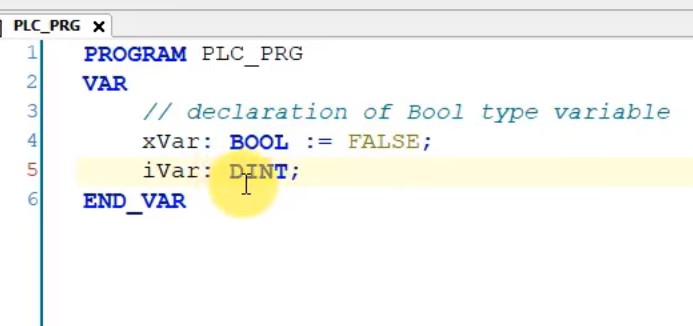
- To resolve this, change the data type to DINT (Double Integer): diVar := 40000;
- Also, update the prefix from i to di.
By using DINT, the program will now support a larger value range without errors.
Declaring Unsigned Integer Variables
Unsigned integer variables do not allow negative values. Let’s declare an Unsigned Short Integer (USINT):
- Open the Declaration Window and enter: usiVar : USINT := 200;
- This variable can store values between 0 and 255.
- If you attempt to assign -10, a warning will appear in the compiler: usiVar := -10;
- The compiler will notify you of an implicit conversion issue, as negative values are not allowed.
- Running the simulation will show that the stored value is interpreted differently due to the unsigned limitation.
Optimizing Memory Usage
Why not always use large integer types? The reason is memory efficiency. For example:
- SINT (8-bit) uses less memory than INT (16-bit).
- UINT (16-bit) is more efficient than DINT (32-bit) for storing small positive numbers.
- Smaller types matter most in large arrays, retain memory and communication buffers. On modern 32-bit and 64-bit CPUs a DINT is not slower than an INT, so choose the type mainly by the value range you need.
Using integer types wisely ensures efficient memory management and enhances the performance of industrial applications.
Declaration of Variables in CODESYS: Declaration Part and Syntax
Every program organization unit (POU) in CODESYS - a program, a function or a function block - has two parts: the declaration part at the top, where you declare variables, and the implementation part below, where you write the code. The "Auto Declare" dialog shown above simply writes a new line into the declaration part for you. You can also type the declaration directly. The general syntax of a declaration is:
Identifier (AT address) : data type (:= initial value);
The variable is identified by its name, the data type determines how much memory it takes and which values it can hold, and the optional initial value is written to the variable when the application starts. If you do not initialize a variable, CODESYS uses the default value of the type: FALSE for BOOL, 0 for numbers and an empty STRING for text.
PROGRAM PLC_PRG
VAR
    xStart        : BOOL;                 // local variable, FALSE by default
    iSetpoint     : INT := 250;           // local variable with initial value
    sMessage      : STRING(40) := 'Ready';// text, max. 40 characters
    xDoorClosed AT %IX0.0 : BOOL;         // variable mapped to a physical input
END_VAR
VAR CONSTANT
    c_iMaxParts   : INT := 100;           // cannot be written by the program
END_VAR
VAR RETAIN
    udiCycleCount : UDINT;                // keeps its value after a power cycle
END_VAR
The keywords around the declarations define the scope of the variables:
- VAR - local variables, visible only inside the POU where they are declared.
- VAR_INPUT, VAR_OUTPUT, VAR_IN_OUT - the interface of a function or a function block, used to pass values in and out when the block is called.
- VAR_GLOBAL - global variables, declared in a Global Variable List (GVL) and available throughout the entire project.
- VAR CONSTANT - constants such as c_iMaxParts; trying to write to them causes a compiler error.
- VAR RETAIN / VAR PERSISTENT - remanent variables that keep their values in memory after a power failure or a restart of the PLC.
Global Variable Lists and Variables in Function Blocks
A global variable list is added in the device tree with right-click on Application - Add Object - Global Variable List. Every variable declared there can be read and written by all programs, functions and function blocks of the application:
VAR_GLOBAL
    g_xEmergencyStop : BOOL;
    g_rTankLevel     : REAL;
END_VAR
Use global variables for data that really is shared, for example I/O signals or values exchanged with an HMI. Inside a function block, prefer local VAR, VAR_INPUT and VAR_OUTPUT variables: each instance of the function block contains its own copy of these variables, so the same block can control ten motors without any conflict. This is exactly how the standard CODESYS counters CTU, CTD and CTUD work. The difference between local and global variables is shown step by step in Part #7 of this series.
How to Write and Force Variables Online
When you are logged in to the PLC (online mode), the declaration part shows the current value of every variable. To change a value for testing:
- Double-click the "Prepared value" column and enter the new value.
- Write Values (Ctrl+F7) - writes the prepared value once. The program can overwrite it in the next cycle.
- Force Values (F7) - writes the prepared value in every cycle until you remove it with Unforce Values (Alt+F7). Forced variables are marked in the editor.
Forcing is a powerful test tool, but always remove all forces before handing a machine over to production, because a forced input or output ignores the real state of the process.
CODESYS Variables - FAQ
How do you declare variables in CODESYS?
Type the declaration in the declaration part of the POU, for example iCounter : INT := 0; inside a VAR ... END_VAR section, or write the variable name in the code and press Enter to open the Auto Declare dialog, which adds the declaration for you.
What are the data types in CODESYS?
The most common elementary data types are BOOL, the integer types (SINT, INT, DINT, LINT and their unsigned versions USINT, UINT, UDINT, ULINT), the bit strings BYTE, WORD and DWORD, the floating-point types REAL and LREAL, STRING and WSTRING for text, and TIME, DATE and TIME_OF_DAY for time values. Arrays and structures are described in Part #6.
What is the difference between a variable and a constant in CODESYS?
A variable can change its value while the program runs. A constant is declared in a VAR CONSTANT section, gets its value at declaration and cannot be written by the program, which protects configuration values such as limits or recipe sizes.
Summary
Efficient memory and variable management in CODESYS is crucial for optimizing PLC resources and ensuring proper program execution. This article covers fundamental memory units, variable types, and declaration methods, highlighting the importance of selecting appropriate data types for system performance and stability. You also learned how the declaration part, global variable lists and online write and force commands work. In the next part we move on to REAL numbers, arrays and structures in CODESYS. If you want to practice all of this on a virtual PLC, check our Structured Text programming course in CODESYS.