CODESYS 4 is the new web-based IEC 61131-3 development environment for PLC programming, released by CODESYS Group on September 24, 2026 as version 1.0.0.0. Same compiler, same libraries, same runtime on the controller. What is new is the user interface, the project format and the command line. Below I break down what you actually get in the first release, what is still missing and who should install CODESYS 4 right now.
What is CODESYS 4?
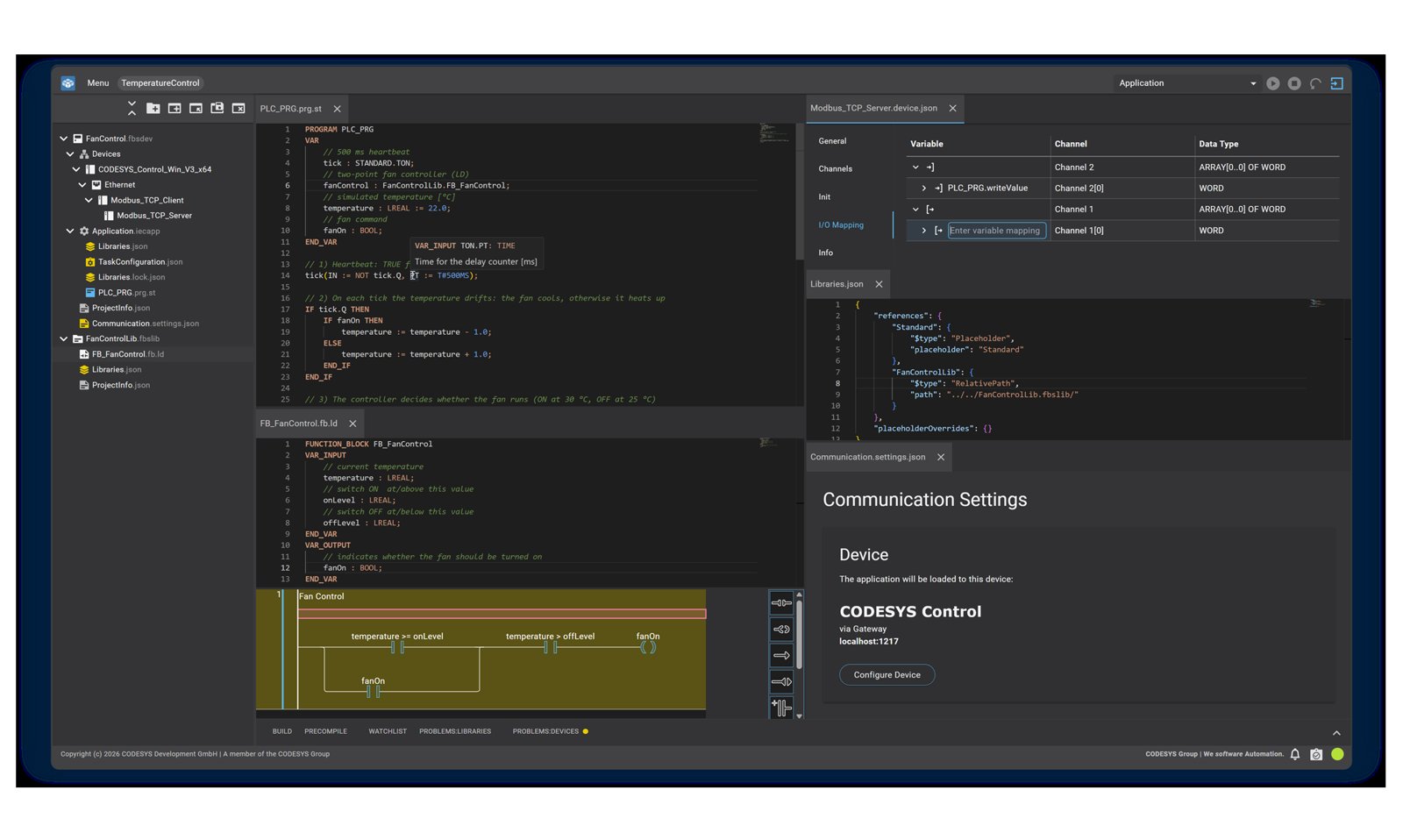
CODESYS 4 is a second programming system next to CODESYS Development System 3, not an overnight replacement. You still program according to IEC 61131-3, in Structured Text (ST) and Ladder Diagram (LD). What changes is what lies underneath:
- the user interface runs in a browser window (on Windows in its own window, no separate browser needed),
- a project is a folder of text files (JSON, XML, plain text), not one binary file,
- next to the GUI there is a command-line tool,
c4-cli.
New to CODESYS? Start with CODESYS: What Is It and Why Should Every PLC Programmer Know It?
What stays the same
This is the key point for anyone with CODESYS 3 projects in production.
- Compiler, libraries and runtime are identical. Code compiled in CODESYS 4 runs on any controller that runs CODESYS 3 code (runtime V3.5 SP19 or newer).
- Library projects are compatible in both directions. A library stored in CODESYS 3 with file-based storage opens in CODESYS 4 and vice versa. A compiled library (
.compiled-library) can be used in projects in both environments. - Device projects need conversion. They cannot be opened directly across environments. A conversion tool is planned but not included in 1.0.0.0.
- CODESYS 3 is here to stay. Both tools are developed in parallel and there is no end-of-life date for version 3.
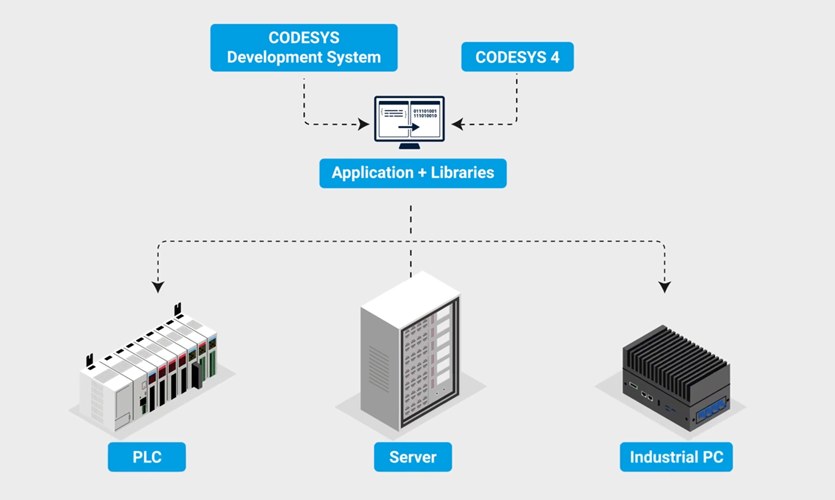
What's new in CODESYS 4 version 1.0.0.0
The project is a folder, ready for Git
Instead of a single project file you get a directory: .fbslib for libraries, .fbsdev for device projects and .fbsws for workspaces. You can diff the files with standard tools and keep them in Git, like any software team does. It is the same problem I covered for Siemens in TIA Portal V21 Version Control in Git, except that here the text format is the default. For Git basics, see GitHub for Automation Engineers and PLC Programmers.
Dependency management like modern software
Libraries.jsonlists the libraries you use, including version ranges such as3.5.*,Libraries.lock.jsonrecords the exact resolved versions with a SHA384 checksum,- semantic versioning, including pre-release tags.
Result: the build machine in your pipeline uses exactly the same library versions as your laptop.
The c4-cli command line and CI/CD
Example commands in the first release:
c4-cli library save-compiled   # builds a compiled library
c4-cli library pack            # creates a source archive
c4-cli bootapp compile         # builds a boot application without an IDE connection
On top of that: install, restore, resolve and check for dependencies, controller login and logout, controller reset and workspace creation. In the first release the pipeline build machine needs no separate license.
Editors
- ST editor with syntax highlighting, auto-completion and hover tooltips.
- Ladder (LD) editor version 0.1, based on the CODESYS 3 graphical editor, currently with basic offline functions.
- Inline monitoring of variable values directly in ST code.
- Command Center for keyboard navigation, split views and saved tab layouts.
- UI in English and German, light and dark themes.
Operating modes and platforms
| Mode | Platform | How it works |
|---|---|---|
| Single user | Windows x64 | installer, own window, no internet needed |
| Single user | Linux x64, Linux ARM64 | .deb package, session in the local browser |
| Team server | Linux x64, Linux ARM64 | c4-server, Linux users and groups (LDAP via PAM), one process per session |
| Headless | Windows and Linux | c4-cli run manually, from a script or in a pipeline |
"Web-based" describes the UI technology. CODESYS 4 is not a cloud service and not a subscription. You install it on your own PC, on a server in your network or even on a controller.
Supported controllers and requirements
In version 1.0.0.0 only CODESYS Control SL runtimes are approved for engineering:
- Raspberry Pi: Control for Raspberry Pi SL, MC SL and 64 SL,
- Windows soft PLC: Control Win V3 (x64) and Control RTE V3 (x64),
- Linux: Control for Linux SL, ARM SL and ARM64 SL,
- virtual controllers: Virtual Control for Linux SL, ARM SL and ARM64 SL.
The minimum runtime is CODESYS V3.5 SP19, because user management on the controller starts with that version. The connection goes through CODESYS Gateway 3.5 or newer. Third-party hardware can technically be integrated, but without a guarantee. The device vendor has to test the device description and libraries, and distribution as a Content Extension is expected from version 1.1.0.0.
Workstation requirements: 3 GB RAM (8 GB recommended), 4 GB free disk space, .NET 8 (Desktop Runtime and ASP.NET Core Runtime) and Chrome, Edge or Firefox.
What is still missing
CODESYS Group says openly that the first release is intentionally limited. Two use cases are production-ready:
- Library development in ST and LD with automated builds (CI/CD).
- Small device projects on Modbus TCP, such as test benches and simple machines.
For everything else, stay with CODESYS 3. Missing items include:
- online changes, breakpoints, writing and forcing variables,
- online power flow display in Ladder,
- FBD, SFC, CFC and IL, other fieldbuses, visualization, motion and safety,
- refactoring, cross-reference lists, project-wide undo and redo,
- Test Manager, static analysis and automated unit tests,
- TLS encryption and certificate authentication for PLC communication.
That is why CODESYS 3 is still the better tool for classic commissioning at the machine.
CODESYS 4 vs CODESYS 3: who should use it now?
| Criterion | CODESYS 3 | CODESYS 4 (1.0.0.0) |
|---|---|---|
| User interface | Windows desktop app | browser or own window, Windows and Linux |
| Project format | single binary file | folder of text files |
| Languages | all IEC 61131-3 languages | ST and LD |
| Commissioning | full online features | no online change or forcing |
| CI/CD | via scripts and add-ons | native, c4-cli |
| License | free | free until the end of 2028 |
Install CODESYS 4 now if you:
- write ST libraries and want to build them automatically from Git,
- build small machines or test benches on Modbus TCP,
- work on Linux or ARM and do not want to keep a Windows virtual machine around.
You can also combine both: write and test the library in CODESYS 3 and use CODESYS 4 only for automated builds in the pipeline.
License and release cycle
- CODESYS 4 is free to use until the end of 2028.
- A paid model is planned from 2029 at the earliest, as part of the Professional Developer Edition. If you already use its tools, such as CODESYS Git or the CODESYS MCP Server, CODESYS 4 is included in the same bundle.
- CODESYS Development System V3 stays free.
- New versions (1.1.0.0, 1.2.0.0 and so on) are planned every 6 to 8 weeks, with no service packs or patches. If you build in a pipeline, plan your upgrades.
Details and downloads: CODESYS 4 product page and CODESYS Store.
FAQ
Do I have to switch to CODESYS 4?
No. CODESYS 4 does not replace CODESYS 3 today. Both are developed in parallel and there is no phase-out date for version 3.
Will my existing code keep running?
Yes. Compiler, libraries and runtime are unchanged. Library projects open in both environments, device projects need conversion.
Are CODESYS 4 projects stored in the cloud?
No. The UI is web-based, but you install the software yourself and store projects wherever you want. No internet connection is required.
I only program in Ladder. Is CODESYS 4 for me?
The LD editor is there from day one and you do not need a high-level language. It is still version 0.1 without online features, so keep CODESYS 3 for commissioning.
Is version 1.0.0.0 a beta?
No. It is approved for production use in library development and small projects, with the same quality standards as CODESYS 3. The feature set is just much smaller.
Summary
CODESYS 4 is mainly a change in how you work: text-based projects, Git, a command line and automated library builds. The foundation does not change, so your IEC 61131-3 and CODESYS 3 skills carry over one to one. CODESYS 3 remains the main commissioning tool for now, but CODESYS 4 is worth installing today to learn the concepts while it is free.
The best preparation is solid Structured Text, because that is what CODESYS 4 is built around.
Author