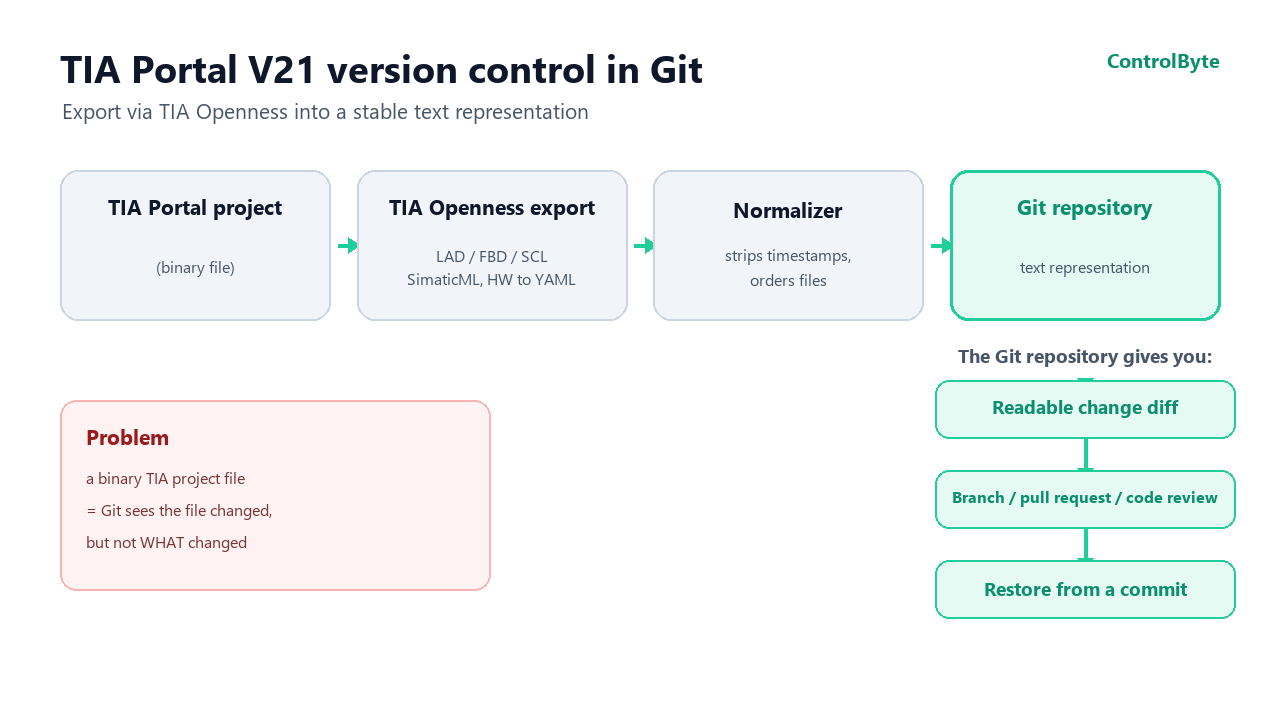
TIA Portal version control in Git usually runs into the same wall: a TIA Portal project is a binary file. The repository will show that the file changed, but it will not explain what actually changed. For an engineer who maintains machines, that is a real problem, not just a tooling inconvenience.
TIA Project Server helps manage successive versions of a project. It stores them, locks files and keeps the order of work under control. What it does not give you is a simple answer to the question: "What changed in the project between Tuesday and Thursday?". You can rely on version comments, but their quality depends on how disciplined everyone working with the project is.
I wanted to see whether this process could be complemented with a readable change history. So I built a proof of concept of a tool that exports the contents of a TIA project into a form suitable for versioning in Git. In this article I describe the assumptions, the biggest difficulties and the results of the tests so far.
Where the idea came from
The starting point was a set of situations that come up regularly in machine maintenance.
The first is a breakdown and the question: "What is actually loaded right now?". Determining which logic and hardware configuration were running on the controller on a specific day usually means opening successive project versions in TIA and comparing them by hand.
The second is hardware changes. Someone changed an IP address, added a module or reassigned a device address on the PROFIBUS network. With several controllers, distributed stations and an extensive network, reconstructing who made the change and when can be very hard.
The third problem is change review. File-based HMI projects can be put in a repository and reviewed before deployment. With the PLC program it is harder, because the project file itself gives you nothing to base a sensible code review on.
In all of these cases the same thing is missing: a history you can read and understand quickly, without opening several copies of the project.
A few Git concepts
Four basic concepts are enough to follow the rest.
- Git is a version control system. It remembers successive states of a directory of files and lets you return to any of them. It works best with text files.
- A commit is a saved state of the project at a given moment, together with a change description and author information.
- A diff shows the difference between two commits: the lines added, removed or changed. This is exactly what is missing with a binary TIA project file.
- Branches and pull requests let you prepare a change on a separate branch, put it through review, and only then merge it into the main version.
A text representation of the TIA project
Instead of trying to version the project file itself, I export its contents through TIA Openness. The binary file can still live in TIA Project Server, while its text representation goes into Git.
At the moment it covers:
- LAD, FBD and SCL blocks as Simatic Source Documents - in TIA Portal V21 graphical blocks can also be exported to readable text instead of XML;
- UDTs and tag tables saved as SimaticML;
- the hardware configuration exported via CAx/AutomationML and processed into an ordered YAML file;
- HMI panel program elements, among others screens, tags and connections;
- signatures of F blocks, intended solely for change tracking.
TIA Openness is the programming interface of TIA Portal. It lets an external program open a project and export its contents without manually clicking through the TIA interface.
After the export you get an ordinary repository: you can browse the history, work on branches and prepare pull requests. The TIA project itself does not change its format in the process.
A readable diff of the hardware configuration
For the program, part of the problem is solved by the export itself. SCL has long had a text form, and TIA Portal V21 lets you treat graphical blocks in a similar way. The hardware configuration required more work.
Changing an IP address, adding a module or reassigning a PROFIBUS address should be visible in the history in a way a human can understand. The raw CAx/AutomationML export is not convenient for that, so the tool transforms it into ordered YAML and then compares the changes at the level of meaning.
As a result, the history can contain messages like these:
PLC-01: interface X1 IP address changed from 10.2.0.1 to 10.2.0.50
IO station: added DI 4x24VDC module in slot 3 (6ES7 221-3BD30-0XB0)
Such an entry is readable not only for a programmer. It can also be used by an engineer on another shift or a maintenance manager who wants to quickly establish the scope of a modification.
The biggest problem: export reproducibility
The most time was not taken by running the export or preparing the diff view. What turned out to be crucial was bringing the exported files to a stable form.
TIA can save the same, unchanged project in a slightly different way on successive exports. The files include, among other things, the export date, the compilation date and the block's last modification time. A single such field is enough for Git to show a change even though no one modified the program or the configuration.
If such an export were run daily, the repository would quickly fill up with meaningless changes. After a while, users would simply stop trusting the history.
That is why a normalizer sits between the export and the commit to Git. It removes time-dependent fields and orders the file structure. The basic test is: two exports of an unchanged project must produce an empty diff.
In practice I take a snapshot of the project, make no changes and run the snapshot again. If the tool then wants to create a commit, the export is not yet stable enough. During the first test, the cause of the false changes was a single export-date field added to every file.
Restoring the project from a chosen commit
Browsing the history is useful, but I also wanted to check the ability to return to an earlier state. In the current version the tool reads a chosen commit and, based on it, restores the program and hardware configuration in the TIA project.
This part also matters for working with branches. Once a change is approved and merged, the state saved in Git has to be transferable back into TIA Portal. Without that, the repository would mainly serve as documentation.
Writing back to the project is the riskiest operation the tool performs, so I applied three safeguards:
- a change plan is always created before writing;
- a timestamped backup is created before every write operation;
- safety blocks remain untouchable.
F block signatures are saved in the history, but only to detect changes. The tool has no import path for the safety program. Exporting and re-importing such blocks could invalidate the collective F signature and require re-acceptance of the safety. This kind of operation should not happen automatically in the background.
What has been verified
The project is still at the proof of concept stage. On a real project I tested:
- taking a snapshot of the whole project;
- getting an empty diff for two exports with no changes;
- a semantic comparison of the hardware configuration;
- restoring a chosen snapshot;
- a simple desktop application;
- a web panel with the station history.
The restore test gave a promising result. After running the export and a commit, I imported the saved state back into TIA and then exported it again. The resulting text representation was byte-identical to the original.
The scope of the tests is limited for now. I have not checked TIA Portal versions older than V21, nor the tool's behavior on large projects. The attempts so far covered one PLC, one HMI panel and a few modules. The results should therefore not yet be treated as confirmation that it works for every TIA configuration.
Frequently asked questions (FAQ)
Do I have to give up TIA Project Server?
No. The binary file can still live in TIA Project Server, while its stable text representation goes into Git in parallel. The two tools complement each other: Project Server keeps the order of work, Git gives a readable change history.
What exactly goes into the repository?
LAD, FBD and SCL blocks as Simatic Source Documents, UDTs and tag tables as SimaticML, the hardware configuration as ordered YAML, HMI elements, and F block signatures (for change detection only).
Does the tool modify safety blocks?
No. F blocks remain untouchable, and their signatures are stored only to detect changes. The tool does not import the safety program, so it will not invalidate the F signature or force a re-acceptance of the safety.
Which TIA Portal version does this work with?
The tests were run on TIA Portal V21, where graphical blocks can also be exported to readable text. Older versions have not been checked yet.
Summary
A TIA Portal project can have a readable change history, even if its underlying format stays binary. In my approach Git does not store the binary itself as the main source of diffs, but a stable text representation created through TIA Openness.
The most important condition is reproducibility: two exports of a project in which nothing was changed must be identical. Only then does the history show real modifications instead of export dates and other technical details.
The most useful part turned out to be the readable description of hardware changes. Instead of being told that a file changed, you can see which IP address was set or which module appeared in a station. That turns the repository not just into an archive of the program, but also into practical documentation of changes in the machine.
If you want to learn PLC programming from scratch and apply this kind of approach in real projects, check out our premium PLC programming course in LAD/FBD. See also our take on Git and GitHub for PLC programmers and on building a TIA Portal MCP server on Openness V21. Interface details are in the Siemens TIA Openness documentation.