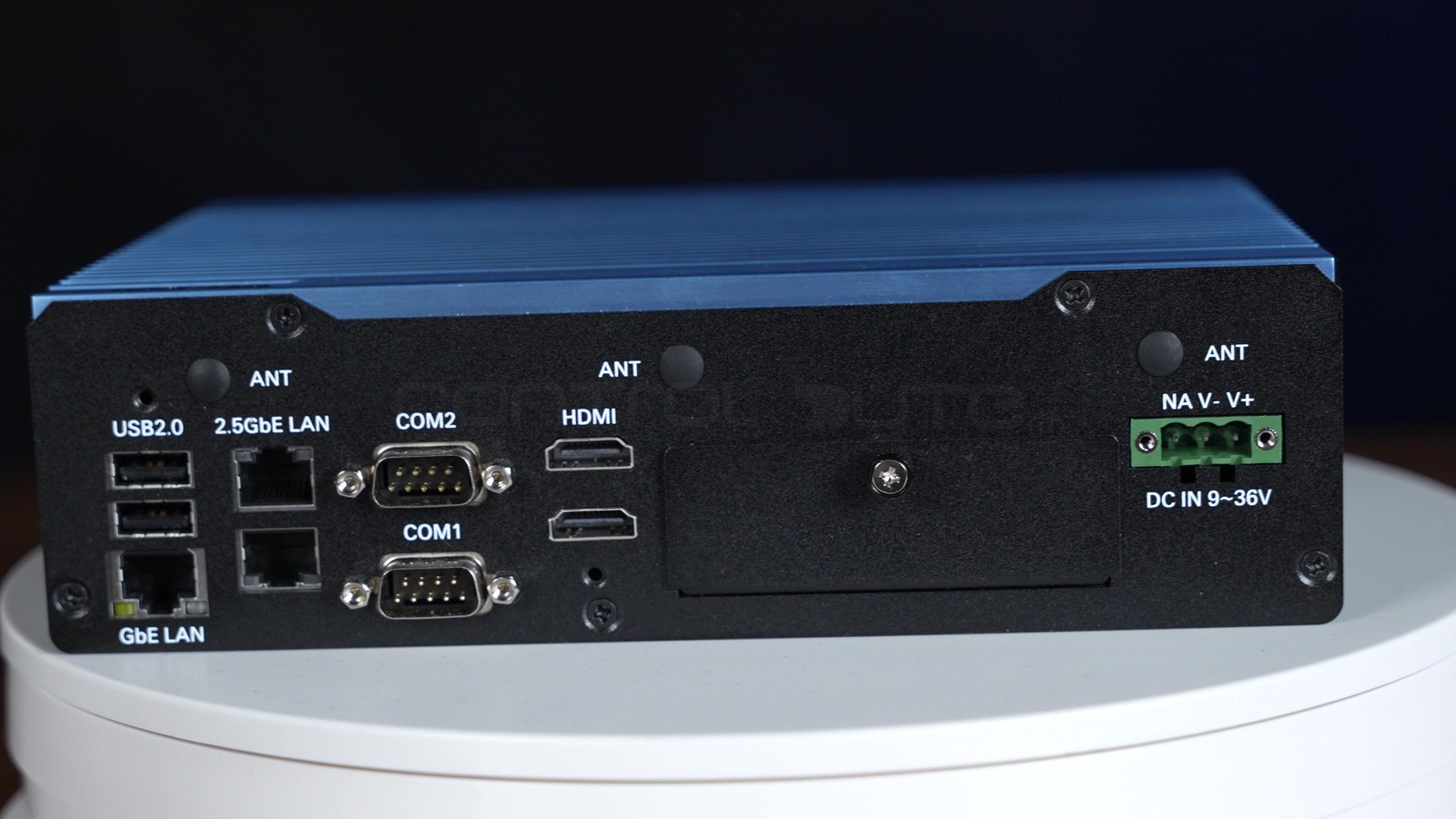
A fanless industrial PC is the quiet workhorse behind many modern machines, and the Boxer (model BOXER-6647-MTH) is the unit we have been testing in the ControlByte lab. We borrowed this fanless box PC from CSI to show, on real hardware, how an industrial computer differs from an ordinary desktop or mini PC and where it fits in an automation system. Below we walk through every port on the front and rear panels, explain how passive cooling works, compare fanless and fan-cooled designs, and share the four industrial tasks we use the Boxer for: communication, data collection, a mobile communication node and edge AI.
What is a fanless industrial PC?
An industrial PC (IPC) is a computer built for continuous operation in conditions where an office computer would not last long: heat, dust, humidity, vibration and an unstable power supply. A fanless industrial PC takes this one step further and removes every moving part from the cooling system. There is no fan, no filter to clean and no bearing to wear out. The whole metal enclosure works as one large heat sink, so heat from the processor and other internal components travels into the chassis and leaves through the fins into the surrounding air.
Because nothing pulls air through the case, there are no vents for dust, metal particles or oil mist to enter. That is the main reason why fanless industrial PCs are so common in control cabinets, on production lines and in other challenging industrial environments where uptime matters more than raw processing power.
Types of industrial computers
Industrial computers come in several form factors:
- Box PC - a compact, rugged enclosure with all ports on the panels; you connect your own monitor. The Boxer belongs to this group.
- Panel PC - a computer built into a touch display, often used as an HMI on the machine.
- DIN-rail PC - a slim fanless embedded computer that clips onto the rail inside a control cabinet.
- Rackmount PC - a server-style unit for 19-inch racks in a control room, usually with fans.
Compared with a consumer mini PC, a fanless box PC offers an industrial-grade enclosure, more communication interfaces (dual LAN, serial COM ports, digital I/O) and a fanless design meant for 24/7 work rather than short office sessions.
Fanless vs fan-cooled industrial PCs
Both designs have their place. The table below summarizes how they compare in practice.
| Feature | Fanless industrial PC | Fan-cooled industrial PC |
|---|---|---|
| Cooling | Passive: the metal enclosure removes heat | Active: a cooling fan forces airflow through the case |
| Moving parts | None in the cooling path | Fan and bearings that wear over time |
| Dust and dirt | Sealed design, no air intake | Vents and filters that need cleaning |
| Noise and vibration | Silent, no vibration from cooling | Audible fan noise |
| Processing power | Usually low-power or mid-range processors | Room for high-performance CPUs and GPUs |
| Maintenance | Practically maintenance-free | Regular filter and fan service |
| Typical place | Control cabinet, machine, kiosk, vehicle | Control room, rack, lab |
In short: a fan-cooled computer wins when you need maximum compute, for example a large GPU for training AI models. A fanless computer wins when the PC has to sit close to the process for years without service.
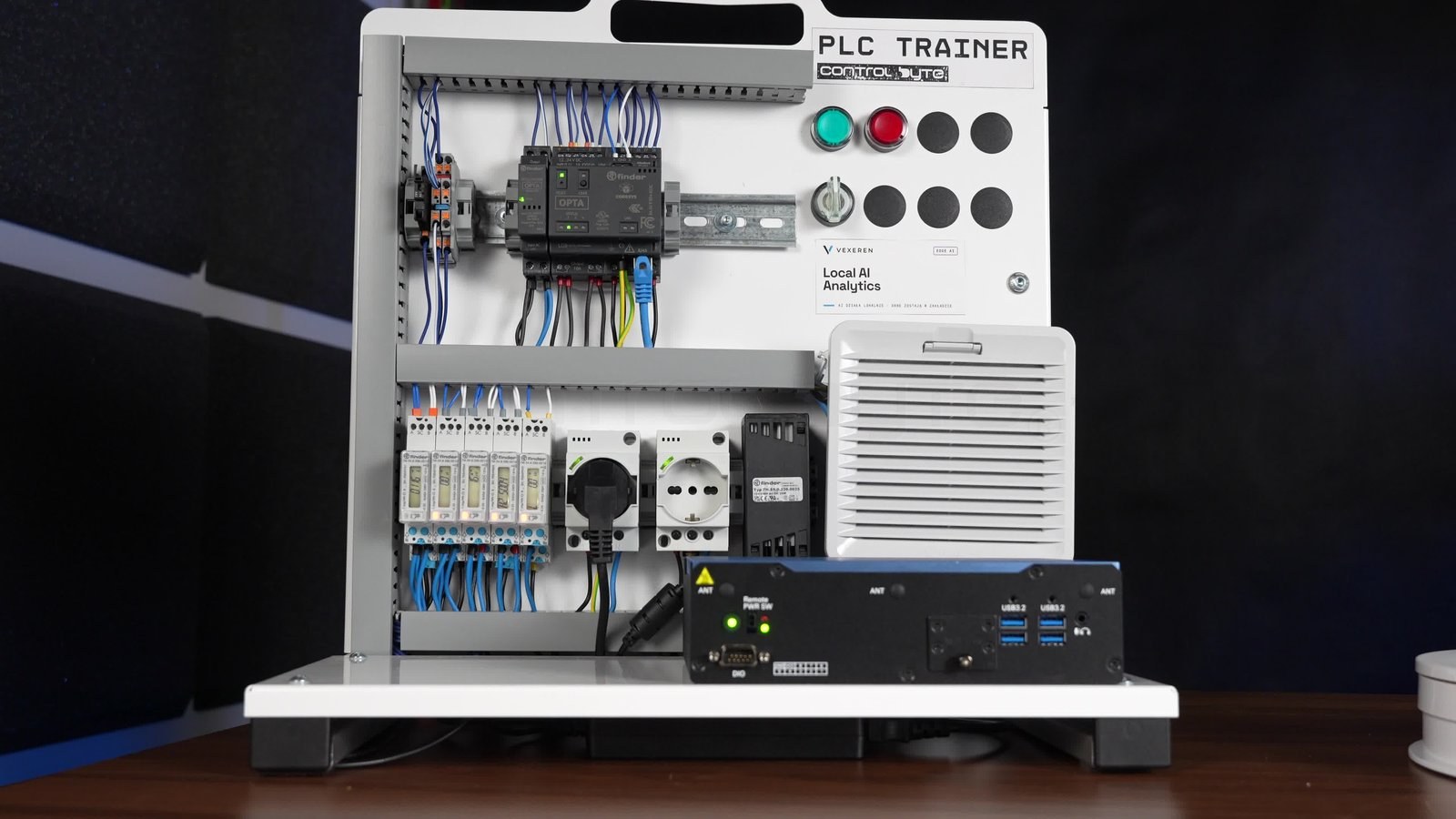
The Boxer from CSI on our training station
We placed the Boxer on our PLC training station, next to a CODESYS-based controller and an edge analytics panel. This shows straight away what company such a computer keeps in a real application: it does not work alone, but as one part of a larger automation system.
The chassis is fully metal, with deep fins along the sides. The fins are not decoration, they are the heat-dissipating surface. The unit is compact and ready to be mounted inside a cabinet. Both panels carry a full set of industrial connectors, which we describe one by one below.
Front panel ports
The front panel groups the ports you use most often: network, video and basic USB.
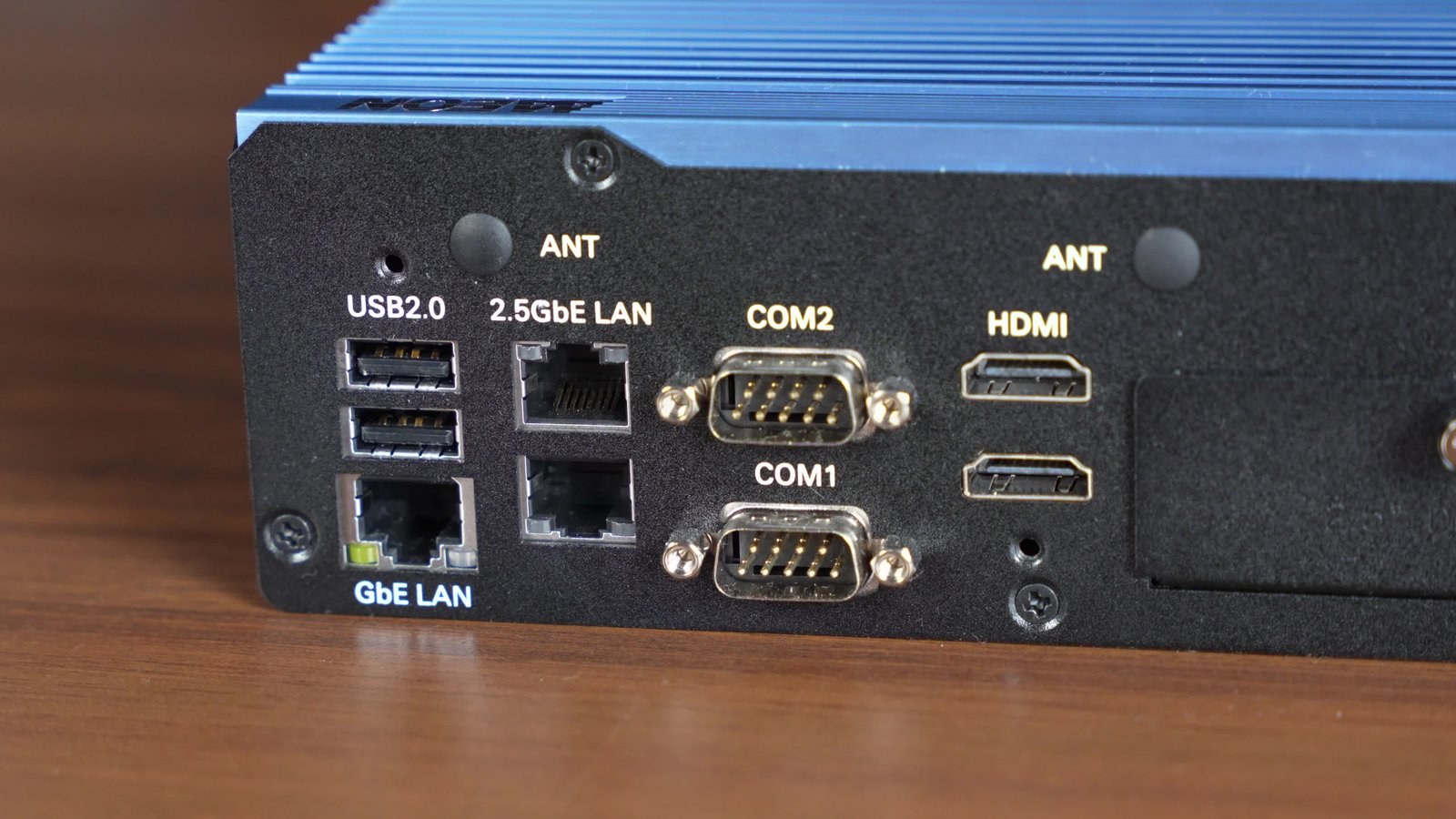
| Port | Qty | What it is for |
|---|---|---|
| USB 2.0 | 2 | Keyboard, mouse, license dongle, service tools |
| LAN 2.5GbE | 1 | Fast Ethernet for cameras or bulk data transfer |
| LAN GbE | 1 | A second, independent network |
| COM1 (DB9) | 1 | Serial port, typically RS-232/422/485 for industrial devices |
| COM2 (DB9) | 1 | A second serial port for another device |
| HDMI | 2 | Two independent displays, e.g. operator screen and diagnostics |
| Antenna | 1 | Wireless antenna connector |
Dual LAN is a key feature in industrial automation. Two independent ports let you physically separate the machine network from the office network, which is one of the foundations of IIoT and OT security. The two DB9 serial ports support older but still very common devices such as scales, barcode readers, drives and energy meters that talk RS-485 or RS-232.
Rear panel ports
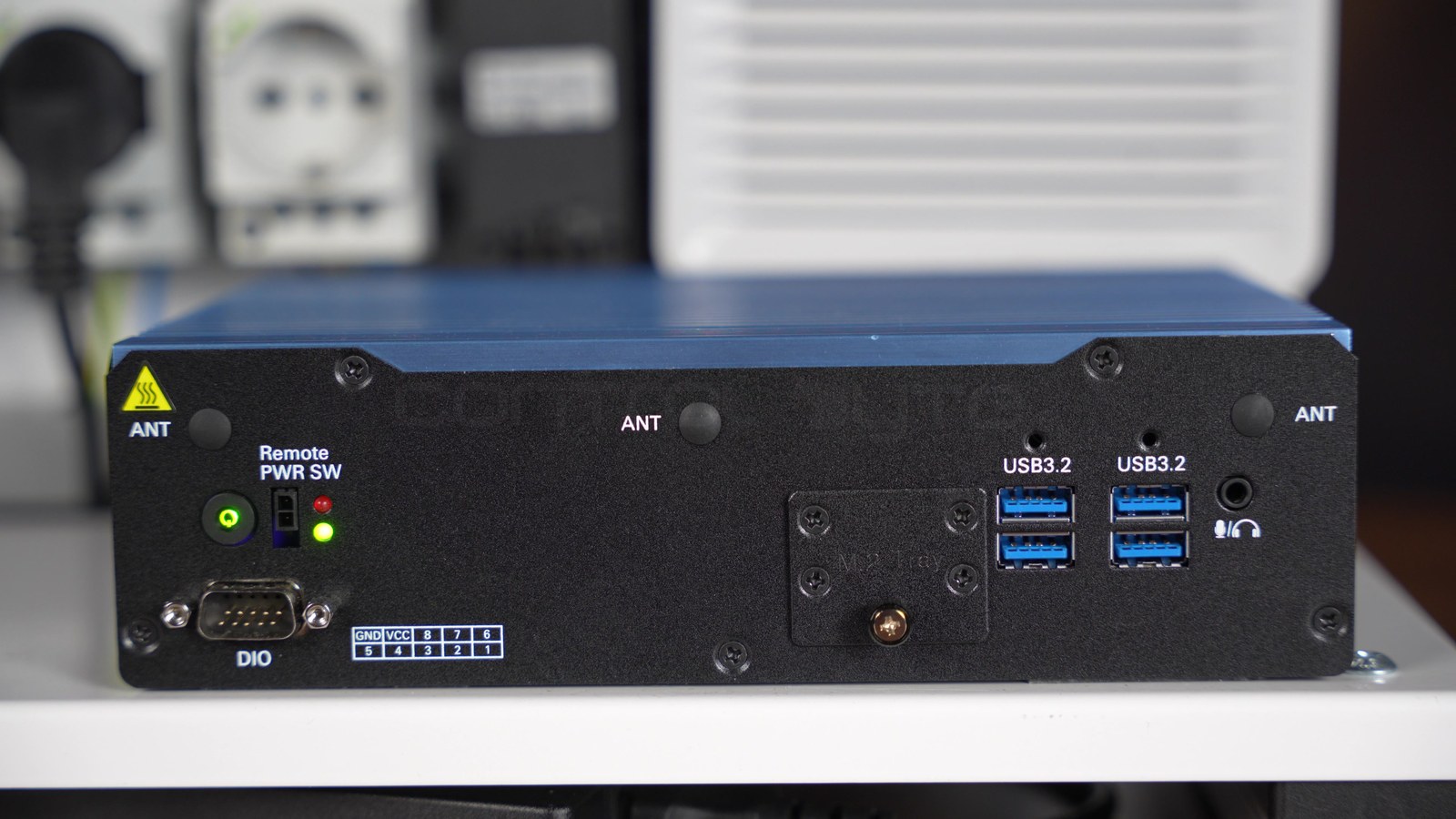
The rear panel holds the high-bandwidth ports, digital I/O and service features.
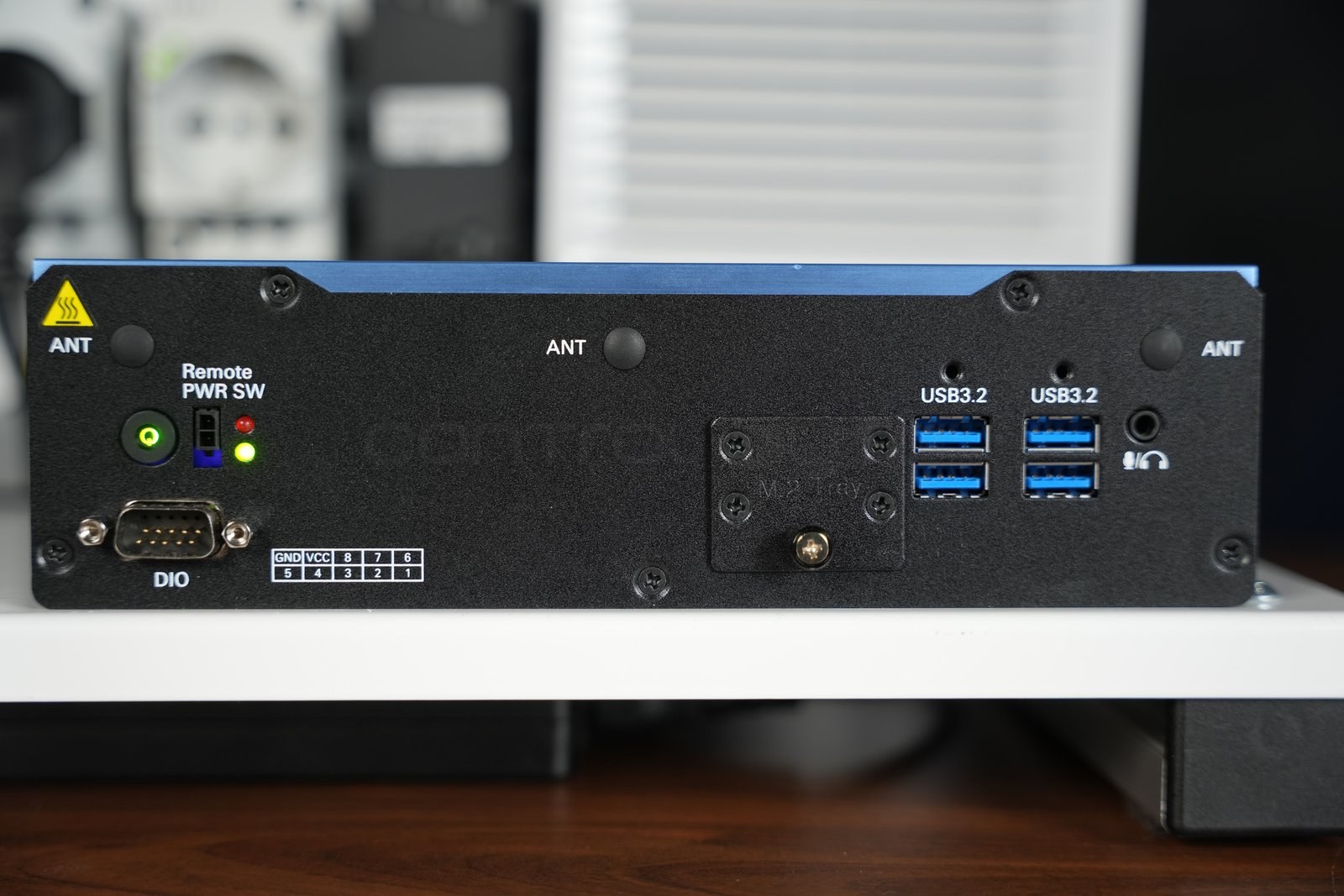
| Port | Qty | What it is for |
|---|---|---|
| USB 3.2 | 4 | Fast storage, industrial cameras, AI accelerators |
| DIO (DB9) | 1 | Digital inputs and outputs for simple field signals |
| M.2 Tray | 1 | Removable tray for the M.2 SSD |
| Audio / mic | 1 | Sound, e.g. alarms or voice communication |
| Antenna | 3 | Wi-Fi or cellular modem antennas |
| Remote Power SW | 1 | Switch the PC on and off with an external button |
The Remote Power Switch connector is a small detail that makes a big difference in real installations. When the computer is mounted deep inside a cabinet, an external power button on the cabinet door makes service much easier. Status LEDs sit right next to it. Three antenna connectors on the rear and one on the front show that the unit is prepared for both Wi-Fi and cellular connectivity, so it can work as a data gateway in places with no network cable.
The DIO connector step by step
DIO stands for Digital Input/Output. On the Boxer it is a DB9 socket that lets the computer read and drive simple on/off signals without a separate I/O card.
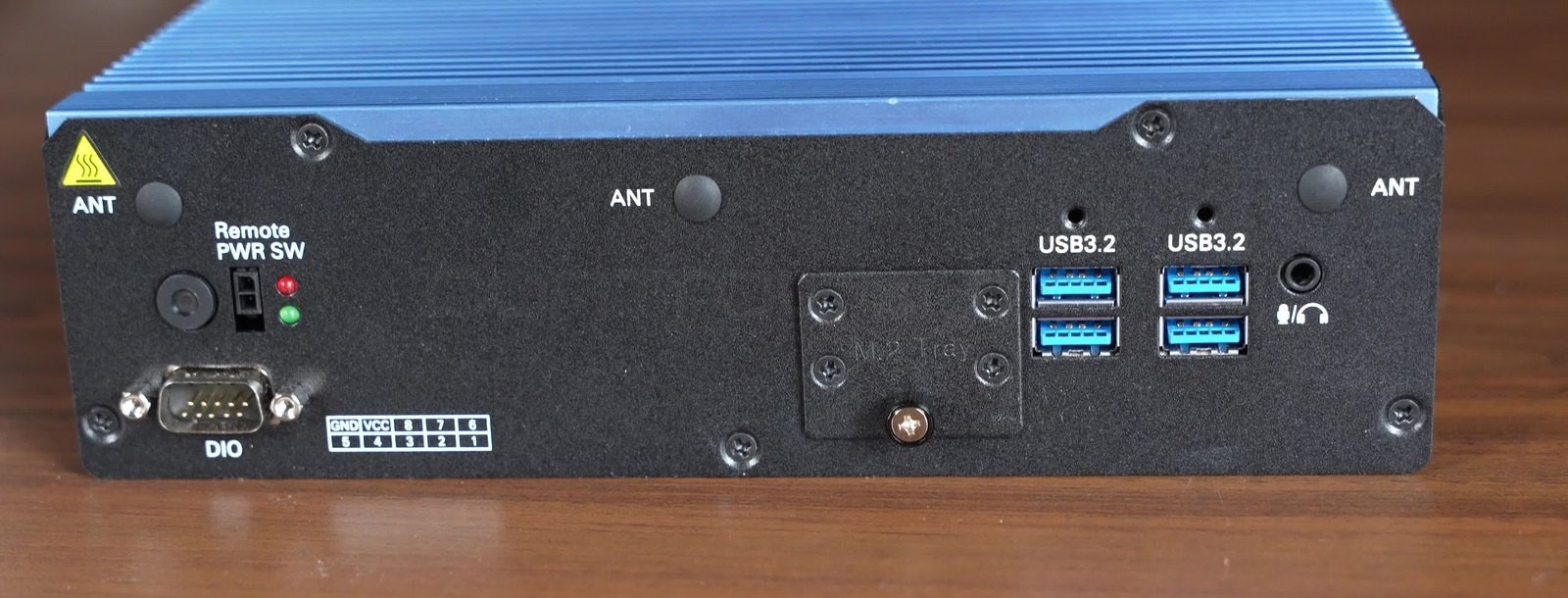
The pin legend printed on the enclosure shows:
- GND - ground reference.
- VCC - supply pin.
- Lines 1-8 - eight digital signal lines.
In practice you connect inputs such as a limit switch, a presence sensor or a push button, and outputs such as a signal lamp or a relay. Which lines work as inputs or outputs, and what voltage levels they accept, must be checked in the manufacturer's documentation before wiring. Once connected, the PC can take part in simple signal logic, for example detecting an event on the line and logging it to a local database.
Passive cooling: how a fanless PC stays cool
The side walls of the enclosure form one large heat sink. Heat from the processor moves into the metal and spreads through the fins into the surrounding air. This passive cooling has three practical benefits:
- Reliability - there is no fan that can stop and cause overheating.
- Dust resistance - no forced airflow means no dust or dirt is pulled inside.
- Silence - no noise and no vibration from the cooling system.
Do fanless industrial PCs overheat?
A well-designed fanless computer does not overheat under its rated workload, but the thermal design has to be respected. The processor is chosen with a TDP that the enclosure can dissipate, and under a sustained heavy workload some fanless PCs lower their clock speed to stay within limits. Two rules help in practice: leave free space around the fins inside the cabinet, and check the operating temperature range in the datasheet against the real conditions on site. The Boxer itself carries a hot-surface warning label, which is normal for a fanless design under load. It is also normal for a fanless PC to feel hot to the touch.
Technical specifications
We described the ports and the design directly from the unit on our bench. Computing parameters such as the processor, RAM, storage capacity, operating system, operating temperature range and power input will be confirmed against the manufacturer's specification and added to this section once we receive the datasheet from CSI. Below is what can be read directly from the enclosure and its equipment.
| Feature | What we see on the unit |
|---|---|
| Model | BOXER-6647-MTH |
| Type | Fanless industrial PC (box PC) |
| Cooling | Passive, enclosure as heat sink, no fan |
| Network | 2 x LAN (2.5GbE and GbE) |
| Serial ports | 2 x COM (DB9) |
| USB | 4 x USB 3.2, 2 x USB 2.0 |
| Video | 2 x HDMI |
| Digital I/O | DIO on DB9 (8 lines + GND/VCC) |
| Storage | M.2 SSD in a removable tray |
| Wireless | 4 antenna connectors (Wi-Fi / cellular) |
| Power | Remote Power SW connector for an external button |
| Audio | Microphone / headphone jack |
This set of ports is a typical, well-equipped configuration of a general-purpose industrial computer: it can serve as a communication gateway, a data collection station and a local compute node.
How to choose the right fanless industrial PC
When you select a fanless industrial PC for an application, go through this checklist:
- Processor and workload - match the CPU class (for example Intel Atom, Intel Core or Xeon class chips) to the real workload. A protocol gateway needs far less compute than machine vision.
- I/O and expansion options - count the LAN, serial, USB, DIO/GPIO ports you need today and leave spare ones. Check PCIe or M.2 slots if you plan to add cards or accelerators later.
- Operating temperature range - compare the wide temperature range in the datasheet with the temperature inside your cabinet in summer.
- Rugged features and certifications - look at shock and vibration ratings, ingress protection (IP rating) if the PC is not inside a cabinet, and the industrial or IEC standards your sector requires.
- Operating system - most units run Windows 10/11 Pro or IoT editions and Linux. Make sure the drivers for DIO and serial ports exist for your system.
- Storage - a solid-state SSD with no moving parts fits the fanless philosophy. Plan capacity for logs and databases.
- Mounting and power - DIN rail, wall or VESA mount, and a DC power input that matches your cabinet supply.
How we test the Boxer at ControlByte
We borrowed the computer to check it on real industrial tasks rather than synthetic benchmarks. We focus on four areas.
Industrial communication. Two LAN ports and two serial ports make the Boxer a natural protocol gateway. We use it as the meeting point between devices speaking Modbus TCP and Modbus RTU, OPC UA, MQTT or Profinet and the higher-level systems. Here it translates protocols and organizes the data flow, for example with a Python script that reads a PLC over OPC UA.
Mobile communication node (Mobile CCP). Thanks to the antenna connectors and wireless connectivity, we test the computer as a mobile communication node that keeps working where there is no fixed network cabling.
Local database. We run a local database on the M.2 SSD and use the Boxer as a station that collects and stores process data close to the machine. Data is written locally first and synchronized with higher-level systems such as SCADA at a convenient moment, a pattern similar to the one in our wind turbine SCADA project with CODESYS, Ignition and Grafana.
Edge AI for industry. The most interesting area is running AI models locally, right at the machine. Edge computing means processing data where it is created: machine vision on camera images, anomaly detection and support for predictive maintenance, without sending everything to the cloud. USB 3.2 ports allow cameras and AI accelerators to be connected, while dual LAN keeps the data traffic away from the control network.
Fanless industrial PC applications
Putting it all together, a fanless industrial PC like the Boxer works best as:
- a communication gateway between PLCs and IT or SCADA systems,
- a data collection station with a local database at the machine,
- an industrial edge computer for local computing and AI models,
- a visualization or HMI station with two independent displays,
- a retrofit component for older installations thanks to its serial ports,
- a node in Industrial IoT and remote monitoring systems.
In each of these roles the same things decide: a reliable, maintenance-free design and a full set of industrial interfaces in one small enclosure.
Learn the automation skills around an industrial PC
An industrial computer is only a tool. The value appears when you can connect it to PLCs, protocols and data, and that is what we teach at ControlByte. If you are just starting, begin with our Industrial Automation Basics course.
If you want to do exactly what we did with the Boxer, take the Profinet, Modbus, OPC UA and MQTT communication course. For data and scripting on the edge, see Python for Automation Engineers, and to bring artificial intelligence into your PLC work, check the AI PLC Programming course.
Frequently asked questions
What is the difference between an industrial PC and a regular PC?
An industrial PC is designed for continuous operation in harsh conditions: higher temperature, dust and vibration. It has a rugged enclosure, industrial connectors, often dual LAN and serial ports, and in the fanless version cooling without a fan. A regular desktop PC is not built to survive 24/7 operation in a control cabinet.
Why choose a fanless industrial PC?
Because it has no fan, which is the part that most often fails. No forced airflow also means no dust gets inside. As a result, a fanless industrial PC is more reliable and practically maintenance-free, as well as silent and dust-resistant.
Are fanless PCs slower than fan-cooled PCs?
They usually use lower-power processors, so the top performance is lower than in a fan-cooled workstation with a large GPU. For typical industrial tasks such as protocol gateways, data logging, HMI and many edge AI inference workloads, the processing power of a fanless PC is fully sufficient.
Can an industrial PC replace a PLC?
Not in a control loop with hard real-time requirements. An industrial PC usually works one level above the PLCs: it collects data, talks to higher-level systems, computes and visualizes. It can handle simple on/off signals through the DIO connector, but fast and deterministic machine control remains the job of the PLC.
Does a fanless industrial PC support Modbus TCP and Modbus RTU?
Yes. Modbus TCP runs over an Ethernet port and Modbus RTU over a serial port. The Boxer has two LAN ports and two DB9 COM ports, so it can act as a gateway between Modbus RTU devices and a Modbus TCP network at the same time.
The Boxer industrial computer reviewed in this article was provided by CSI S.A. Product names and trademarks mentioned in this article belong to their respective owners.