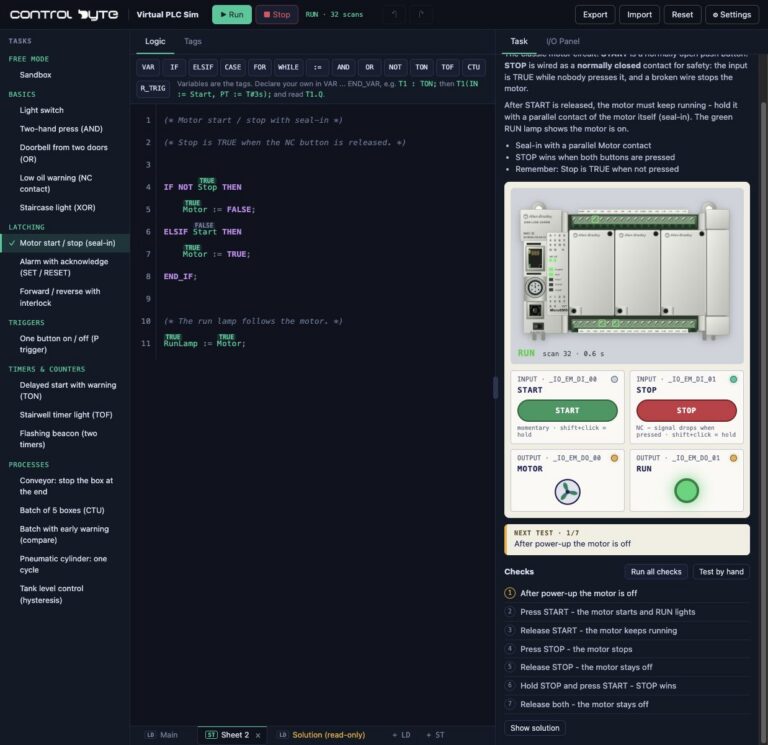
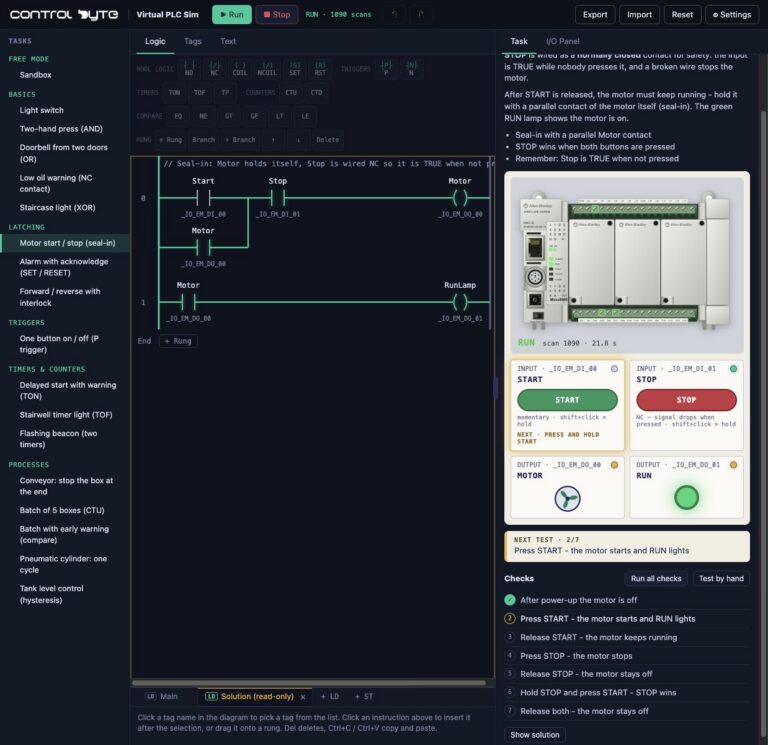
Virtual PLC Sim is ControlByte's online PLC simulator that runs right in your browser. You write a program in ladder logic or Structured Text, press Run and immediately see how the controller drives a conveyor, lamps, a tank or a cylinder. No installation, no physical PLC and no account needed to start. This guide covers everything about the simulator: PLC profiles, the editor, virtual stations, the full exercise list, saving programs and the best order to learn in.
What is Virtual PLC Sim?
Virtual PLC Sim is a browser-based PLC simulator built for learning PLC programming. Instead of installing vendor software, you open a web page and get three things on one screen: a program editor, a virtual controller with inputs and outputs, and a station that your program controls.
The simulator runs your program the way a PLC does. On every scan it reads inputs, executes rungs or statements and updates outputs. The difference is that everything happens on screen, and every signal change is visible live.
It is an independent learning tool with virtual controller models and its own execution engine. It is not Siemens or Allen-Bradley software and does not emulate their firmware. Exercise programs are educational examples, not validated designs for real machinery.

Allen-Bradley hardware used in our materials (Micro800 controllers, HMI panels and accessories) is supplied by our technology partner Elmark Automatyka, an authorized Rockwell Automation distributor.
Who is this PLC simulator for?
- Beginners who want to see a working program before buying hardware or installing TIA Portal.
- Maintenance technicians and electricians who want to read machine programs with confidence and troubleshoot faster.
- Students who need a practice station at home.
- ControlByte learners who complete hands-on course exercises in the simulator.
PLC profiles and programming languages
You choose a controller profile in the simulator. The profile sets the available languages and instructions, just like real engineering tools.
| Profile | Languages | Real-world equivalent |
|---|---|---|
| Allen-Bradley Micro850 | LD (ladder) and ST | Connected Components Workbench |
| Siemens S7-1200 | LAD and SCL | TIA Portal |
| Siemens LOGO! | LAD | LOGO! Soft Comfort |
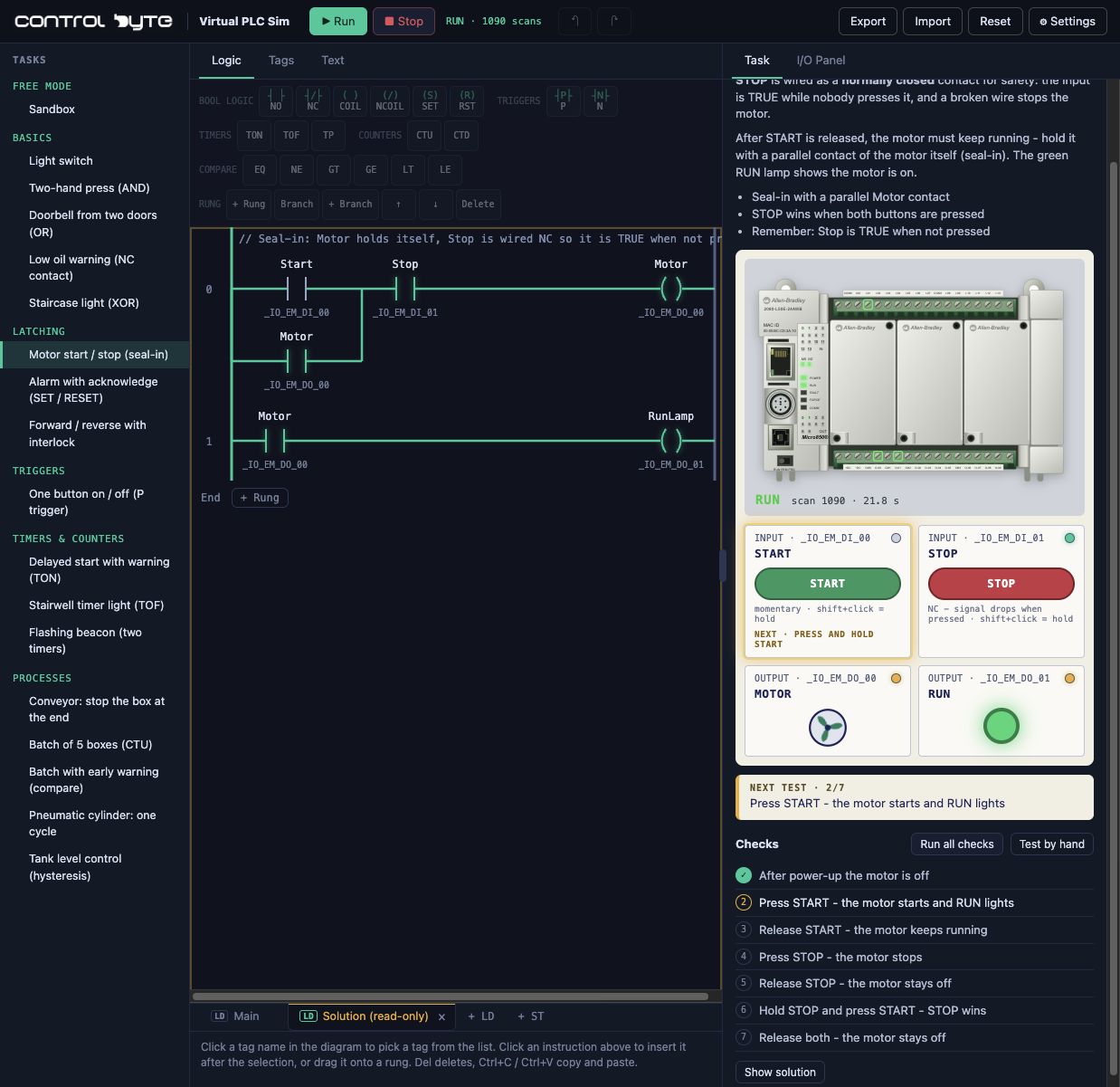
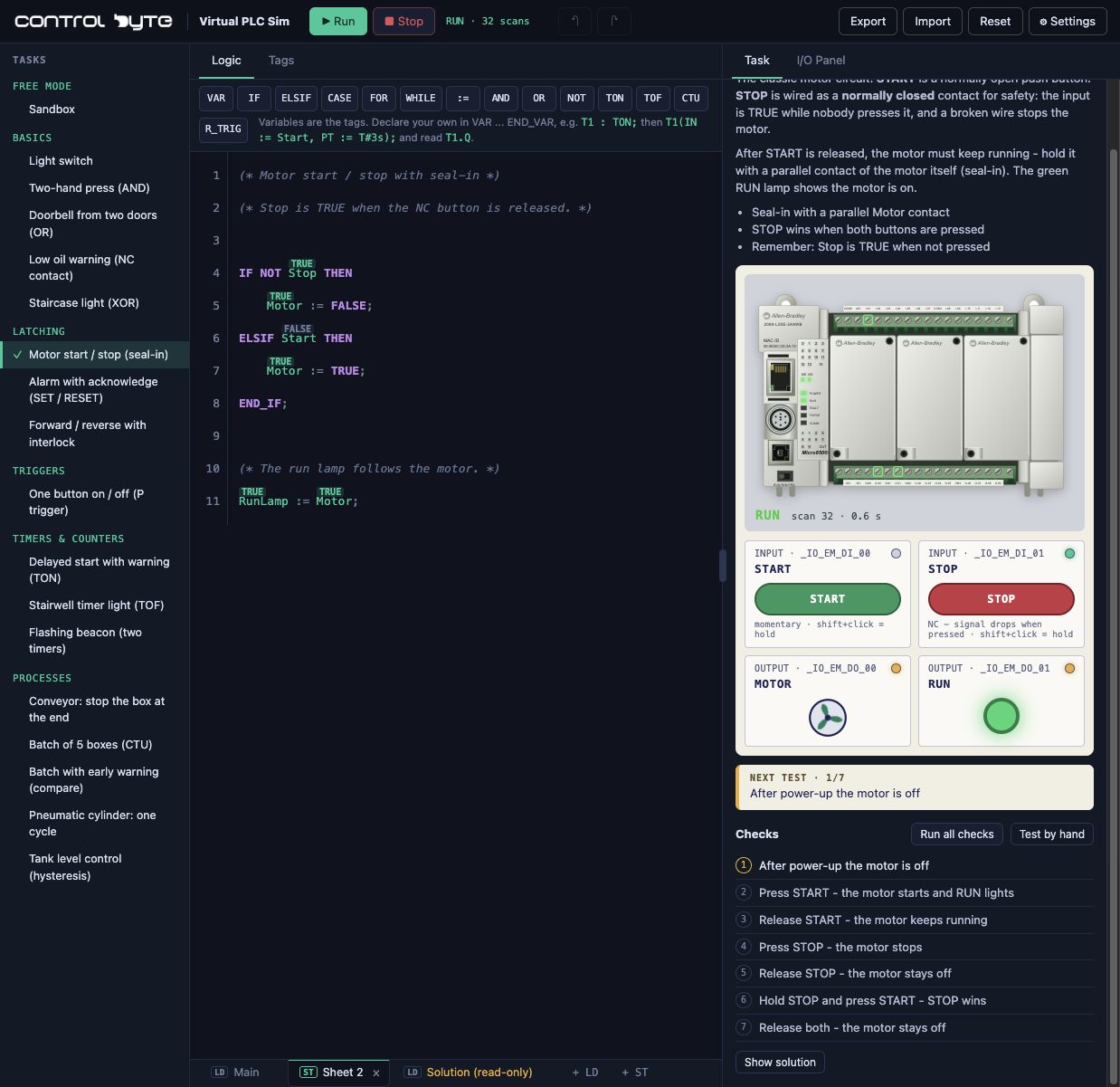
This lets you write the same circuit in several ways and compare them. A motor start-stop in ladder logic looks like a contactor diagram; in Structured Text it is an IF / ELSIF statement.
The editor: what can you build?
The ladder and text editors support the instructions you will find in most machine programs:
- normally open and normally closed contacts, coils and negated coils,
- SET and RESET for latching,
- rising edges for one-button control,
- TON, TOF and TP timers,
- counters and value comparisons,
- PID control in the level control exercises.
Every tag is visible live. You can force inputs, stop and start the CPU and watch how one signal change travels through the whole program.
Virtual stations and processes
Your program does not drive abstract bits. It drives stations modelled on real machines:
- conveyors with boxes, sensors and collection bins,
- operator panels with push buttons, selectors and pilot lamps,
- tank filling with level sensors,
- a pneumatic cylinder with end-position sensors,
- level control with a VFD-driven pump.
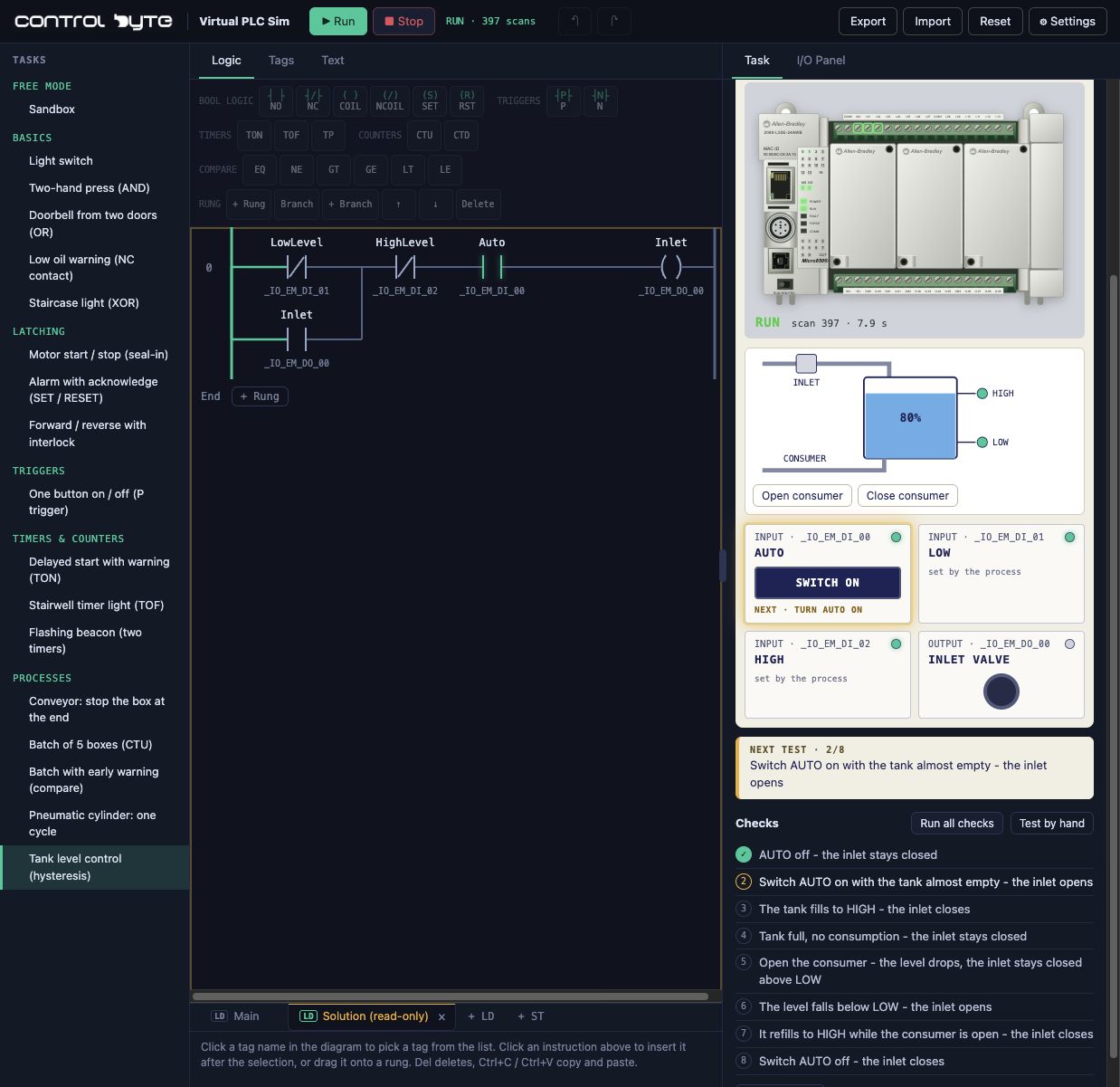
You see the effect of every mistake. Forget STOP priority and the motor will not stop. Set a timer wrong and the box overshoots.
Exercises and automatic checks
Every exercise has a description, a signal list and test cases. When you think the program is ready, you run the checks and the simulator walks through each case, showing which condition fails. It is like an instructor who always has time.
Free starter exercises
With no account and no purchase you get the sandbox and starter exercises, including:
- Conveyor with boxes - your first rung: a contact and a coil,
- Conveyor thermal overload - NOT logic and detecting a broken sensor wire,
- Conveyor with a collection bin - AND logic,
- Light switch, two-hand press and a doorbell from two doors - basics: a contact, AND and OR,
- Sandbox - free mode where you build any program you like.
The exercise path for learners
Learners with eligible course access get 29 numbered exercises, ordered from simple to advanced:
| Exercises | Block | Examples |
|---|---|---|
| 01-15 | Boolean logic | NOT, AND, OR, NAND, NOR, XOR, XNOR, De Morgan's laws, fault lamp with LAMP TEST, duplicate coils |
| 16-21 | Memory and edges | conveyor START/STOP with seal-in, alarm acknowledge with SET and RESET, forward/reverse conveyor, one-button on/off |
| 22-27 | Timers | delayed start with TON, staircase off-delay with TOF, flashing RESET button, pneumatic cylinder, box air blow with TP |
| 28-29 | PID control | level control with one VFD pump and with two pumps and staging |
On top of that there is an extended basics set, including a low oil warning with an NC contact, forward/reverse with an interlock, a flashing beacon with two timers, a batch of 5 boxes with a CTU counter and tank level control with hysteresis.
Getting started: your first 10 minutes
- Go to simulator.controlbyte.tech/plc/ and click "Try for free".
- Choose the "Conveyor with boxes" exercise and read the signal list.
- Build one rung: a NO contact assigned to the RUN selector and a coil assigned to the conveyor motor.
- Press Run on the CPU, then switch the station's RUN selector on. The boxes start moving.
- Run the exercise checks and fix the program if any condition fails.
- Move on to the next exercise, or open the sandbox and build your own circuit.
The step-by-step walkthrough with screenshots is in Your First PLC Program: Conveyor Start/Stop. The next tutorials cover NOT logic, AND logic, start/stop with seal-in and the TON timer.
Saving programs and your account
Programs are saved in your browser and you can export them to a file. When you sign in with a ControlByte account, your progress is saved to the account, so you can continue on another computer. Export your work before clearing browser data. The English and Polish sites have separate browser storage and separate sign-in. You can switch language in Settings, Language.
System requirements
A modern browser with JavaScript enabled is all you need. A desktop or laptop is recommended for editing, because the ladder editor is too small for comfortable work on a phone. You do not need TIA Portal, Connected Components Workbench or CODESYS.
Virtual PLC Sim vs vendor simulators
Virtual PLC Sim does not replace S7-PLCSIM or the simulator in Connected Components Workbench. It does a different job: fast logic practice with no installation. Once the basics are solid, you move to the vendor environment and then to a real controller. For a comparison of all simulator types, read Free PLC Simulators: Browser, Vendor and 3D Options.
What comes after the simulator?
The simulator checks your logic. A course teaches the engineering workflow, project setup and the tools of a specific platform, and the course exercises in the simulator complement the video lessons.
- Siemens S7-1200/1500 in LAD/FBD
- Structured Text Programming in CODESYS
- PLC Bootcamp for a complete learning path
- All ControlByte PLC courses
Training a whole team? See our PLC training plans for teams, which include full simulator access. If you want to move to real hardware, see the ControlByte PLC Trainer and your first contacts and coils on a real Micro800.
Wiring Sim: an electrical circuit simulator
Alongside the PLC simulator we are building Wiring Sim, a 24 V DC electrical circuit simulator. You will take multimeter measurements, locate open circuits and shorts, and check PLC input wiring with PNP sensors. The public release is coming soon.
FAQ
Is Virtual PLC Sim free?
Yes. The sandbox and starter exercises are free and need no account. Additional guided exercises, including the tank, cylinder and PID processes, require eligible course access.
Do I need a real PLC?
No. The simulator runs in the browser and needs no controller and no installation.
Is it a Siemens or Allen-Bradley emulator?
No. It is an independent learning tool with its own engine. The profiles reflect the languages and workflow, not the controller firmware.
Can I practise ladder logic and Structured Text?
Yes. Micro850 offers LD and ST, S7-1200 offers LAD and SCL, and LOGO! offers LAD.
Is there a Polish version?
Yes. In the simulator, open Settings, Language and choose Polski to open the Polish version with the same exercise.