Siemens released TIA Portal V21 in December 2025, and by April 2026 it is the version most engineers are either rolling out or evaluating. Unlike incremental V18→V19→V20 updates, V21 is the release where Siemens finally puts software-defined automation, proper Git integration, and a production-ready AI copilot into the same package.
This is a hands-on review of what actually matters in daily engineering - not the marketing bullet list. If you are still on V19 or V20, this guide tells you whether the migration is worth doing now or waiting for the first service pack.
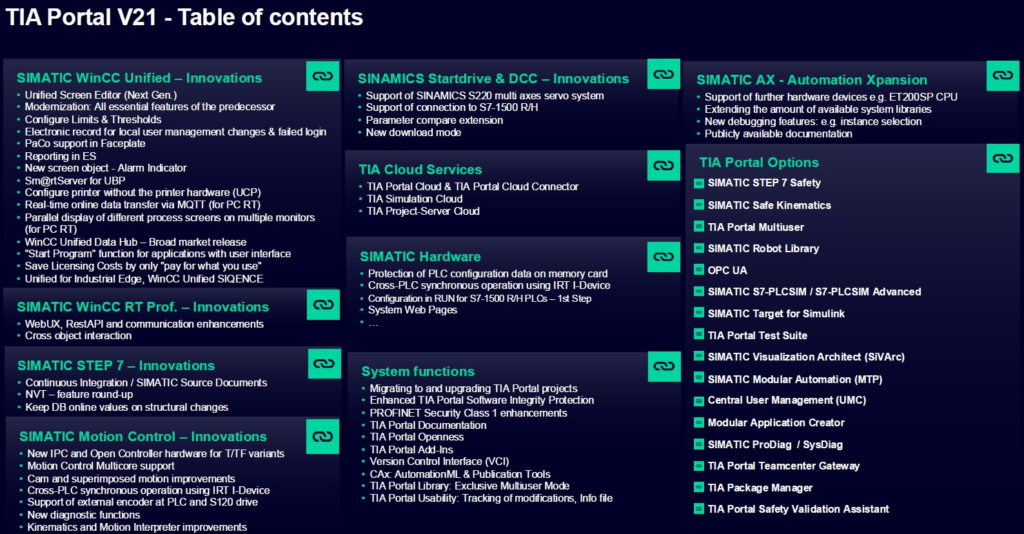
1. Native Git Integration - Finally a Real VCS for PLC Code
The single biggest change in V21 is a new export format that enables seamless integration with Git and other version control systems for LAD, FBD, SCL, data blocks, PLC data types, and mixed-language blocks.
Before V21, PLC projects were one giant binary blob. Diffs were impossible. Code review meant "let's open two instances of TIA Portal side by side." Pull requests, branching, CI pipelines - out of reach for 99% of teams.
V21 changes the model completely:
You can now branch, merge, review, and automate. CI pipelines running pytest-style unit tests on FB_* blocks are finally practical. For distributed teams - mandatory.
My take: this alone justifies the V21 jump. If your team does code review or works across multiple sites, you will feel the difference in week one.
2. Engineering Copilot TIA Standard - AI That Actually Helps
Siemens shipped Engineering Copilot TIA Standard, a generative AI assistant embedded in the IDE. Natural language in, PLC code and HMI visualizations out.
What it does well in V21:
- Generates SCL function blocks from a description ("FB for two-stage compressor with interlock")
- Writes WinCC Unified screen layouts from a prompt
- Explains unfamiliar library blocks in plain English
- Suggests variable names consistent with your project's style
What it still cannot do: debug live runtime issues, replace a proper test rig, or guess what the client actually meant in a vague spec. Treat it as a fast autocomplete for the boring 70% of code.
Reality check: the Copilot is cloud-based and requires a Siemens ID and an active license. Offline-only customers (pharma, defense) cannot use it yet - the on-prem variant is announced but not released.
3. S7-1200 G2 Gets Full OPC UA
The SIMATIC S7-1200 G2 now has full OPC UA server and client functionality - not just the basic data access profile. In V21 you get methods, events, alarms, and pub/sub on hardware that costs a fraction of an S7-1500.
This matters because the G2 is now a legitimate edge controller. You can build an ISO 95 Level 2 data bridge without an S7-1500 or an extra IPC. Direct MQTT-over-OPC-UA from a €600 controller to Azure IoT Hub or AWS IoT Core is now standard, not a workaround.
Python side - unchanged, still asyncua:
4. WinCC Unified: Redundant Server Architectures
SCADA built on WinCC Unified can now run in redundant server architectures - hot-standby, automatic failover, no data loss during switchover. Previously this required Classic WinCC or third-party redundancy layers.
For any plant with a real uptime SLA, this is the feature that makes Unified viable for greenfield projects. Pharma, food and beverage, automotive press shops - the conversation shifts from "Classic or Unified" to "which Unified topology."
5. New WinCC Unified Screen Editor
The Screen Editor was rebuilt from the ground up. Most layout operations that previously required round-trips to the Properties panel or modal dialogs are now direct-manipulation. Grid snapping, alignment guides, multi-select edit, and live property changes work like a modern design tool.
If you've been doing WinCC Unified HMI screens and cursing the click count, V21 cuts it roughly in half. First time I can recommend WinCC Unified HMI work without a long caveat about the editor.
6. Multicore Motion Control - Up to 30% Faster
On newer multicore PLCs (1516T-3, 1517T-3, 1518T-4), Motion Control Technology Objects can now be distributed across two cores. Enable Improve System Performance inside the Technology Object OB and processing moves off the single core it used to live on.
Siemens claims up to 30% reduction in Technology Object processing time. Real-world - on a multi-axis cam-table pick-and-place rig, I measured ~22% cycle time improvement on an S7-1517T. Not always 30%, but always positive.
This is the first release where you can credibly run 16+ coordinated axes on a single CPU without reaching for a SIMOTION.
7. Safety Integrated - Test Mode and Faster Commissioning
Safety Integrated in V21 gets a Safety Test Mode that lets you force F-I/O states during commissioning without downloading test logic, and F-block compare that shows you exactly what changed between two F-block versions with the checksum implications spelled out.
For ISO 13849 PL d / IEC 62061 SIL 2 projects this is a massive time saver. Previously, proving that a small change didn't affect the safety integrity required a full re-check of checksums and a manual diff. V21 gives you both in the UI.
---
TIA V20 vs V21 - Quick Comparison
| Area | V20 | V21 |
|---|---|---|
| Version control | Project-level binary | Git-ready text export (LAD, FBD, SCL, DBs) |
| AI assistant | Limited code suggestion | Engineering Copilot (full IDE integration) |
| S7-1200 G2 OPC UA | Basic DA | Full server + client, methods, events |
| WinCC Unified redundancy | Not supported | Hot-standby, automatic failover |
| WinCC Screen Editor | Property-dialog-heavy | Direct-manipulation rebuild |
| Motion multicore | Single core per TO | Distributed across 2 cores, up to 30% faster |
| Safety diff | Manual checksum check | F-block compare + Safety Test Mode |
Should You Upgrade?
Upgrade now if any of these apply:
- Team of 3+ engineers, distributed, needs real code review → Git integration alone pays for the migration
- Greenfield WinCC Unified SCADA with uptime requirement → redundancy is the deciding feature
- Motion-heavy application on multicore hardware → the 20-30% cycle improvement is free
- Safety projects where change management eats hours per revision
Wait for SP1 if:
- You are on a validated pharma/medical project where requalification is expensive
- You need offline-only Copilot (not yet available)
- Your OEMs haven't released V21-compatible libraries yet
Migration Checklist (V20 → V21)
- Back up your V20 project and tag it in your current VCS (or at minimum, zip + archive).
- Install V21 side-by-side with V20 - both can coexist.
- Migrate a non-critical project first to calibrate timing and catch library incompatibilities.
- Re-check checksums on all F-blocks after migration before any SAT/FAT.
- Regenerate hardware configuration for any S7-1200 G2 stations to pick up full OPC UA.
- Export your project to the new Git-friendly format and commit the baseline - this is the snapshot you'll diff every future change against.
FAQ
Q: Is TIA Portal V21 backward compatible with V20 projects? A: Yes, V21 opens V20 projects and migrates them. The migration is one-way - once saved in V21, you cannot open the project in V20 again, so keep a V20 archive.
Q: Does Engineering Copilot work offline? A: No - the Standard Copilot in V21 requires a cloud connection and a Siemens ID. An on-prem variant has been announced but is not yet available.
Q: Which PLCs support multicore motion distribution? A: Multicore S7-1500T CPUs, specifically 1516T-3 PN/DP, 1517T-3 PN/DP, and 1518T-4 PN/DP. The feature is enabled per Technology Object OB.
Q: Do I need a new license for V21? A: If you have an active Software Update Service (SUS), V21 is included. One-time V20 licenses require an upgrade or a new purchase.
Q: When will TIA Portal V21 SP1 be released? A: Siemens has not confirmed a date. Historically SPs land 6-9 months after the major release, which would place SP1 in Q3 2026.
---
Want to go deeper into Siemens PLC programming? Our structured training at controlbyte.tech covers TIA Portal from first project to advanced SCL, motion, and safety - all aligned with the V20/V21 feature set.
Author