Timers in CODESYS: Complete Guide with TON, TOF, TP

Timers are one of the most important building blocks in PLC programming. In CODESYS, mastering timers like TON, TOF, and TP gives you precise control over delays, pulses, and sequence logic in industrial automation.

This guide walks through:

1. What Are Timers in Industrial Automation?

A timer in a PLC is a function block that measures time between events and changes outputs after a defined delay. Instead of wiring separate hardware time relays, PLCs implement timers in software while preserving the same concepts: on‑delay, off‑delay, and pulse timing.

There are a lot of uses of timers, such as:

  • Delay starting a motor after a start command (e.g., pre‑lubrication time)
  • Keep a fan running for a few seconds after a heater turns off
  • Generate a fixed‑length pulse for alarms or indicators
  • Sequence operations (conveyor start → clamp close → cylinder extend with delays)

In IEC 61131‑3‑based systems (like CODESYS), timers are standardized function blocks, so once you learn them in one platform, the logic transfers easily to others.

2. Visualizing Timer Behavior (Simple Graphs) 

Below are simplified timing diagrams to build intuition. The horizontal axis is time; 0 = OFF / low, 1 = ON / high.

TON (Timer ON Delay)

2.1 On‑Delay Timer (TON)

The output turns ON after the input has been continuously ON for the preset time.
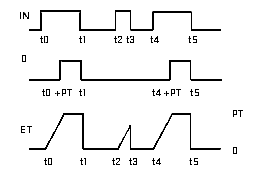
– When IN goes from 0 → 1, timer starts counting.
– After PT elapses, Q turns 0 → 1.
– If IN goes back to 0 before PT, timer resets and Q stays 0.

2.2 Off‑Delay Timer (TOF)

The output turns OFF after a delay once the input goes OFF.

TOF (Timer OFF Delay)
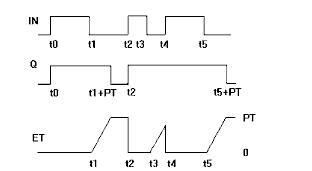
– When IN is 1, Q is 1 immediately.
– When IN goes 1 → 0, timer starts; Q stays 1 during PT.
– After PT, Q turns OFF (1 → 0).

2.3 Pulse Timer (TP)

The output turns ON for a fixed duration whenever the input sees a rising edge.

TP (Pulse Timer)
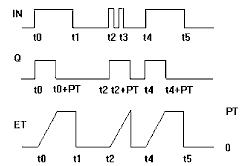
– A rising edge at IN starts the pulse.
– Q is ON for exactly PT, then returns to 0.
– Additional edges during the pulse usually do NOT extend PT.[cite:10]

These graphs match the standard definitions adopted by IEC 61131‑3 timers TON, TOF, and TP.

3. Timer Types in CODESYS ( Practical use example):

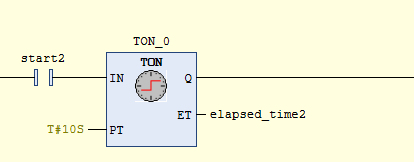
We walk through Codesys. After creating a Ladder Logic Diagram project, as described in the video below, we double-click on PLC_PRG (PRG). In the Toolbox, under Function Blocks, we find TOF and TON timers. For the PT timer, we add it from an empty box in the toolbox under General, declare it as TP, and then name it, as we did with TON and TOF. Here is the description on Codesys:

After putting the timers on the network (explained in the video below) and adding an output, we observe the following: 

3.1 TON – On‑Delay Timer

  • If IN = FALSE
  • Q = FALSE
  • ET = T#0s
    • When IN becomes TRUE
  • ET counts from T#0s up to PT (10 second on this example)
  • When ET >= PT, Q = TRUE
    • If IN goes back to FALSE before reaching PT
  • Timer resets (ET = 0, Q = FALSE)

3.2 TOF – Off‑Delay Timer

  • If IN = TRUE
  • Q = TRUE
    • When IN becomes FALSE
  • ET starts counting up to PT
  • After ET >= PT, Q = FALSE
    • If IN returns to TRUE during the delay
  • The timer resets and Q stays TRUE


3.3 TP – Pulse Timer

  • On a rising edge of IN(0 → 1)    

                Q goes TRUE

                 ET counts from T#0s to PT

  • While ET < PT

                  Q = TRUE

  • When ET >= PT

                   Q = FALSE

  • A new rising edge during the pulse doesn’t extend the pulse (standard behavior).

Note (TIME Constants in CODESYS):

To set PT, CODESYS uses TIME literals with the prefix T#:

  • T#100ms
  • T#1s
  • T#2.5s
  • T#1m30s

You will type these directly into the PT field when configuring the timer in Ladder or FBD.

And here is the entire description in video, including instructions on how to connect to the virtual PLC Codesys, as we described before her.


Summary

Timers are essential tools for introducing time‑based logic into your PLC applications:

  • TON (On‑delay)delays turning ON an output until the input has remained TRUE for the preset time.
  • TOF (Off‑delay)keeps an output ON for a defined time after the input goes FALSE.
  • TP (Pulse)generates a fixed‑length pulse when the input sees a rising edge.

In CODESYS, these timers are standardized IEC 61131‑3 function blocks with clear inputs (IN, PT) and outputs (Q, ET). Using simple TIME constants like T#5s or T#500ms, you can define precise delays and pulses that make your automation logic safer, more robust, and easier to understand.

By:

  1. Creating a structured Ladder program
  2. Declaring TON, TOF, and TP timers
  3. Running everything on CODESYS Control Win V3
  4. Simulating inputs and watching live timer values

you gain hands‑on experience without needing any physical hardware.

Author

Mohammed Bendjerad

Author Mohammed Bendjerad

Automation Engineer and PLC Specialist

More posts by Mohammed Bendjerad