If you’ve spent any time in industrial automation, you probably have a story. Maybe it’s the time a technician overwrote the wrong version of a program during a breakdown at 2 AM. Maybe it’s the mystery machine that runs a slightly different build of the code and nobody knows why. Or maybe it’s the final_v3_ACTUAL_FINAL_USE_THIS_ONE.ap17 sitting in a shared drive somewhere.
These aren’t just inconveniences — they’re engineering risks. And Git, the version control system that powers GitHub, is how the software world solved this problem decades ago. This tutorial will show you how to bring those same tools into your automation workflow, whether you’re working with Siemens TIA Portal, Beckhoff TwinCAT, Rockwell Studio 5000, or Codesys.
Why Git for PLC Code?
Version control gives you three things that a shared drive never can:
A full history of every change. Every commit is a snapshot in time. You can see exactly what changed, when, and who made the change — down to a single rung of ladder logic or a single line of structured text.
The ability to work in parallel without overwriting each other. Branches let multiple engineers work on the same project simultaneously without stepping on each other’s changes.
A safe way to experiment. Try a new approach on a branch. If it works, merge it. If it doesn’t, throw it away. The main codebase stays clean.
Git Basics — Explained for PLC Engineers
You don’t need to become a software developer to use Git effectively. Here’s the core vocabulary, framed for the automation world.
Repository (repo): Think of it as your project folder — but one that remembers every version of itself. A repository lives locally on your machine and (optionally) remotely on GitHub, where the whole team can access it.
Commit: A saved snapshot of your project at a specific point in time. A good commit message describes what changed and why — not just “update” but “Fixed speed ramp on conveyor 3 — was causing e-stop on startup.”
Branch: An independent line of development. You might have a main branch for production-ready code, a develop branch for active work, and a feature/new-safety-zone branch for a specific change you’re testing. Branches are cheap and disposable.
Merge / Pull Request: When work on a branch is ready, you merge it back into main or develop. On GitHub, this is done through a Pull Request (PR) — which gives teammates a chance to review the code before it’s merged.
Remote: The copy of your repo that lives on GitHub. You push your local changes to the remote, and pull updates from it.
.gitignore: A file that tells Git which files to ignore — compiled outputs, temp files, backups. Crucial in PLC projects where IDEs generate a lot of noise.
Platform-Specific: Getting Your Code Into Git
This is where automation differs from standard software development. Most PLC IDEs save projects in proprietary binary formats that Git can’t diff meaningfully. The solution is to work with exportable text-based formats — typically XML — that can be read, compared, and tracked line by line.
Siemens TIA Portal
TIA Portal stores projects as binary .ap files by default, which are not suitable for direct version control. The recommended approach is to use TIA Portal’s built-in export functionality to produce an XML-based representation of your program blocks.
- Use File → Export to export function blocks, data blocks, and organization blocks as
.xmlfiles. - For more advanced automation, the TIA Portal Openness API allows you to script exports, making it possible to automate the export step as part of your save workflow.
- Store only the exported XML in your Git repository — not the
.approject file itself. - Add a
.gitignoreentry for*.ap*, temp folders, and any simulation logs.
Tip: Consider writing a small script that exports all blocks automatically before you run
git commit. This removes the manual step and reduces the chance of forgetting to export before committing.
Beckhoff TwinCAT
TwinCAT is the most Git-friendly of the major PLC platforms. Projects are stored natively in an XML-based format, which means you can commit your project files directly without any special export step.
- Simply add your TwinCAT project folder to a Git repository and commit as you work.
- TwinCAT solution files (
.sln,.tsproj,.plcproj) and source files (.TcPOU,.TcDUT,.TcGVL) are all text-based and will produce clean, readable diffs. - Your
.gitignoreshould exclude the_Bootfolder,_CompileInfo, and any.tmccompiled outputs.
This tight integration with Git is one of TwinCAT’s significant advantages for teams that care about traceability.
Rockwell Studio 5000
Studio 5000 saves projects as binary .ACD files. Like TIA Portal, the solution is to export to an XML-based format before committing.
- Export your project using File → Save As → L5X to produce a
.L5Xfile, which is an XML representation of your full program. - Commit the
.L5Xfile to Git — this gives you meaningful diffs between versions. - The
.ACDfile can optionally be committed too, but treat it as a binary blob; it won’t produce useful diffs. - Your
.gitignoreshould exclude.ACDfiles (or mark them explicitly as binary with.gitattributes) unless you specifically want to store them.
Codesys
Codesys projects can be exported in an XML-based format (.export files) which are suitable for version control.
- Use Project → Export to produce an XML export of your project or individual POUs.
- For Codesys projects backed by a Git repository directly (available in some Codesys versions and distributions), you may be able to use built-in source control integration — check your specific version’s documentation.
- Commit the exported XML files and maintain a clear export convention across your team so everyone’s exports are consistent.
Project Folder Structure
A consistent folder structure is the foundation of a maintainable project. Here’s a structure that works well for most automation projects:
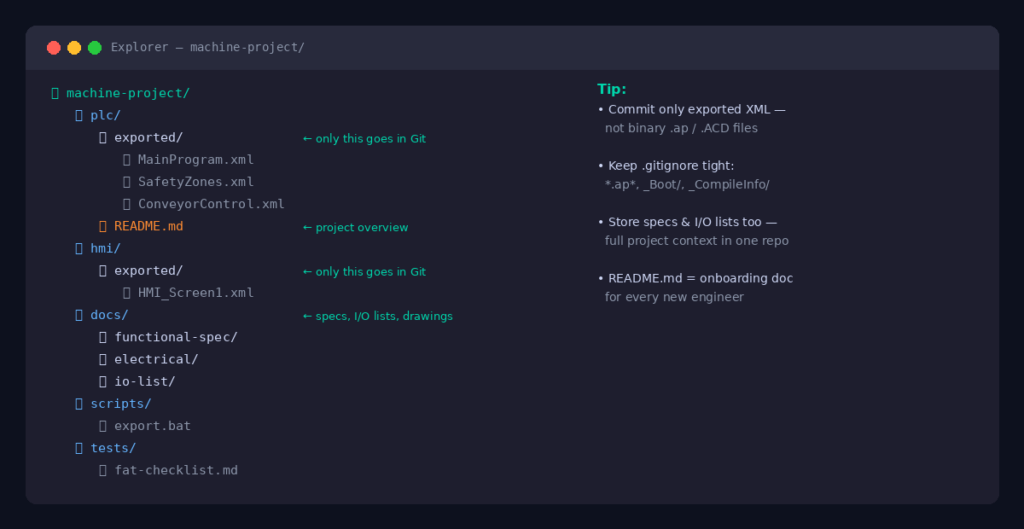
machine-project/
├── plc/
│   ├── exported/        # Exported XML source files (what goes in Git)
│   └── README.md        # Notes on how to import/export
├── hmi/
│   └── exported/        # HMI project exports
├── docs/
│   ├── functional-spec/ # Functional design specifications
│   ├── electrical/      # Electrical schematics (PDFs or source)
│   └── io-list/         # I/O mapping spreadsheets
├── scripts/
│   └── export.bat       # Automation scripts for export workflow
├── tests/
│   └── fat-checklist.md # Factory acceptance test procedures
├── .gitignore
└── README.md            # Project overview, machine details, how to get started
The key principle: everything that defines how the machine behaves should be in the repository. That includes not just code, but specs, I/O lists, and test procedures. When a new engineer joins the project, they should be able to clone the repo and have everything they need.
Branching and Change Management
A simple branching strategy goes a long way. Here’s one that works well for automation teams:
main — Always contains the latest production-ready, tested code. Only merge here after code has been reviewed and validated. Tag every release (e.g., v1.0.0, v1.2.3) so you can always get back to exactly what was running on the machine.
develop — The active integration branch. Engineers merge their feature branches here for integration testing before anything goes to main.
feature/<description> — Short-lived branches for individual changes. Examples: feature/add-vision-system, feature/fix-conveyor-timeout. One engineer, one task. Merge and delete when done.
machine/<name> — For multi-machine projects where the same codebase is deployed with different configurations, use branches (or better, Git tags) to track the exact version running on each machine.
hotfix/<description> — For urgent fixes that need to go directly to production. Branch from main, fix, merge back to both main and develop.
Tagging Releases
When you commission a machine or deploy an update, tag the commit:
git tag -a v2.1.0 -m "Post-FAT release — all safety functions validated"
git push origin v2.1.0
This means you can always check out the exact code that was running on the machine at any point in time. For audits, warranty claims, or incident investigations, this is invaluable.
Team Collaboration
Writing Good Commit Messages
A commit message is a note to your future self (and your colleagues). The difference between a useful history and a useless one is commit message discipline.
❌ Weak: update
✅ Better: Fixed false e-stop trigger on safety zone 2
✅ Best: Fixed false e-stop trigger on safety zone 2 — debounce timer was set to 0ms, increased to 50ms per safety review SR-204
The format: start with an imperative verb, keep the first line under 72 characters, and add detail in the body if needed.
Pull Requests as Engineering Review
A Pull Request isn’t just a software concept — it’s a structured change review, which automation engineers already understand as MOC (Management of Change). Before any change merges to main:
- The engineer opens a PR describing what changed and why.
- A second engineer reviews the code — checking logic, naming, safety implications.
- Any issues are discussed and resolved in the PR comments.
- The PR is approved and merged.
This creates a permanent, auditable record of every deliberate change to the codebase — the closest thing automation has to a formal red-line review process, but fast and searchable.
Using Issues for Change Tracking
GitHub Issues work well as a lightweight change request system. Before starting work, open an issue describing the problem. When you open your PR, reference the issue (Closes #42). When the PR merges, the issue closes automatically — giving you a traceable thread from problem statement to code change.
Getting Started: Your First Commit
- Install Git on your engineering workstation: git-scm.com
- Create a GitHub account (free for private repos for individuals and small teams).
- Create a new repository on GitHub for your project.
- Clone it to your local machine:
git clone https://github.com/yourname/machine-project.git - Export your PLC project using your platform’s export method and copy the files into the cloned folder.
- Add a
.gitignoreto exclude compiled outputs and IDE temp files. - Make your first commit:
git add .
git commit -m "Initial commit — exported TIA Portal project v1.0"
git push
You now have version-controlled PLC code, with a full history from this point forward.
Closing Thoughts
Version control isn’t a software developer habit that automation engineers have to borrow reluctantly — it’s a fundamental engineering discipline that the software world formalized. Industrial automation is late to the party, but the tools work just as well for ladder logic as they do for Python.
Start small: one project, one repo, one consistent export habit. Build the muscle memory. Once you’ve worked through a messy change control situation with Git backing you up — or once you’ve been able to roll back to a known-good state in twenty seconds during a breakdown — you won’t go back.
Have questions about setting up Git for your specific platform or use case? Drop them in the comments below.
Author